
Reports page
Full feature reference for /reports and /reports/[id]. List with Generate flow, detail with inline editing, regenerate, and Markdown/HTML/PDF/DOCX export.
Last updated 2026-08-28
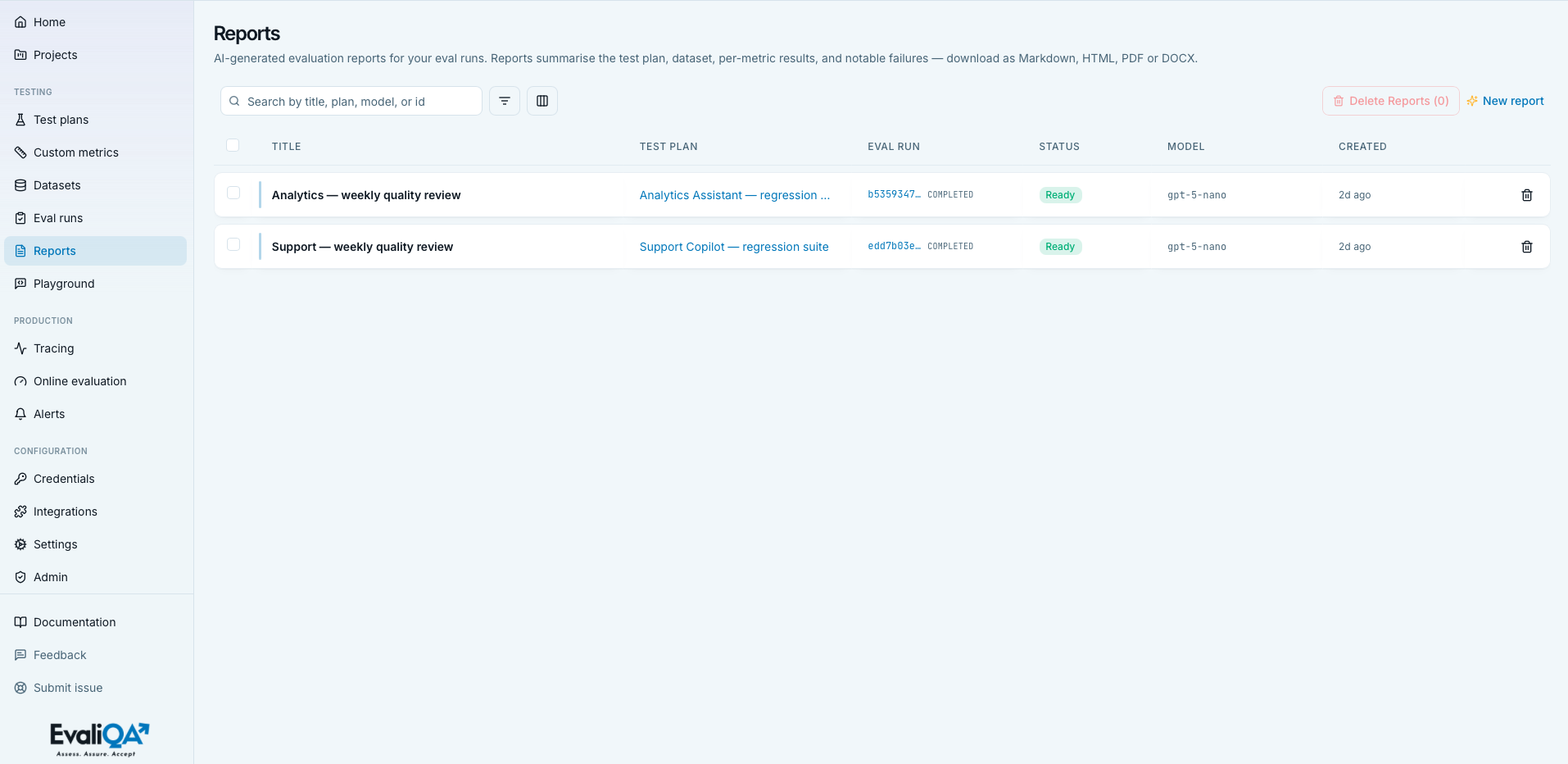
The Reports page at /reports is the workspace library of AI-generated write-ups. Every report summarises one completed eval run into a shareable Markdown document you can edit, regenerate, and export.
The screencast (0:25) turns a finished run into a written report.
A report is one paragraph-shaped rendering of one run, meant for a reader who won't scroll through raw rows: a PM deciding whether to ship, a stakeholder catching up quarterly, an auditor filing a compliance record. The report doesn't replace the run, it's the communication layer on top of it.
For methodology on when to generate a report, what to add before sharing, and how to shape reports for different audiences, see Preparing a report.
When to open this page
- After a release-gate run. Generate a report to attach to the release notes.
- For a stakeholder update. Filter to the recent completed runs, pick the one you want to explain, generate a report, export as PDF.
- For a compliance record. Generate a report against the monthly / quarterly red-team run, download as DOCX for the audit binder.
- Cleanup. Bulk-delete old draft reports whose runs are gone or no longer relevant.
Reports can also be generated from a run's own detail page (Generate
report / New report header actions). Both paths land you on the same
/reports/{id} after the async generation task completes.
List page
Header
- Icon and title.
FileText, "Reports". - Subtitle. "AI-generated evaluation reports for your eval runs. Reports summarise the test plan, dataset, per-metric results, and notable failures, download as Markdown, HTML, PDF or DOCX."
- No header actions. Everything lives in the toolbar.
Empty states
- No eval runs. Title "Run an evaluation first", description
explains a completed run is required. Primary CTA "Go to eval
runs" →
/eval-runs. Hint "You have no eval runs yet.". - Runs exist, no reports. Title "No reports yet", description "Generate your first report from a completed eval run.". Primary CTA "Generate report" opens the Generate sheet.
- Filters match nothing. Table shows "No reports match this search / filter combination.".
Loading state: "Loading...". Errors: red banner above the list.
Toolbar
Search input. Placeholder "Search by title, plan, model, or
id". Matches across title, report id, eval_run_id, plan
name, and model, case-insensitively.
Filters popover. Rules stack as Where ... And ....
| Column | Kind | Operators |
|---|---|---|
| Title | text | contains, equals |
| Test plan | plan enum | equals |
| Eval run | run enum | equals |
| Status | status enum | equals |
| Model | text | contains, equals |
Report Model is the report-generation model, the LLM used to draft the report, not the plan's judge model or the target model. It defaults to the workspace's report model configured in Settings.
Columns popover. Title is required and can't be turned off. Optional columns:
- Test plan (default visible). Link to the plan.
- Eval run (default visible). Short id linked to the run detail, small run-status label alongside.
- Status (default visible). Report status badge.
- Model (default visible). Monospaced model string.
- Cost (default hidden). USD, same formatting as the eval-run
list:
$0.00/ four decimals / two decimals / integer. - Created (default visible). Relative time.
- Updated (default hidden). Relative time.
- ID (default hidden). Monospaced UUID.
Bulk-delete button. Red "Delete Reports (N)", disabled at
N=0. Opens the BulkDeleteSheet (see Bulk delete).
+ New report. Text link with Sparkles icon. Disabled when
runs.length === 0. Opens the Generate sheet (same as the
empty-state CTA).
Row card
Floating card. Whole <tr> is clickable to /reports/{id}
(Enter/Space too). Left checkbox for bulk selection, single ghost
trash icon on the right.
Columns and their behavior:
- Title. Bold link.
- Test plan. Brand link to
/test-plans/{planId}(or "-" if the plan reference is missing). - Eval run. Monospaced short id linked to
/eval-runs/{id}plus a small run-status label alongside. - Status. Colored pill (see below).
- Model. Monospaced.
Reports reference their source run by id. If the run is later deleted, the report survives as an orphan: plan and run links degrade gracefully to italic "-". The report content and the context snapshot are still intact, only the live links break.
Report status badge
Three states:
- Generating (
pending, brand-tintedbg-brand/15 text-brand). Generation is in flight. The detail page will show a loading hint; the list keeps the pill until the task finishes. - Ready (
ready, pass greenbg-pass/15 text-pass). Terminal success state. Content is populated and exportable. There is no separate «Completed» state, Ready is the terminal success. - Failed (
failed, destructive redbg-destructive/15 text-destructive). Generation errored. Open the detail page to see the error banner and decide whether to regenerate.
Generate flow
Both the "+ New report" toolbar link and the empty-state CTA open the same right-side sheet.
- Eval run picker (required). Lists only runs with
status === "completed". Newest first. - Title (optional). Placeholder "Defaults to «Report, [plan name]»". If left empty, the report title is auto-generated.
On submit: generateReport(runId, title). Sheet closes, list
refreshes, router navigates to /reports/{report.id} where you
watch the generating-then-ready progress.
Generation time. Roughly 15 to 60 seconds depending on run size and the report model. Large runs (1000+ rows) with a strong report model take longer.
Bulk delete
Row-trash and toolbar-bulk both funnel through the same
BulkDeleteSheet (entity "report" / "reports").
Cascade summary. "The generated markdown body and its context snapshot".
Deletes are permanent. Export any report you want to preserve before deleting (Markdown or PDF from the detail page).
Detail page
Open a report to land on /reports/{id}.
Header
- Icon and title.
FileText,report.title. - Subtitle. "Generated report for eval run [short id]", the short id links to the run detail.
- Status badge (Generating / Ready / Failed).
- Actions cluster (right-aligned):
- Edit (outline, pencil).
- Regenerate (outline, sparkles).
- Download (outline popover, download icon).
- Delete (destructive, trash).
While in edit mode, the actions collapse to Cancel + Save.
Breadcrumbs. Reports → {title}.

Metadata cards
Above the report body: a three-column grid of cards.
- Test plan (link to the plan).
- Dataset (link to the dataset).
- Generated by. Report model name plus generation cost
formatted
$0.0000.
If context_snapshot.counts is present, three more cards render
below:
- Total rows.
- Passed (green).
- Failed / errored (destructive; sum of
failed_rows + errored_rows).
A red banner surfaces report.error when the status is
failed. The error text usually names the cause (context too
large, model timeout, invalid prompt).
Report content
Single body block, report.content_md rendered via the shared
Markdown component. The entire report is one document, no
separate section blocks in the UI. Whatever structure the
generator produced (executive summary, per-metric breakdown,
notable failures, suggested next steps) is inline Markdown.
Standard Markdown works: headings, lists, tables, inline code, fenced code blocks. Links open in a new tab.
Editing
Click Edit to swap the body for an inline editor (not a modal, not a separate route).
- Title input (max 256 chars).
- Body as a 28-row monospaced Markdown textarea.
- Helper text under the body: "Rendered exports (HTML / PDF / DOCX) are derived from this Markdown source on download.".
Save calls updateReport(id, {title, content_md}). Empty
title is rejected with "Title cannot be empty.". Cancel
restores the drafts from the persisted report, drafts are held
in local state until you either Save or Cancel.
There is no autosave. Reload while editing = drafts lost.
Regenerate
Header Regenerate action. Native window.confirm asks:
"Regenerate this report? Any manual edits to the body will be
replaced.".
On confirmation, regenerateReport(id) fires. Both the report
and any in-progress edit drafts are replaced; edit mode is forced
off. Manual edits are overwritten.
Practical rule. If your manual edits are worth keeping, export the current version (usually Markdown) before you Regenerate, then hand-merge the parts you wanted from the fresh draft.
Export
Click Download in the header to open a popover with four formats in fixed order:
- Markdown (
.md). - HTML (
.html). - PDF (
.pdf). - Word (
.docx).
Selecting a format calls downloadReport(id, format), converts
the returned blob to a browser object URL, programmatically
clicks an <a download={filename}>, then revokes the URL and
closes the popover.
- While a download is in progress, the row's icon becomes a spinner.
- Errors surface inline within the popover.
- PDF / DOCX are derived from the Markdown source at download time. Edit the Markdown, then re-download to get a fresh export.
Filenames follow a stable convention so you can drop them into release-notes folders without renaming.
Delete
Uses a native window.confirm: "Delete this report? This cannot
be undone.".
Note the shape differs from the list page's BulkDeleteSheet,
this is a simpler flow because you're acting on a single record
you're already looking at.
On success, routes back to /reports. On failure the error
surfaces in the page-level error banner.
Share / permalink
None. No Share button, no copy-link surface, no public preview today. The report id in the URL is the only shareable reference, teammates need workspace access to open the link.
For sharing outside the workspace, use the Download action and send the PDF or HTML.
Interpreting the list
- Report with status Generating for more than 5 minutes = the generation task is stuck. Open the detail; if you still see Generating there, delete and start a new one, or ask an admin to check the worker queue.
- Report tied to a Failed eval run = usually not useful, reports work best on completed runs. Delete or ignore.
- Multiple reports with similar titles under the same plan = someone iterated on the report content or regenerated several times. Keep the latest, prune the drafts.
- Report with Cost column much higher than average = someone ran with a heavier report model. Check Settings if that wasn't intended.
Tips and nuances
- Report content is Markdown, not rich text. Learn the basics (headings, lists, code fences) or edit in your favourite Markdown editor and paste back.
- Regenerate wipes edits. If your team collaboratively edited the body, export first, then regenerate, then hand- merge the diff.
- Multiple reports per run are allowed. Different audiences need different framing. The list has room for many reports per run.
- The Cost card is the report-drafting cost only, not the underlying run's cost. To see run cost, click through to the run detail.
- Passed / Failed counts on the header are frozen at report generation time. If the run is later modified (deleted rows, say), the report's numbers do not update, they're a snapshot.
- Failed reports can be regenerated. The header action works even when status is Failed; it fires a fresh generation task.
- Delete removes both the body AND the context snapshot. There is no soft-delete, no way to recover the exact old version. Export first if you care.
Related
- Methodology. Preparing a report, the deep dive on what to add before sharing and how to shape reports for engineers / PMs / non-technical stakeholders / compliance.
- Where reports come from. Eval runs page, the source list. Evaluation results, reading the underlying run.
- The runs that produce reports. Test plans page, where runs are started.
- Big picture. Evaluation pipeline, where reports fit in the release / quarterly-review cadences.