
Custom metrics page
Full feature reference for /custom-metrics. Toolbar, base metric selector, the G-Eval and Custom Eval field sets, consensus toggle, delete behavior, and how presets propagate to plans.
Last updated 2026-09-09
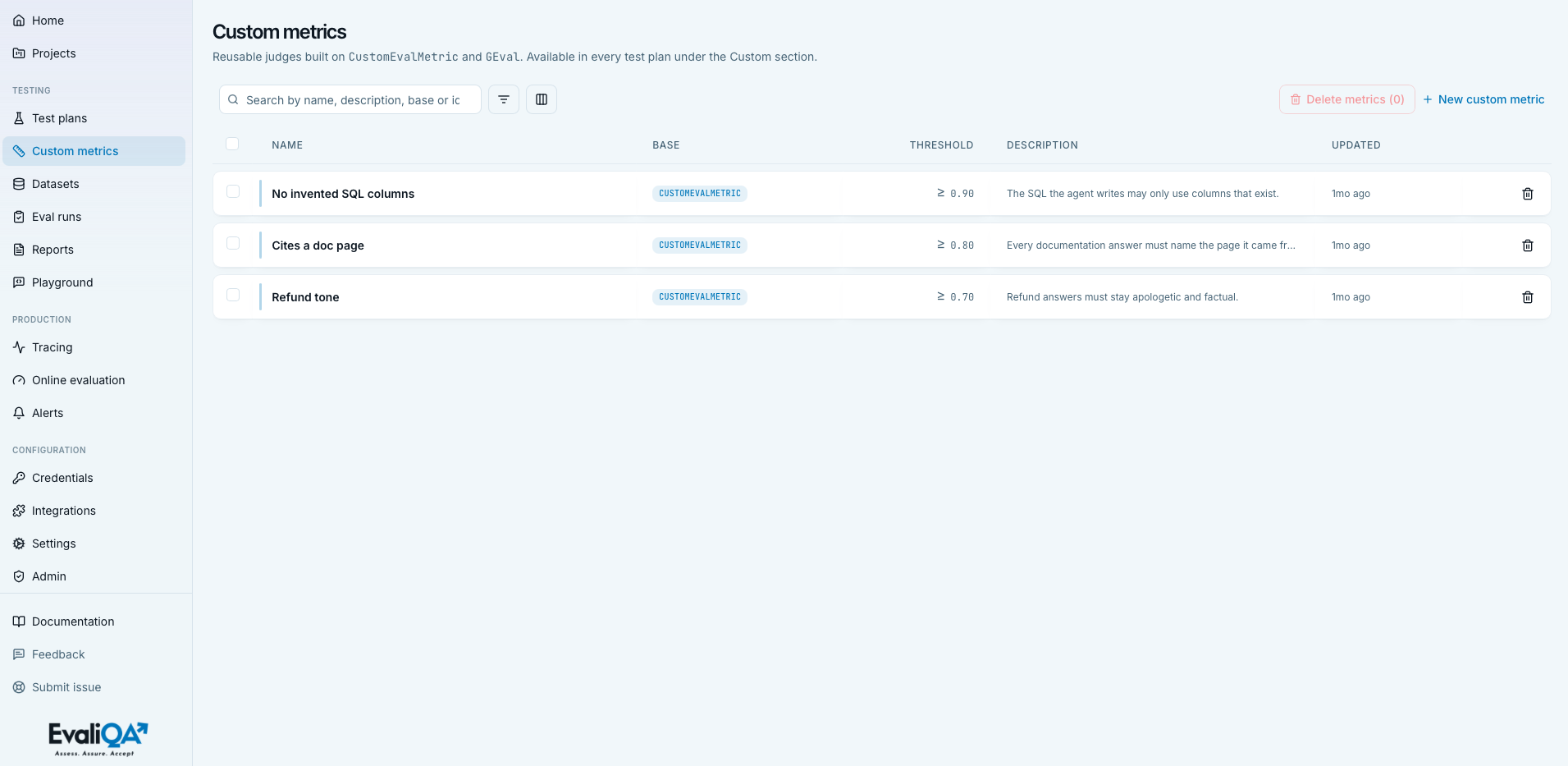
The Custom metrics page at /custom-metrics is the workspace-wide library of reusable LLM-judge presets. Each entry can be attached to any test plan under the Custom section of the wizard's Metrics step, and reused as many times as you need across projects.
A custom metric is a natural-language rubric plus a small configuration for how the judge should score it. Two bases are available today, G-Eval and Custom Eval, they differ in how the judgement is structured (holistic paragraph vs discrete criteria list) and how they aggregate the score. See Custom metrics concept for the methodology of which to pick and how to phrase criteria that actually work.
When to open this page
- Save a rubric you keep re-typing. If two or more plans already inline the same criteria list, promote it here.
- Standardise judges across the team. A brand-tone rubric or a compliance policy check should live once and be reused.
- Iterate on a preset whose current version isn't producing the expected verdicts, tune the criteria here, then re-attach it in the plans that need the new version.
- Audit which judges the workspace uses, especially in regulated verticals where the scoring rubrics are part of the audit trail.
Header
- Icon and title.
Ruler, "Custom metrics". - Subtitle. "Reusable judges built on
CustomEvalMetricandGEval. Available in every test plan under the Custom section." - No header buttons. New custom metric and bulk-delete live in the toolbar.
Empty state
Card with Ruler icon, title "No custom metrics yet",
description "Save a reusable judge here and it'll show up in
every test plan's Custom section, no more re-typing criteria.".
Primary CTA "Create your first metric" opens the create sheet.
Filters match nothing: "No custom metrics match this search / filter combination.".
Toolbar
Search input
Placeholder "Search by name, description, base or id". Matches
across name, description, base_metric_id, and preset id
case-insensitively. If you saved a rubric named "Brand tone" and
another with "brand" in its description, both surface on the
same search.
Filters popover
ListFilter icon, badge with count when active.
| Column | Kind | Operators |
|---|---|---|
| Name | text | contains, equals |
| Base | base enum | equals (dropdown of CustomEvalMetric, GEval) |
| Description | text | contains, equals |
Nuances.
- Only three filter columns. Threshold, Created, Updated, and ID are not filterable, they're visibility-only.
- Base filter is often the fastest way to slice the library: "give me all my Custom Eval verdict-strategy rubrics" vs "give me all my G-Eval holistic ones".
Columns popover
Name is required, shown greyed out with "required" tag. Optional columns:
- Base (default visible).
- Threshold (default visible).
- Description (default visible).
- Created (default hidden).
- Updated (default visible).
- ID (default hidden).
Footer reads "N of M selected".
Bulk-delete button
Red "Delete metrics (N)", disabled when selection is empty.
+ New custom metric
Brand-colored text link with plus icon. Opens the create sheet.
Row card
Floating card row. Whole <tr> is clickable (also Enter/Space) to
open the edit sheet. There's no separate Edit icon, the row
itself is the edit affordance.
- Left checkbox for bulk selection.
- Left brand rail that saturates on hover.
- Name (bold, truncated).
- Base (uppercase brand-tinted pill,
CUSTOMEVALMETRICorGEVAL). - Threshold (right-aligned, formatted
≥ 0.NNor an em-dash fallback if unset). - Description (truncated, italic em-dash when null).
- Created / Updated (relative time,
3d ago). - ID (monospaced, truncated).
- Right-edge action. Single ghost trash icon.
No duplicate icon and no separate edit icon, click the row to edit, use the trash to delete.
Create / edit sheet
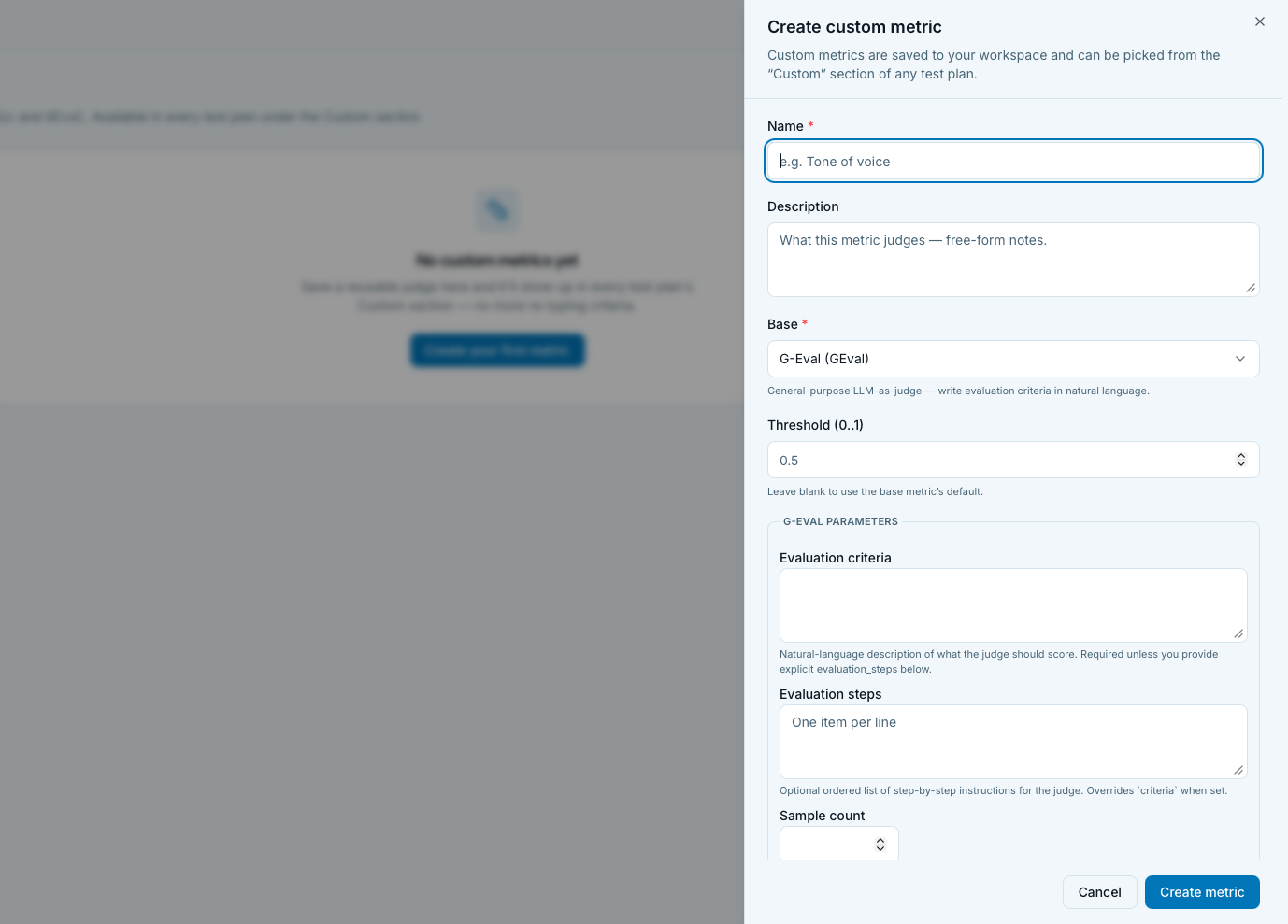
Right-side drawer, width sm:max-w-md md:max-w-xl. Title flips
between "Create custom metric" and "Edit custom metric".
Description: "Custom metrics are saved to your workspace and can
be picked from the Custom section of any test plan.".
Top-level fields
- Name (required). Input, placeholder "e.g. Tone of voice", autofocus. Must be unique in the workspace, the API returns 409 on a duplicate and surfaces inline.
- Description (optional). Two-row textarea, placeholder "What this metric judges, free-form notes.". This is what teammates see when scrolling the workspace library, worth spending a line to explain what the rubric is for.
- Base (required). Select of custom-category catalog entries.
Today:
CustomEvalMetricandGEval. Loads asynchronously with a spinner; error surfaces inline if the catalog fetch fails. The selected base's own description renders below the select as a small helper line. - Threshold (0..1) (optional). Number input, min 0 / max 1 /
step 0.01. Placeholder shows the base's
default_threshold(0.5 for both today) or "Metric default". Help: "Leave blank to use the base metric's default.". Empty is stored as null; the plan uses the base default at run time.
G-Eval parameters
Rendered when Base is GEval. Uses the generic parameter
renderer; threshold and name are handled by the sheet's own
top-level fields and don't render again inside the fieldset.
- Criteria (
criteria, text). Natural-language description of what the judge should score. This is G-Eval's primary knob. Should be a paragraph, not a list, use Custom Eval instead if your rubric is a checklist. - Evaluation steps (
evaluation_steps, string_list). Optional. Ordered instructions the judge follows step-by-step. When set, overridescriteria. Useful when you want an explicit chain-of-thought. - Sample count (
n_samples, number). Default 20. Number of samples the judge draws per row for log-prob-weighted scoring. Higher = smoother scores, more expensive; lower = cheaper but noisier. - Sampling temperature (
sampling_temperature, number). Default 2.0 (deliberately high). Widens the sample distribution so the aggregation has variance to work with. Only touch if you know what you're doing.
Custom Eval parameters
Rendered when Base is CustomEvalMetric. Custom fieldset with
dynamic field visibility based on strategy.
- Evaluation criteria (
evaluation_criteria, string_list, required). One criterion per line. Each entry must contain at least one{{placeholder}}— connector output field, built-in test case field, or an opted-in dataset column — because a criterion without one is skipped at judging time. Example:The response must acknowledge the user's order number ({{order_id}}).See the placeholder cheat-sheet below, which renders right under this field. - Scoring strategy (
strategy, enum, defaultverdict).verdict(default). Judge scores each criterion separately (none / minor / partial / mostly / fully) and aggregates via TCVA (Threshold-Calibrated Verdict Aggregation). Fine-grained. Judge reasoning names each criterion, great for debugging.direct. Judge returns a single integer 0..10 for all criteria together, normalised to 0..1. Coarser, cheaper (one call). Best when the rubric is small and you want a fast number.
- Temperature (
temperature, verdict-only). Shown only when strategy isverdict. Sampling temperature for TCVA aggregation. - Enable consensus aggregation (checkbox, direct-only). Off by default. See below.
The consensus toggle (Custom Eval direct strategy)
Appears only when strategy is direct. Dashed-border group with
a checkbox and a short explanation.
- Off by default. "Off by default, the judge is called once per test case. Turn on to average multiple judge runs; LLM sampling temperature is raised automatically so runs differ.".
- On behavior. Reveals
n_runs(bounded 1..15) andaggregation(mean / median / min) fields. Also setsn_runs = 3if the current value isn't already ≥ 2. - Off behavior. Strips both
n_runsandaggregationfrom the payload so the library uses its defaults (n_runs = 1, no aggregation). - Initial state derived from
params.n_runs > 1, so editing an existing consensus metric opens with the toggle already ticked and the correctn_runsvisible.
When to enable consensus. High-stakes metrics where you want
multi-judge agreement (compliance rules, safety-critical
verdicts). Costs n_runs× the base direct-strategy call, keep
n_runs at 3 for a light consensus, 5 for a stricter one.
Extra parameters (forward-compatible)
Any parameters introduced by a future library version that this UI doesn't know about will render generically at the bottom of the fieldset, no code change required. If you see extras, they're new tunables from an eval-ai-library bump.
Placeholder cheat-sheet
Rendered directly under Evaluation criteria, for the
CustomEvalMetric base only.
Picking the context
This page is workspace-wide and has no project of its own, so the cheat-sheet borrows one:
- Show fields from project. Any project in the workspace. Defaults to the last one you picked (remembered in the browser, per device).
- Connector. All active connectors by default, or one specific connector.
The choice is reference-only — it is not saved on the metric. A saved preset stays workspace-scoped and usable in every project; the picker only answers "what could I write in a criterion?" while you write it. Nothing about it reaches the API.
The chips
Three groups, each a {{name}} you can click to insert at the
cursor in the criteria box:
- From your connector. Every custom output field on the
selected connector(s). Hover for its JSONPath, its description
and the value it resolved to in the connector's last successful
test —
{{confidence}} → metadata.score → 0.82is usually enough to confirm a mapping without opening the Connectors page. - Built-in.
{{input}}and{{actual_output}}always;{{expected_output}}and{{retrieval_context}}greyed out because they exist only on rows that carry a value. A criterion referencing a greyed-out one is skipped for the rows that don't. - Dataset columns are named in a note rather than as chips, because they are opt-in per run: tick them under Extra fields when you start the run.
The warning box
An amber box appears under the chips when a criterion won't be judged. Two cases, both advisory rather than blocking (the name might still arrive as a dataset column at run time):
- A placeholder nothing provides. The named fields are listed.
- A criterion with no placeholder at all. These are skipped too — and a metric whose criteria are all prose scores 0 with "No criteria could be evaluated".
Where the connector fields come from
The whole chain is automatic:
connector output_mappings  →  custom_outputs on the invoke result
                           →  EvalTestCase.extra_fields
                           →  {{name}} inside criteria
To add one: open the project's connector, go to its Response
tab, add a custom output field with a name and a JSONPath. The
name is the placeholder — the connector sheet spells out the exact
{{token}} next to the field. Nothing needs configuring on the
test plan in between.
G-Eval has none of this. Its prompt interpolates the test case
directly and never reads extra_fields, so the chip groups are
replaced with a short note when the base is GEval. A {{name}}
typed into G-Eval criteria reaches the judge as literal text.
Delete flow
Both row-trash and bulk delete open the same confirmation sheet (entity "custom metric" / "custom metrics").
Cascade summary. Just one line: "The saved preset, plans that already bound a copy keep their inlined params.".
There is no per-plan cascade listing, deleting a preset never blocks and never enumerates the plans that reference it. Bound plans continue to work with their inlined copy of the old preset.
Deletes run in parallel; partial failures surface via toast.
How presets propagate to plans
Understanding this model saves a whole class of confusion later.
- Attaching a preset to a plan copies its params in place (inline). From that moment, the plan's copy is independent of the workspace preset.
- Editing the preset does NOT retroactively change plans that already bound it. To pick up the new version in an existing plan, edit the plan and re-attach the preset.
- Deleting the preset only removes it from the workspace library. Plans that already bound a copy keep working.
This is the same "snapshot on bind" pattern used elsewhere in the platform (dataset snapshots on runs, plan snapshots on runs), so old configurations stay reproducible even as the library changes underneath.
Practical workflow when a preset changes. After editing a preset that plans depend on:
- Note which plans use the preset (search plans for its name in the test plans list).
- Open each plan, edit its Metrics step, remove the preset, re-add it. This inlines the fresh copy.
- Optionally rerun the plan against a baseline dataset to check that the new rubric moves the pass rate in the direction you expected.
Interpreting the list
- A preset with 0 attached plans (you'd need to check plan- by-plan to know this) is a candidate for pruning if it was experimental.
- Very similar names (
Brand tone,Brand tone v2,Brand tone final) usually mean nobody deleted the older drafts. Pick the current one, prune the rest. - Presets without a Description are likely one-off experiments that got saved by mistake, or knowledge trapped in one person's head. Add a description or remove the entry.
Tips and nuances
- Test on 3-5 known-outcome rows before rolling out. Draft the criteria, attach the preset to a smoke-test plan, run against a small dataset with rows you already know should pass or fail. Adjust until the judge agrees with your intuition.
- Split ANDs into separate criteria. A criterion of "is polite AND mentions the order AND doesn't discuss competitors" averages into one verdict; three criteria give you three per-row signals in the run results.
- Anchor "fully" vs "partially" with explicit level descriptions for each criterion. The judge scores more consistently when it knows what the levels mean in your domain.
- G-Eval
n_samples = 20is expensive. On a 500-row plan with two G-Eval metrics that's 20,000 extra judge calls per run. Reduce to 5-10 for iteration, restore for release runs. - Custom Eval
verdictstrategy is chattier in results. Per-criterion verdicts and reasoning show up in the row detail view, great for debugging bad scores. - Reuse the same judge model across runs you want to compare. Don't tune a preset's rubric AND swap the plan's judge model at the same time, then you can't tell which change moved the numbers.
- The
+ Add anothertrick from the plan wizard means both G-Eval and Custom Eval can be attached to the same plan multiple times. If you have several distinct rubrics (brand tone, disclaimer present, call-to-action included), save each as its own preset here.
Related
- Methodology. Custom metrics concept, the deep dive on how to write criteria that work. Metrics hub, the full catalog and categories. Metrics, category subpages for RAG / Agent / Security / Deterministic built-ins.
- Where custom metrics get attached. Test plans page, presets show up in the plan wizard's Metrics step under the Custom category.
- How they score. Evaluation results, reading the judge reasoning per-row on a completed run.
- Adjacent.
Datasets page, one source of the
{{placeholder}}values custom criteria substitute — the other being a connector's custom output fields.