
Datasets page
Full feature reference for /datasets and the row editor. Toolbar, filters, columns, cell types, inline editing, add/import/duplicate flows, statuses, template mapping to plan modes, and every nuance worth knowing.
Last updated 2026-08-28
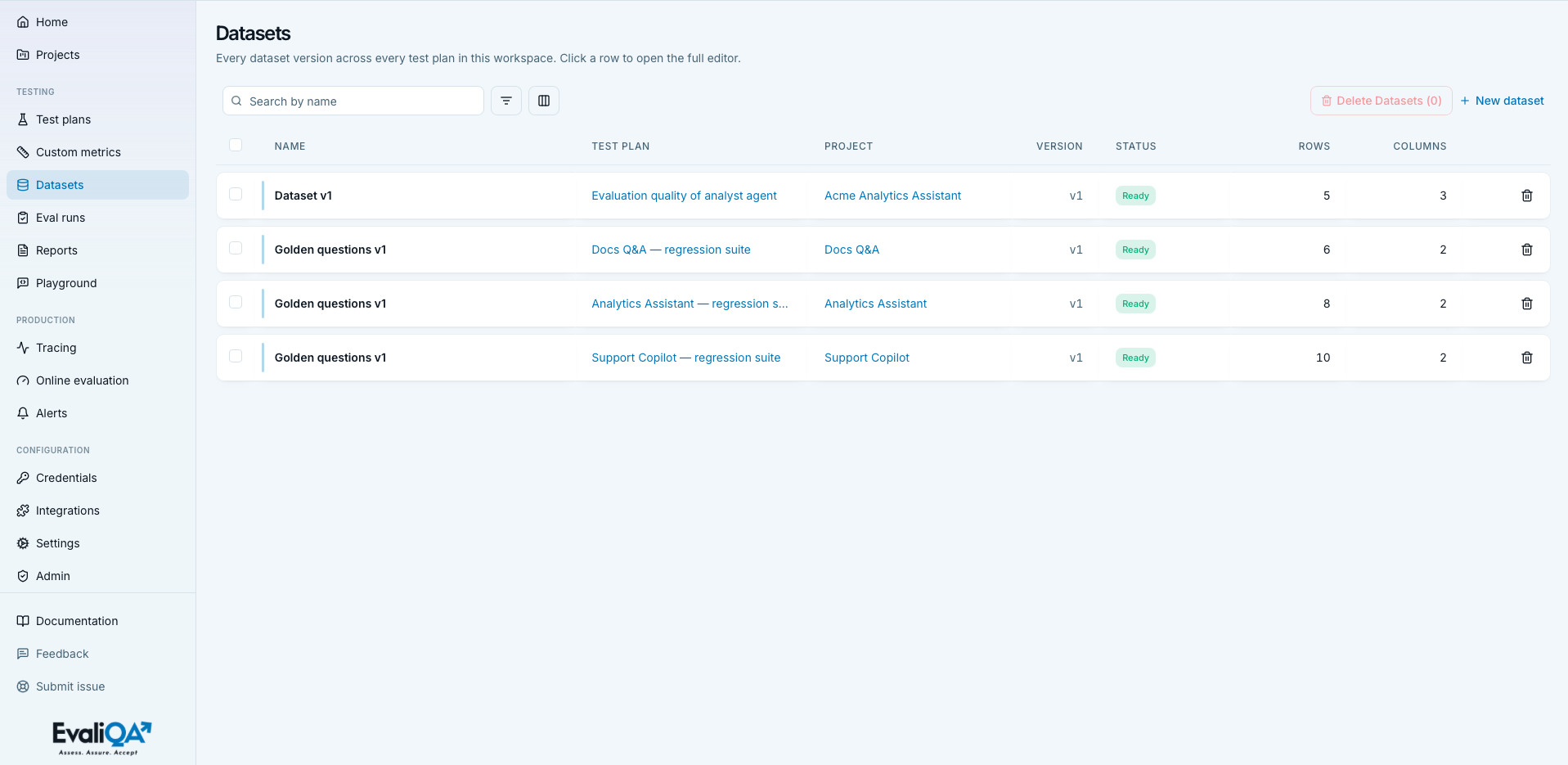
The Datasets page at /datasets is the workspace-wide list of every dataset version across every test plan. Every row is one version of one dataset; opening a row lands you in the full editor where you can add, retype, edit, delete, and bulk-manipulate rows.
The screencast (0:52) creates an empty dataset and fills it in the row editor.
Datasets are the ground truth of an evaluation, everything the eval engine iterates over. A dataset always belongs to a test plan (which belongs to a project), and its schema is seeded from the plan's mode via a template. The row shape a plan needs (single-turn Q&A vs multi-turn scenarios vs red-team attack payloads) determines the columns you'll see in the editor.
For methodology on what to put in a dataset, see Datasets, methodology hub, Evaluation dataset types, Red-team dataset types, and Golden dataset.
When to open this page
- Editing rows by hand, either fixing an expected output the generator got wrong, or hand-writing new rows for a golden set.
- Importing an existing test bank from CSV or JSONL.
- Duplicating a dataset as a new version before running a big edit, so old runs stay reproducible against the frozen original.
- Auditing coverage, checking which plans have small datasets (under 20 rows) or empty ones (rows generation failed).
Generating a fresh dataset is NOT done from here, that flow lives on the test plan detail page (Generate button under the Datasets tab). This page reads and edits existing datasets.
List page
Header
- Icon and title.
Database, "Datasets". - Subtitle. "Every dataset version across every test plan in this workspace. Click a row to open the full editor."
- No header buttons. Toolbar has everything.
Empty states
- No test plans yet. Title "Create a test plan first",
description "Datasets live inside a test plan, you need at
least one before you can generate rows.". CTA to
/test-plans. Hint "You have no test plans yet.". - Test plans exist, no datasets. Title "No datasets yet", description "Open a test plan and click Generate, or create an empty draft here.". Primary CTA "New dataset" opens the create sheet.
- Filters match nothing. Table shows "No datasets match this search / filter combination.".
Loading state: "Loading datasets...". Errors: red banner.
Toolbar
Search input. Placeholder "Search by name". Matches the dataset display name case-insensitively. For datasets without a name, matches against the auto-label "Dataset v".
Filters popover. Rules stack as Where ... And .... Blank
values silently skipped.
| Column | Kind | Operators |
|---|---|---|
| Name | text | contains, equals |
| Test plan | plan enum | equals |
| Project | project enum | equals |
| Status | status enum | equals |
| Source | source enum | equals |
| Rows | number | equals, greater than, less than |
| Columns | number | equals, greater than, less than |
| Version | number | equals, greater than, less than |
Nuances.
- Rows filter counts committed rows, not generation targets. If a Generate task was told to make 500 but failed after 120, the filter sees 120.
- Source filter values.
generated(AI wrote the rows),linked(attached from another plan via Attach existing),manual(empty draft you built by hand or via import).
Columns popover. Name is required. See Optional columns.
Bulk-delete button. Red-tinted "Delete Datasets (N)".
+ New dataset. Subtle brand-colored text link with plus icon. Disabled with tooltip "Create a test plan first, datasets live inside a plan." when no plans exist. Opens the New Dataset sheet (see New dataset flow).
Row card
Floating card with brand accent bar. Whole <tr> is clickable
to /datasets/{id}. Enter/Space also open. Left checkbox for
bulk selection, trash icon on the right for single delete.
Cells (visible by default plus always-on Name / Select):
- Name. Bold. Falls back to
Dataset v{version}if unnamed. - Test plan. Brand link to
/test-plans/{id}. Italic "Orphan (plan missing)" if the plan was deleted, the dataset survives the plan delete but reads as orphaned. - Project. Brand link to
/projects/{id}. - Version.
v{n}monospaced, right-aligned. New versions come from the Duplicate action on the detail page. - Status. See Status badge.
- Rows.
row_countwith thousands separators (e.g.1,240). - Columns. Count of columns in the schema.
Optional columns
Visible by default (in addition to the always-on ones above): Test plan, Project, Version, Status, Rows, Columns.
Hidden by default:
- ID. Monospaced, truncated.
- Source. Uppercase,
dataset.source_kind(GENERATED,LINKED,MANUAL) or-. - Error.
generation_errorin destructive red if present, else italic dash. Full message in tooltip. Turn this on when triaging Failed datasets. - Created. Relative time.
Status badge
Four statuses, colored by state:
- Draft (muted grey). Dataset exists but has no committed content, either a fresh empty template or a generation that hasn't started yet.
- Generating (warn amber,
bg-warn/15 text-warn). AI generation is in progress. Progress isn't visible on this page, the test plan detail's Datasets tab shows a progress bar per generating dataset. - Ready (pass green,
bg-pass/15 text-pass). The dataset is usable, Run eval can pick it up. - Failed (destructive red). Generation errored. Turn on the Error column to see why.
Status is NOT repeated on the detail page header (the header shows a row-count badge instead). The list is the only place to check status at a glance.
Delete cascade
Row and bulk delete share the same confirmation sheet.
Cascade summary:
N rows of data.- All eval runs based on these datasets and their traces.
Runs snapshot the dataset they used, so an existing run's history stays intact only if the run finished before the dataset was deleted. Deleting a Ready dataset that has active runs against it will remove those runs too.
Deleting a dataset also nulls out any references from the parent plan, the plan's Datasets tab loses the row.
New dataset flow
The "+ New dataset" toolbar button opens a right-side sheet with two source tabs.
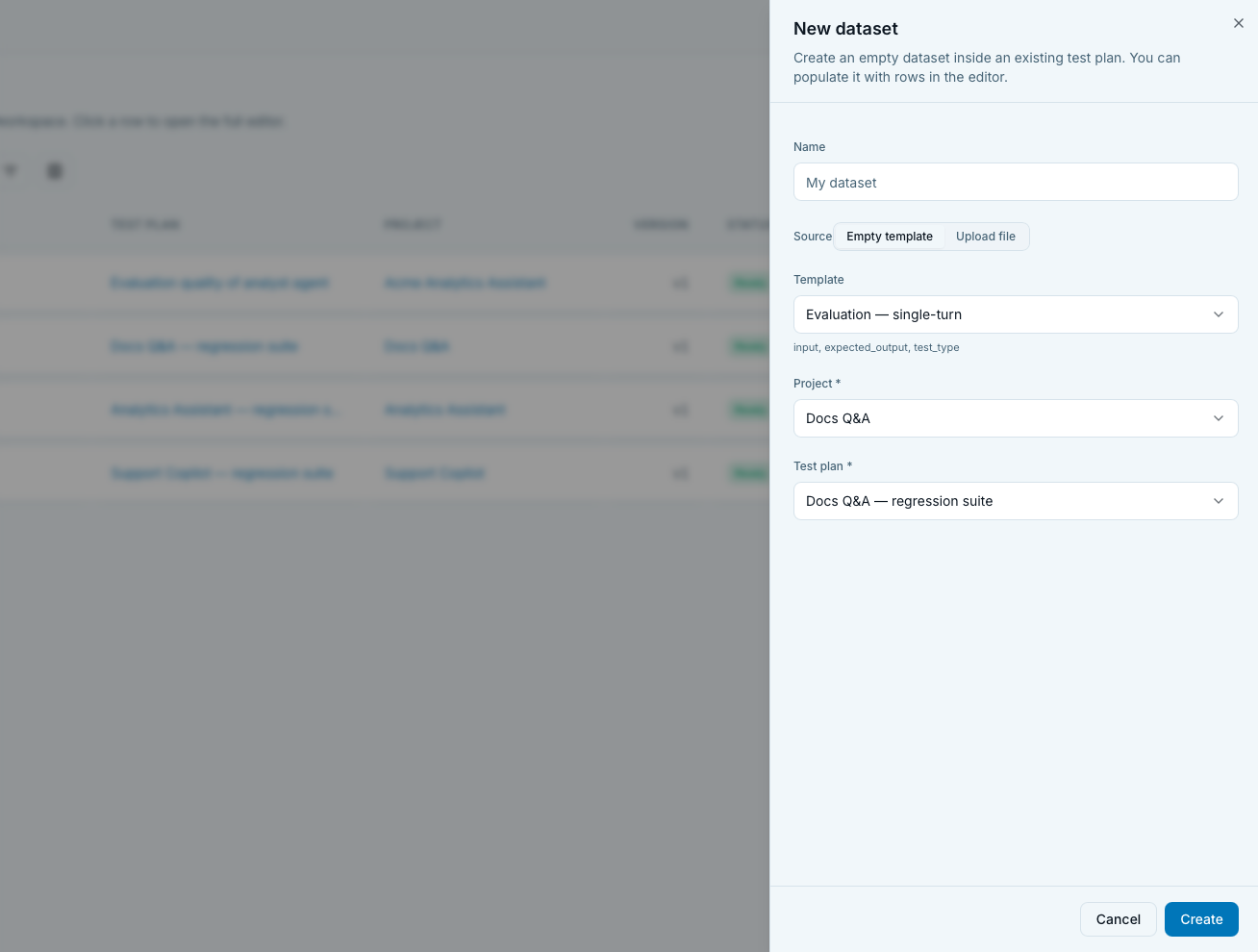
Empty template tab
- Project select.
- Test plan select, filtered to plans in the chosen project.
- Template select, filtered to templates matching the plan's mode. A helper line below shows the seeded column names.
Templates per plan mode:
| Plan mode | Templates and their seed columns |
|---|---|
eval_single_turn | input (text, required), expected_output (text), test_type (enum, default qna) |
eval_multi_turn (simulation / adaptive) | intent (text, req), persona (text, req), success_criteria (string_list, req), max_turns (number, req, default 6) |
eval_multi_turn (scripted) | title (string, req), user_turns (string_list, req), expected_outcome (text, req) |
redteam_single_turn | vulnerability (enum, req), attack_type (enum, req), attack_prompt (text, req), expected_refusal (text, req), severity (enum, default medium) |
redteam_multi_turn | vulnerability + attack_type + title + user_turns + expected_outcome + severity |
| Voice, outbound (simulation / adaptive) | phone_number (string, req), intent, persona, success_criteria, max_turns (default 10) |
| Voice, outbound (scripted) | phone_number, user_turns, expected_outcome |
Voice templates are gated on the voiceEval feature flag.
The "Empty" template with no columns is always available if you want to build the schema from scratch. Not recommended unless you know exactly what columns your metrics need.
Onboarding hand-off. With ?onboarding=1, the sheet
auto-opens with the first available plan preselected.
Upload file tab
Same Project / Test plan pickers plus a file input accepting
.csv,.json,.jsonl.
Helper text: "Columns are inferred from the header (CSV) or object keys (JSON / JSONL). Up to 1000 rows per file. All columns start as text, you can retype them in the editor.".
What "all columns start as text" means. JSON booleans,
numbers, arrays all import as text. You need to open the
editor, use the column menu → Change type, and let EvaliQA
convert existing values. Conversions report failed_rows in a
toast (rows whose value couldn't parse into the new type are
left as their original text).
Format expectations.
- CSV: header row is required. Column names in the header become dataset column names.
- JSON: array of objects. Keys become columns; missing keys become null in the row.
- JSONL: one JSON object per line. Same key-to-column mapping as JSON.
Dataset detail editor
Open a row to land on /datasets/{id}. This is the full
editor.
Header
- Icon and title.
Database,dataset.name || "Dataset v{version}". - Subtitle. "Test plan: [name]" linking to the plan detail.
- Badge.
{row_count} rows. - Actions:
- Rename (outline, pencil). Uses
window.promptfor a new name. Empty name is rejected. - Duplicate (outline, copy). Calls
duplicateDatasetand navigates to the new version. This is the "duplicate as new version" workflow, use it before a big edit so old runs stay reproducible against the frozen original.
- Rename (outline, pencil). Uses
Breadcrumbs: Datasets → {name or v{version}}.
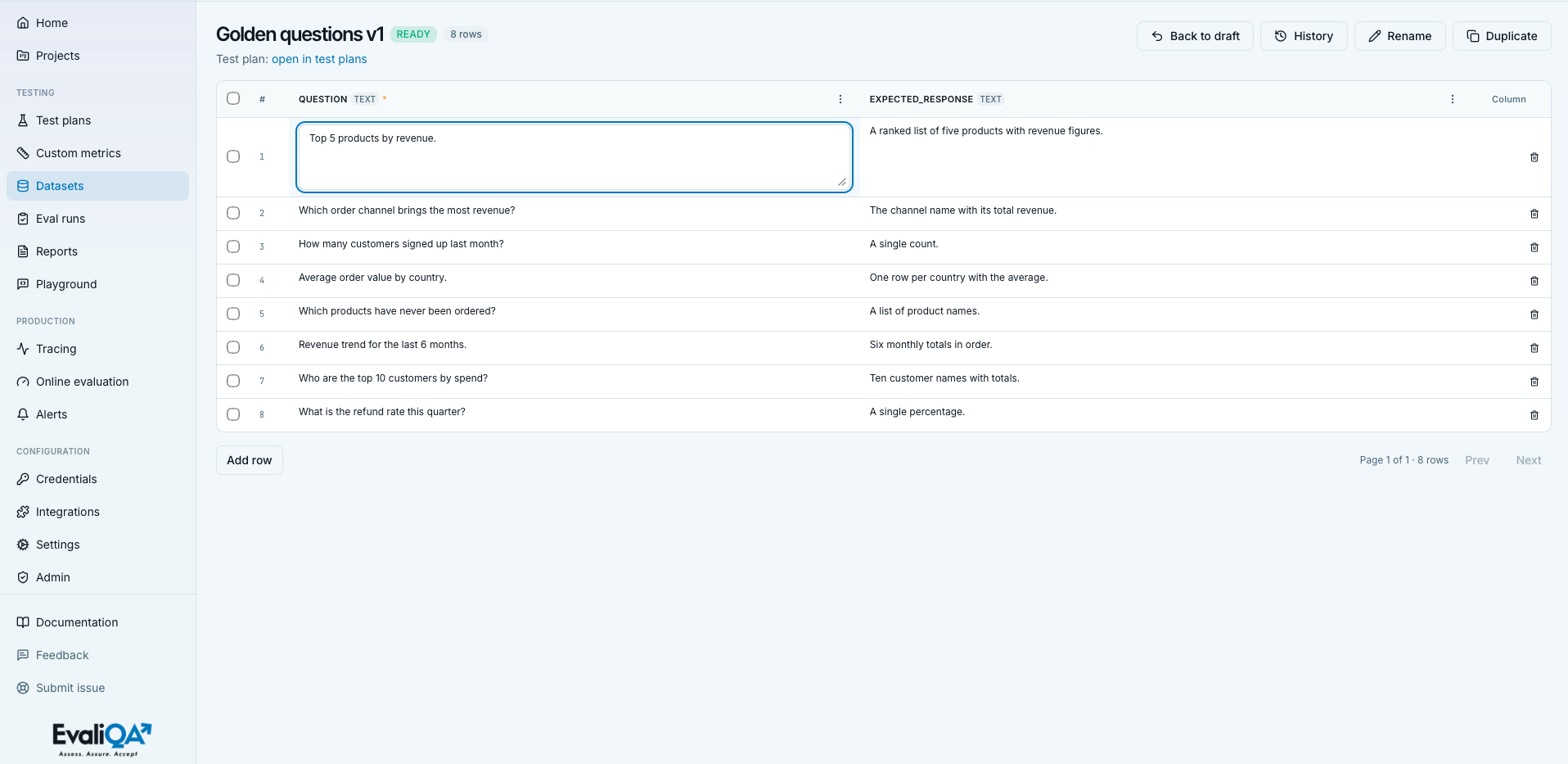
Table editor
- Header row. Checkbox column,
#(row index), one column perdataset.columns, and a final+ Columnghost button that opens the Add Column popover. - Column header. Name (bold), small muted type badge, warn-
colored
*if required, three-dot menu. - Body row. Checkbox, mono row number, one cell per column, trash icon at the end for single-row delete.
Cell types
Seven types, each with its own editor. Every value is stored as JSON on the backend, the editors are convenience surfaces.
string. Single-line text input.text. Three-row textarea. View mode truncates at 120 characters with a title tooltip on the full value.number. Number input. Empty commits asnull. Handles floats and integers alike.boolean. Checkbox. View renders a green "true" pill or muted "false". Click commits immediately, no keyboard confirmation needed.enum. Select from the column'senum_valueslist. Change commits immediately.string_list. Textarea with one item per line (newlines only, deliberately not commas, so entries with commas in them survive). View renders as comma-joined for compactness.json. JSON editor with live parse validation on every keystroke. Commit is blocked while an inline parse error is shown. View renders one-lineJSON.stringifyfor a quick glance.
Empty cells render as an italic muted "empty" pill.
Inline editing
- Click a cell to enter edit mode. Background turns brand-tinted so you know which cell owns the focus.
- Commit triggers vary by widget:
string,number,enum,boolean: Enter or blur.text,string_list,json: blur only (Enter inside a textarea inserts a newline).
- Cancel via Escape.
- Optimistic writes. The cell updates locally as soon as you commit, then a PATCH fires. On success the server row replaces the local one. On error the cell rolls back, flashes destructive red for 4 seconds, and shows the error inline.
- If the pending value equals the previous value, no PATCH fires. Type-and-abandon is safe.
Column menu (three-dot)
- Rename.
window.promptfor a new name. SendsupdateDatasetColumn({new_name}). - Change type. Inline popover with the seven type buttons
and, for
enum, a comma-separated enum-values input. Apply callsupdateDatasetColumn({type, enum_values})and reports anyfailed_rows(values that couldn't convert and were kept as their original) via a toast. - Delete. Confirmation "Delete column «X»? The value will
be removed from every row.", then
deleteDatasetColumn.
There is no column reorder UI, columns render in
dataset.columns order. Reordering would need a schema
migration, not a UI move.
Add column popover
Fields:
- Name (required).
- Type (all seven).
- Enum values (only shown when
type === "enum", comma-separated). - Description (optional, shown as an editor tooltip when the column is hovered).
- Required checkbox.
Submits addDatasetColumn. New columns start empty in every
existing row.
Adding rows
"Add row" outline button in the footer. Calls
createDatasetRow with an empty data object, reloads the
dataset, and jumps to the last page so the new row is visible.
No keyboard shortcut in the current UI. No cell-autofocus, click into the first cell to start filling.
Deleting rows
- Single row. Trash icon on the row,
window.confirm( "Delete row #N? Subsequent rows will be reindexed."). Row numbers are 1-based visible indices; the underlying id doesn't reindex. - Bulk. Page-scoped selection. Header checkbox selects all rows on the current page (indeterminate state supported). Switching pages or reloading clears the selection.
When any rows are selected, a bulk toolbar appears above the table:
- "N rows selected" label.
- Clear ghost button.
- Destructive "Delete selected" button.
Confirmation "Delete N selected row(s)? This cannot be
undone." fires bulkDeleteDatasetRows, then reloads. If the
deleted set empties the current page (and you're not on page 0),
the editor jumps back a page.
Generation surfaces
Dataset generation is NOT triggered from this page. The empty state explicitly delegates to test plans: "Open a test plan and click Generate.". What this page shows is the outcome:
- Status badge on the list.
generation_errorin the Error column.source_kindin the Source column (generated,linked,manual).
For the generation flow (row count, dataset types, personas, metamorphic relations, vulnerabilities, escalation styles), see the wizard's Generate step: Run your first evaluation, step 8.
Interpreting the list at a glance
- Dataset with 0 rows and status Ready. Empty draft, safe to delete or use as a template starting point.
- Dataset with N rows and status Draft. Rows were added by hand or via import, but the dataset wasn't committed to Ready by the generator. Runs may or may not accept it depending on the plan mode.
- Status Failed for hours. The Error column tells you why. Common causes: Platform AI agent not configured (see Getting started, first credential), target provider timeout, out-of-scope input the generator refused.
- v3 with 200 rows next to v1 with 20 rows on the same plan. The dataset was iterated. v3 is probably the current baseline; v1 stays for reproducibility of old runs.
- Rows count much smaller than what you generated. Either generation failed part-way (check the Error column) or the generator's dedup step dropped near-duplicates.
Tips and nuances
- Duplicate before big edits. Version bumps are cheap; frozen old versions keep old runs comparable. Skip only for one-off typo fixes.
- Retype after import, always. The uploaded CSV/JSONL comes in as text, retype numbers and enums via the column menu before running.
string_listsplits on newline, not comma. If you paste a comma-separated string, you get one item, not many.- JSON cells are strict. Trailing commas, unquoted keys, and
Python-style
Truewon't parse; the editor blocks commit. - Editing schema changes NEVER retroactively update runs, they update the dataset going forward, old runs keep their snapshot.
- The header badge is
{row_count} rowsat load time. If you add or delete rows, the badge doesn't refresh until you navigate away and back. - Bulk selection is per page, not workspace-wide. If a page-2 selection loses selection when you navigate to page 3, that's by design.
- The seven cell types are the whole schema surface. For
anything more structured (nested objects, arrays of objects,
timestamps), use
jsonand let the metric handle it. - Custom column defaults:
""for string/text,falsefor boolean,[]for string_list,nullfor number/json/enum. Override via the Add Column popover if you need different seeds.
Related
- Methodology. Datasets, methodology hub, the big picture. Golden dataset, how to build the small hand-curated set you point CI at. Evaluation dataset types and Red-team dataset types, what each generator template produces. Metamorphic testing and Personas and escalation styles for the more advanced dataset shapes.
- Adjacent surfaces.
Test plans page, the plans whose
datasets live here.
Custom metrics page, the
metrics that read dataset columns via
{{placeholder}}substitution. - What consumes datasets. Eval runs page, the runs powered by the datasets in this list. Evaluation results, the methodology for reading the output.