
An AI teammate is an AI agent you hand work to the way you would hand it to a colleague. You write "the export job times out on accounts with more than 10,000 rows, fix it and add a test", and the agent reads the repository, forms a plan, edits files, runs the test suite, reads the failures, edits again, and comes back with a diff and a short explanation. Claude Code and Codex are the two runtimes most teams build this on, either used directly from a terminal or a CI job, or wrapped in a service built on the Claude Agent SDK or the Codex SDK with the team's own tools attached. The agent is not answering a question. It is acting inside your codebase for 20, 50 or 200 steps, and what it produces is a change to a repository.
The problem is that almost all of that work is invisible. The reviewer sees the diff. The session that produced it, every file read, every command run, every retry and every tool result, sits in a terminal scrollback that nobody opens again. The failures that matter for a coding agent live in that session, not in the diff. An agent that made a failing test pass by changing the assertion, an agent that reformatted 14 files on the way to a two-line fix, an agent that ran the same failing command a dozen times before giving up, and an agent that read a secrets file into its own context all produce a pull request that looks ordinary. This post is about watching the agent where it works. We cover how to trace every Claude Code session into EvaliQA with the plugin built for it, how to get Codex and SDK-built agents in through the same door, how online evaluation scores each session as it arrives with deterministic detectors, bound metrics and the AI Analyst, how alerts reach a person, and how a bad session becomes a permanent row in your test dataset.
What a coding session leaves behind
EvaliQA's tracing vocabulary, from the runtime tracing docs, maps onto a coding agent cleanly. A span is one step, which for Claude Code means one model call or one tool call, a Read, an Edit, a Write, a Bash command. A trace is one agent invocation, holding the span tree plus the model, input, output, tokens, cost and the tools it called. A session is several traces sharing a session_id, which for a coding agent is the whole task from the first prompt to the final answer. Online evaluation and alerts work at the session level, so the session is the unit you will reason about, and a trace without a session id is stored but never scored.
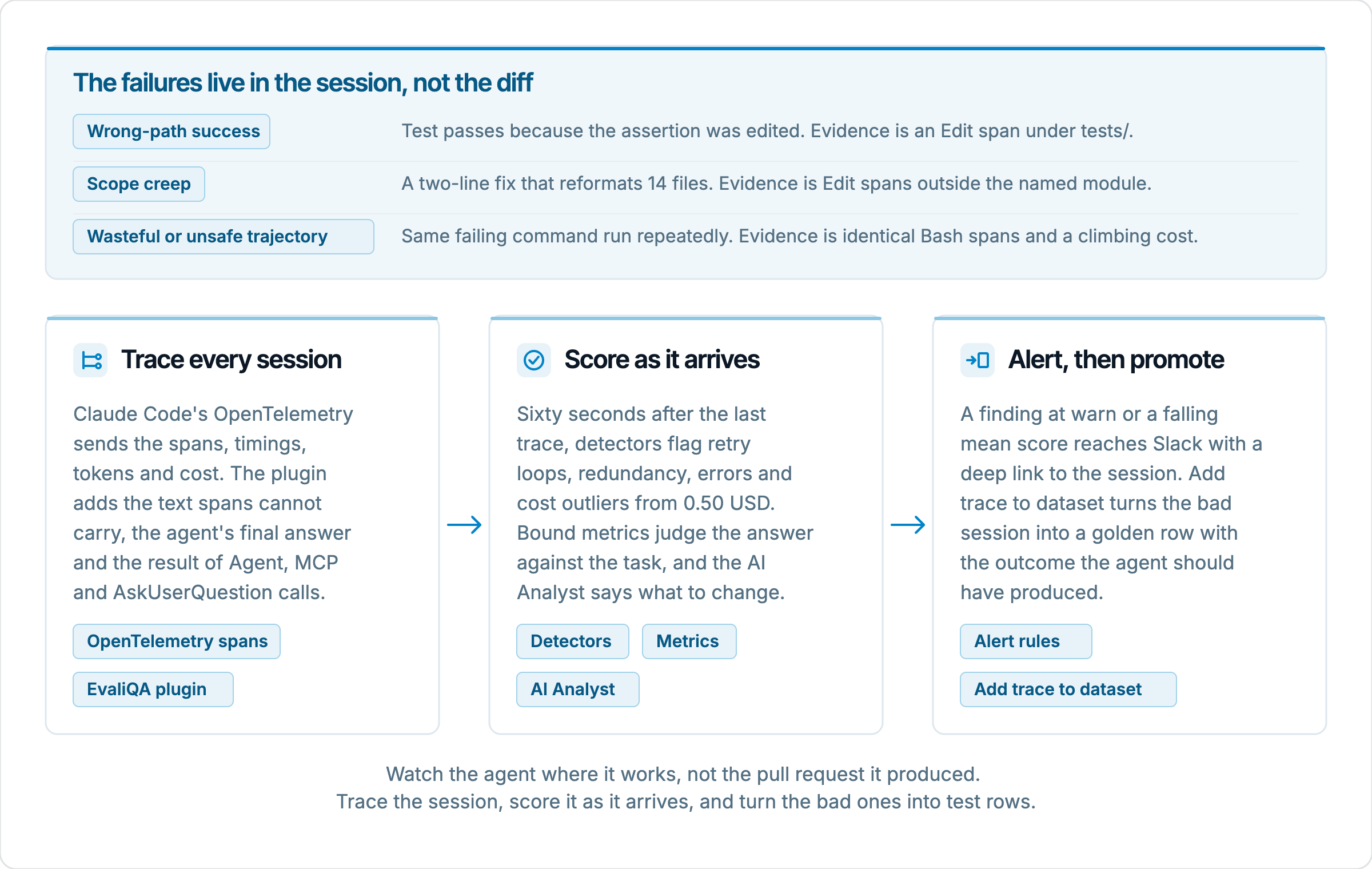
Three failure classes matter for an AI teammate, and each one leaves a different kind of evidence. Wrong-path success is the agent making a failing test pass by editing the assertion, adding a skip marker or hardcoding the expected value, and its evidence is an Edit span on a file under tests/ followed by a confident final answer. Scope creep is a one-module fix delivered with a dependency bump, a rename across three packages and a reformat of every file the agent opened, and its evidence is the list of Edit and Write spans against the module the task named. The wasteful or unsafe trajectory is the agent running the same failing command repeatedly, searching the tree five times with the same query, or reaching for a force push because the fastest way to make an error disappear was to remove the thing producing it, and its evidence is repeated Bash spans with identical input and a cost that keeps climbing after progress stopped.
The spans alone do not carry everything that evidence needs. OpenTelemetry spans are good at structure, timing, token counts and cost, and they tell you the shape of a session, which tool was called when and for how long. They are poor at text. The agent's own answer, the output of a sub-agent, the reply the agent got when it asked the user a question, the result of a call to a Model Context Protocol (MCP) server, none of that fits in a span attribute. To judge whether the final explanation matches what the agent did, or whether it ignored a test result it had just read, you need the transcript next to the spans. That is why the Claude Code integration has two halves, and why the next section spends time on both.
Tracing Claude Code with the EvaliQA plugin
Claude Code has OpenTelemetry built in, so there is no instrumentation to write and no SDK to install. The setup guide on the Runtime eval pages, shown until the project has traces, has a Claude Code tab that lays the integration out in four steps, with your host and project filled in and a Generate API key button that creates the tracing key inline. The guide's own description of the tab is the best one-line summary we have: two halves, Claude Code's built-in OpenTelemetry sends the spans, the call tree, timings, tokens and cost, and the EvaliQA plugin adds the text spans cannot carry, the agent's own answer and the result of Agent, AskUserQuestion and MCP calls. One settings block, one plugin, no application code touched.
The spans
The first half is an env block in .claude/settings.json, the file Claude Code reads at startup, committed to the repository the agent works in. It turns on Claude Code's trace export and points it at EvaliQA's traces endpoint. The block the guide renders looks like this, with your EvaliQA host in place of the placeholder.
{
  "env": {
    "CLAUDE_CODE_ENABLE_TELEMETRY": "1",
    "CLAUDE_CODE_ENHANCED_TELEMETRY_BETA": "1",
    "OTEL_TRACES_EXPORTER": "otlp",
    "OTEL_METRICS_EXPORTER": "none",
    "OTEL_LOGS_EXPORTER": "none",
    "OTEL_EXPORTER_OTLP_PROTOCOL": "http/protobuf",
    "OTEL_EXPORTER_OTLP_TRACES_ENDPOINT": "https://<your-evaliqa-host>/api/traces/otlp/v1/traces",
    "OTEL_LOG_USER_PROMPTS": "1",
    "OTEL_LOG_TOOL_DETAILS": "1",
    "OTEL_LOG_TOOL_CONTENT": "1",
    "OTEL_RESOURCE_ATTRIBUTES": "service.name=my-agent"
  }
}
Two of those lines are deliberate choices the guide calls out. The endpoint is the traces-specific one, OTEL_EXPORTER_OTLP_TRACES_ENDPOINT, with the metrics and logs exporters set to none. EvaliQA takes traces only, so pointing the generic OTEL_EXPORTER_OTLP_ENDPOINT at it would send metrics and logs to a path that answers 404. And OTEL_LOG_TOOL_CONTENT is the single setting that records what a tool actually returned. Without it you still get structure, timings, tokens and cost, but Read, Edit, Write and Bash arrive with no result text, and a judge asked whether the agent ignored a failing test has nothing to read. No secret goes in this file, which is the point of keeping it committed.
The plugin
The second half is the plugin, installed once from inside Claude Code with two commands.
/plugin marketplace add evaliqa/evaliqa-claude-plugin
/plugin install evaliqa
On every turn the plugin ships the session transcript to your EvaliQA host, joined to the trace by session id. That transcript is where the agent's final answer lives, along with the result of every Agent call (a sub-agent the main agent spawned), every AskUserQuestion (the agent stopping to ask the developer something) and every MCP call. Nothing is sent until the credentials in the next step are set, so the guide says it is safe to install repo-wide before anyone has a key. The guide is also clear that both halves are needed. Spans without the plugin leave the answer and the Agent, AskUserQuestion and MCP results blank. The plugin without spans has no timings, no cost and no trace to attach to.
The secrets
All three secret lines go in .claude/settings.local.json, which git ignores, and never in the committed settings.json. The OTEL_EXPORTER_OTLP_HEADERS line carries the key as x-api-key and authenticates the span exporter. EVALIQA_API_KEY and EVALIQA_URL feed the plugin, which appends its own path to the host. One key serves both halves, so a rotation is a single edit, and the key is bound to one project at creation, so whatever service.name says, the traces land in the key's project. After editing either file, restart Claude Code, because telemetry and hooks are read once at startup.
If you would rather have the agent do the wiring, the Cursor / Claude Code / Codex tab in the same guide turns the setup into a prompt. For the Claude Code framework that prompt tells the agent to edit the two settings files and nothing else, lists the exact variable names, and tells the agent to ask you to run the two plugin commands, since a plugin install is a Claude Code command and cannot be done from a file.
Codex and agents built on the SDKs
There is no EvaliQA plugin for Codex, so a Codex teammate goes in through the OpenTelemetry door from whatever process runs it. That door is four environment variables, OTEL_EXPORTER_OTLP_ENDPOINT, OTEL_EXPORTER_OTLP_HEADERS with the key as x-api-key, OTEL_EXPORTER_OTLP_PROTOCOL and OTEL_RESOURCE_ATTRIBUTES, on any stock OTLP/HTTP exporter, and nothing gets installed. If you run Codex inside a service that already emits OpenTelemetry spans, adding EvaliQA is one more exporter and your existing ones keep working. If it runs behind an OpenTelemetry Collector, the OpenTelemetry tab of the setup guide renders the exporter block to add to the Collector's traces pipeline. The mapper reads the GenAI semantic conventions and the older OpenLLMetry and OpenInference spellings, so tool spans and model spans classify themselves as long as something sets gen_ai.operation.name. If your timeline shows every span as custom, that attribute is what is missing.
An agent you built on the Claude Agent SDK in Python takes the SDK door instead. The framework integrations page ships a trace collector that turns Anthropic content blocks, text, thinking and tool_use, into spans, and it works on both the raw Messages API and the SDK's message stream. You wrap the invocation in start_trace and end_trace, set session_id in the trace metadata, and the collector fills in the spans. Pass the runtime's reported cost as cost_usd with cost_source="reported" and the feed shows the real bill rather than a price estimated from tokens. The two doors land in the same place, so a Python orchestrator on the SDK and a Codex sub-agent on OTLP can share one project and one session.
Whichever door you use, make the session one task. The sessions docs describe exactly this case, a planner-executor agent where the dialogue is between your own sub-agents rather than with a person, and recommend the request id as the session id rather than a long-lived conversation id. From OpenTelemetry the same grouping comes from a gen_ai.conversation.id or session.id attribute on the root span. For Claude Code the spans and the plugin already share a session id, so the practical advice is to start a fresh Claude Code session per task rather than running a whole afternoon in one. Online evaluation analyses a session 60 seconds after its last trace and re-arms if more traces land, so a session that is one task gets one analysis that reads as one story, and a session that is six tasks gets a muddled one.
Reading a session on the Runtime eval pages
Traces appear on Runtime eval within seconds, under three tabs, Sessions, Traces and Users. The Sessions list has one row per session id with the user, the trace count, tokens, cost, duration and last seen, and the two sorts that matter for a coding agent are by cost, which finds the expensive tasks, and by traces, which finds the ones that looped. Open a session and you get KPI tiles for tokens, cost, duration and the models involved, then a gantt-style timeline of every trace in wall-clock order. A Claude Code run that spawned three explorer sub-agents reads on that timeline as one story, with the planner's trace and the executors' traces laid out where they happened.
The trace page is the deepest view. The input and output render as Markdown, so the task and the agent's final answer read the way the developer saw them. The Spans tree shows each step as a card with its type, timing, inputs, outputs and attributes, and an error banner if it failed, which is where a Bash span that ran the tests sits next to the Edit span that followed it. Tools called is a collapsible list of the tools the trace invoked, which for a coding agent is the fastest read on scope, because a two-line fix with 14 Edit entries is visible before you open a single span. The cost in the header carries its reported or estimated tag, so you always know whether you are looking at the runtime's number or EvaliQA's price lookup from tokens.
The project's Observability tab is the aggregate over a time range, with tiles for traces, sessions, users, error rate, cost and p95 latency, then traces over time, cost over time, average latency, a by-model breakdown, Top errors and Top tools. For an AI teammate, Top tools is the tool-use distribution of your whole fleet, and a week where Bash climbs and Read falls is a prompt change showing up before anyone noticed it. This is the page to leave open on a second monitor. It shows you what the agent did and how much it cost. It does not yet tell you how well, which is what the next section turns on.
Scoring sessions as they arrive
Open online evaluation, pick the project, and switch to the Settings tab. The Runtime auto-eval panel has three switches, and the same three sit on the project's Tracing tab next to the API keys so you can enable them in the same breath as creating the key. Auto-evaluate sessions is the master switch. Deterministic detectors are sub-second checks that need no model, cost nothing, and the docs recommend leaving them always on. AI Analyst is a strong model reading the whole session, covered in its own section below. Everything except the detectors runs on your workspace's Platform AI agent, configured under Settings, on your key and billed by your provider, and without it the metric and analyst engines skip and say why on the Results row and the session page.
The detectors are built for the failure modes of a coding agent, and it helps to map each one to the failure it catches.
Finding | What triggers it | What it means for an AI teammate |
|---|---|---|
| Runs of identical adjacent spans, same name and same input | The agent is stuck, running the same test or the same command and getting the same failure |
| The same tool invoked with the same arguments more than once across the session | Wasted steps, the same file read or the same search run again, and a sign the agent is not using what it learned |
| A span with an error status or an error field, critical from 3 occurrences | Tool failures the agent hit, which are expected in a fix-the-test task but not three of the same kind |
| The session's total cost reaches 0.50 US dollars (USD), critical from 5 USD | A task that is costing far more than its size justifies, usually the same one that looped |
| A trace takes 3 times the session's median, at least 5 seconds, in a session of 3 or more traces | One sub-agent or one step that ran away, worth opening on the timeline |
Below the switches, Metric scoring lists the metrics the project scores, and Add metric opens the picker. A binding is a metric from the catalogue or a workspace custom metric, a threshold from 0 to 1, a trace field mapping and an optional rule scope. The defaults map input from the trace input and actual_output from the trace output, which for Claude Code is the task and the final answer the plugin shipped. Conversation-level metrics such as Repetitive Pattern Detection and Task Success Rate ask a different question in the picker, what one turn is made of, and you point them at the user message and the agent reply per trace so EvaliQA assembles the conversation from the session. The rule scope matters more for a coding agent than for a chatbot, because a session can contain health checks and sub-agent traces you do not want judged, and the picker shows a sample trace from the project and tells you whether it would match before you save.
Two clocks run once scoring is on. As each trace arrives, every bound single-turn metric whose scope matches scores it immediately, and a trace already scored under the current configuration is not scored again. Sixty seconds after the last trace of a session, the session-level pass runs the detectors, the conversation metrics over the assembled dialogue, the AI Analyst if it is on, and then the alert rules. Every new trace slides the timer, so a long task is analysed once, after it ends. Changing a binding affects traces from then on, and history is not re-scored, so the first bad session you want analysed has to arrive after the switch is on.
Bind deliberately. Every binding is one judge call per trace it matches and spends evaluated cases from the same pool as test runs. A good first set for a coding agent is Repetitive Pattern Detection, because unbounded session length is exactly what the docs recommend it for, and one Custom Eval preset with the verdict strategy whose criteria read the final answer against the task, for instance whether the answer names the root cause and whether it mentions running the tests. Add Task Success Rate once you have read a few sessions and know what task description and success criteria to give it. A judge reading the transcript scores whether the agent behaved like a careful teammate. It does not run the tests and cannot tell you the fix is correct, so the test suite in your CI remains the correctness oracle, and the online scores are the norms oracle alongside it.
What the AI Analyst adds
The AI Analyst is the third switch, and it is the part of online evaluation that reads a coding session the way a senior engineer would. It is a strong model, called once per session through your Platform AI agent, that reads the session, the detector findings and the metric verdicts together and writes recommendations on reasoning quality, tool selection and prompt engineering. The call takes about 30 seconds and is priced like a normal model call on your provider. Where a detector tells you a retry loop happened and a metric tells you the session scored 0.4 on repetition, the Analyst connects the two to what the agent was trying to do and says what to change.
A worked example makes the difference concrete. A Claude Code session on the export timeout task runs the suite, gets a failure in test_export_large_account, edits the query, runs the suite again with the same arguments, gets the same failure, and does this six times before changing the assertion and declaring the task done. The retry_loop detector fires on the six identical Bash spans and the cost_outlier warns at 0.50 USD. A Custom Eval criterion asking whether the final answer names the root cause scores partial, because the answer describes a symptom. The Analyst's finding reads across all of that. It can say the agent never read the stack trace in the first failure's output, kept editing the same function, and resolved the loop by editing the test, and it can recommend a prompt change, such as requiring the agent to quote the failing assertion before its first edit. On the session page those findings sit in the AI analysis card with a severity and the traces each one points at, and critical findings open expanded.
Know what the Analyst is reading. It sees what reached EvaliQA, so the quality of its findings is bounded by the two halves of the integration. Without OTEL_LOG_TOOL_CONTENT it sees that Bash ran six times and not that each run printed the same stack trace. Without the plugin it sees the span tree and not the final answer, and it cannot judge the explanation against the work. It does not execute anything, so a recommendation about correctness is a recommendation about plausibility. And it is one strong-model call per session, which is why the docs say to leave it off until someone is reading its findings. A fleet of 40 developers each running 10 sessions a day is 400 Analyst calls a day, and that is only worth paying for if the recommendations change a prompt or a tool definition.
The place to read its output in bulk is the Results tab, which lists the last 25 scored sessions newest first, each with a status pill, the trace count, the finding count and a badge per metric with the mean score and pass rate, colour-tiered at 0.9 and 0.5. If one engine did not run, the reason is printed on the row. The Overview tab is the drift view above it, with scored sessions, pass rate, findings, average cost and average duration per session, then score over time with a metric selector. A pass rate that slides over a week while the finding count climbs is a model update or a prompt change showing up in production before any test plan ran.
Alerts and the loop back to the dataset
Scores and findings reach a person through alerts. Channels are workspace-wide, Slack, Discord, Teams and Telegram incoming webhooks, a generic HTTP webhook with optional headers, or email, and every channel has a Test action that sends a synthetic alert and records the result in the Last test column, which you should run before trusting it with a real one. Rules are per project and watch one of three things, a metric's pass rate below a threshold, a metric's mean score below a threshold, or findings at or above a severity. The rule builder only offers metrics the project actually scores, so bind the metric you would alert on before you write the rule.
For an AI teammate, two rules do most of the work. The first is Finding severity ≥ warn, which fires on a retry loop, a cost outlier, repeated errors, or anything the Analyst rated at that level, and whose deep link opens the one trace that caused it when there is exactly one and the session otherwise. The second is a mean-score rule on your Custom Eval preset, so an agent that starts answering without naming the root cause shows up as a trend and not as a complaint. Leave the throttle at its default of 15 minutes. A model update that breaks the agent for everyone produces one message, not forty, and the History tab keeps every firing with per-channel delivery status, so a webhook that silently broke is a filter away.
The loop closes on the trace page. A session that went wrong in production is the best test row you will ever write, and Add trace to dataset promotes it in four steps, pick the test plan, pick the dataset and version, map the trace fields to columns with input and output pre-mapped and any column available as a custom value you type, and save. The custom value is where you write the expected outcome you now know the agent should have produced, for the looping session above something like "the named test passes, no file under tests/ is modified, the final answer quotes the failing assertion". Tag the row source = incident in metadata with a one-sentence note on why it exists, and it stays in the set forever as a regression alarm, because the bug can come back from a model update or a prompt tweak.
That promoted row is where the testing road and the production road meet, and the docs say it is the only place they meet, on purpose. Online evaluation detects. A test plan with hand-written tasks and a pinned repository commit, scored with the same metric catalogue, is the controlled experiment that tells you whether the fix you made to the prompt actually removed the loop, and it is what gates the next change to the agent. The docs suggest a weekly pass over the traces online evaluation flagged, promoting the ones worth keeping. For a coding agent that pass is the sessions with findings, the cost outliers and the pull requests a reviewer rejected, and a golden set that grows from those is honest about what the agent does rather than what you imagined it would do.
Create a project and generate a tracing key on its Tracing tab, then open the Claude Code tab of the setup guide and commit the env block to .claude/settings.json in one repository your team's agent works in. Put the three secret lines in .claude/settings.local.json, confirm git ignores it, run the two plugin commands and restart Claude Code. Run one real task in a fresh session and open it on Runtime eval, checking that the spans show tool results and that the final answer is present on the trace page, which proves both halves arrived. Turn on Auto-evaluate sessions and Deterministic detectors, bind Repetitive Pattern Detection and one Custom Eval preset with two or three criteria over the final answer, and leave the AI Analyst off until the first flagged sessions are there to read. Add a Slack channel, test it, and write one rule on finding severity at warn. After a week, read the Results tab, turn the Analyst on for the sessions that fired, and promote the first session that edited a test into a dataset with the outcome it should have produced. From that point the dataset grows from what the agent really does, and the next prompt change has a test row waiting for it.