Teams that have outgrown "run the prompt five times and eyeball it" usually land on the same shortlist, and DeepEval is almost always on it. It is the most visible open-source evaluation library, it speaks the language engineers already use (pytest, a Python function, a CI step), and it is free to install. The trouble starts a few months in. The test cases live in a Python file that only developers can edit, the results live in a CI log that nobody reads twice, the red-team pass is a separate package nobody has wired up, and production traffic is scored by a different tool, if it is scored at all. The evaluation works, but it works for one engineer, and the QA lead and the product manager who need to trust the release number are reading it second-hand.
EvaliQA is built for that second stage. It is a hosted workspace where test plans, datasets, metrics, runs, red teaming and live traces sit in one project, so the person who knows the domain can write the test bank, the person who ships the release can gate on the number, and the person on call can see the same metrics on production sessions. This post walks through what DeepEval gives you, what EvaliQA adds on top of it, and where the gap is widest. We build EvaliQA, so read the recommendation with that in mind; the DeepEval facts come from its own documentation and the EvaliQA facts link to ours.
What DeepEval gives you
DeepEval describes itself as an open-source LLM evaluation framework for LLM applications. It is a Python package under the Apache-2.0 licence, installed with pip install -U deepeval, with a TypeScript implementation in the same repository. The unit of work is a test case. For a single-turn interaction you build an LLMTestCase with an input, an actual output and optionally a retrieval context; for a conversation you build a ConversationalTestCase with a scenario and a list of turns. You then pick metrics and run them, either from a test file with deepeval test run, the framework's pytest integration, or programmatically with an evaluate() call, and both routes take the same list of test cases and metrics.
The metric library is the headline. DeepEval ships more than 50 ready-made metrics across categories it labels Custom (G-Eval, DAG, Arena G-Eval), AI Agents (Task Completion, Step Efficiency, Plan Adherence, Tool Correctness and others), RAG (Answer Relevancy, Faithfulness, Contextual Relevancy, Precision and Recall), Multi-turn (Knowledge Retention, Role Adherence, Conversation Completeness, Conversation Relevancy), Safety (Bias, Toxicity, PII Leakage and others) and Image. Every metric outputs a score between 0 and 1 with reasoning and passes at a threshold that defaults to 0.5. Most are LLM-judge metrics, so they need a model behind them: the default is OpenAI through an environment variable, and you can substitute another provider or your own class. Around the core sit a Synthesizer that generates goldens from documents, a ConversationSimulator that drives a multi-turn test with a live LLM user for a default of 10 user turns, and an @observe decorator for tracing components.
Three boundaries define where the library stops. Red teaming is not in DeepEval itself; it lives in a sibling package, DeepTeam, with its own catalogue of more than 40 vulnerabilities and more than 10 attack methods and its own install. Metrics attached to @observe spans only run inside an evaluate() or assert_test() call, so a decorated app running in production is traced but not scored. And DeepEval is local-first: everything that needs persistence or a screen (shared dashboards, regression tracking, observability, production monitoring) is the job of Confident AI, the company's hosted platform, with its own seats and pricing. A fair reading of "DeepEval" as a team tool is therefore "DeepEval plus DeepTeam plus Confident AI", three things to install, learn and pay for.
What EvaliQA adds
EvaliQA is an evaluation platform: a hosted workspace where projects, datasets, test plans, metrics, runs and live traces live together and stay comparable over time. There is no test file. The equivalent of a DeepEval test suite is a test plan, a saved recipe with five parts: a channel (HTTP connector or voice), a mode, a model and a judge model, a set of metrics with thresholds, and one or more attached datasets. A plan is run against a dataset version with the Run eval action, every row is scored, and the run lands on a results page with per-metric pass rates, per-row judge reasoning and a Total cost tile. The same plan can be triggered from CI through an API endpoint, run on a schedule, and compared run to run from the plan's Eval runs tab.
The product is organised around two loops that share the same metrics. Offline evaluation is the controlled experiment: a frozen dataset, a fixed plan, a repeatable run that answers "is the next release better than the last one". Live evaluation is your production agent streaming traces into EvaliQA, where sessions are scored against the same metric catalogue and alert rules watch the scores. The two meet in one place, the Add trace to dataset action on a trace page, which turns a real production conversation into a test case for the next offline run. That loop is the thing a library cannot give you, because a library has no memory between runs and no view of production.
Metrics come in five catalogue categories: RAG and general LLM-judge (Answer Relevancy, Answer Precision, Faithfulness, the three Contextual metrics, Bias, Toxicity, Restricted Refusal), Agent (Task Success Rate, Goal Achievement, Role Adherence, Knowledge Retention, Tool Correctness, Conversational Flow and others that read whole conversations), Security (PII Leakage, Harmful Content, Prompt Injection and Jailbreak detection and resistance, Policy Compliance), Deterministic (Regex Match, JSON Schema, Length Check, Contains) and Custom (G-Eval and Custom Eval). Every metric produces a 0 to 1 score and a threshold turns it into a verdict, with catalogue defaults between 0.5 and 0.8 depending on the metric. On metric names alone the two tools overlap heavily: both have the RAG triad, Bias and Toxicity, Role Adherence and Knowledge Retention, Tool Correctness and G-Eval. If you have designed a metric set in DeepEval, you can reproduce it in EvaliQA in an afternoon, which is why the comparison below is about everything except the metric list.
Two things you do not need to bring are code and a model key. Quick eval takes an endpoint (you can paste a cURL command copied from your browser), a sentence about what to test, and a case count, and creates the credential, connector, project, plan, dataset and run in about two minutes. Model calls are bring-your-own-key, billed by your provider, or paid in platform credits if you would rather not hold a key at all. The Python SDK, eval-ai-library, is only needed for production tracing, and even there an OpenTelemetry exporter works without it. With DeepEval, the first scored run requires a Python environment, an OpenAI key in the shell and a test file; with EvaliQA it requires a URL.
Test plans the whole team can edit
The first advantage is who can touch the test bank. In DeepEval a test case is a Python object in a file, and a dataset is an EvaluationDataset of Golden objects, a golden being a test case that has not yet been run through your application. You produce the actual output by calling your app inside the test, attach the metrics, and assert. This has a real strength: the evaluation lives next to the code, is versioned with git and reviewed in pull requests. The cost is that every change to the test bank is a code change. A QA engineer who wants to add ten tricky refund questions, or a product manager who wants to read why row 37 failed, needs a developer's time or a seat on the hosted platform.
In EvaliQA the test case is a row in a dataset with a template that matches the plan's mode, and rows arrive four ways: hand-written in the editor, generated from the project's description and scope fields, imported from CSV or JSONL, or promoted from a production trace. Datasets are versioned, and the guide's rule is to use Duplicate as new version before a mass edit so old runs stay reproducible against the frozen version. The plan and the dataset are decoupled on purpose: one plan can run against many dataset versions, and each run records the exact dataset id it used. The person who knows the domain edits the test bank; the developer is not in the loop for a content change, and the release-gate number is still reproducible.
Generation is aimed at the shape of a test bank rather than at a corpus. DeepEval's Synthesizer takes documents or contexts you pass to it and applies "evolutions" to make questions harder, which is useful for a RAG corpus and silent on everything else. EvaliQA's Generate action works from the project's Description, Business scenarios, Capabilities and Out-of-scope lists, optionally plus uploaded documents, and produces rows of five evaluation types: happy path, edge cases, metamorphic pairs, forbidden topics and inappropriate usage, with a recommended mix of roughly 50, 20, 10, 10 and 10 percent. Forbidden topics and inappropriate usage are the rows that catch an agent answering a question it should have refused, and they fall out of the project's own out-of-scope list rather than from a document. Both generators need the same discipline, which is that you read the first batch before you trust it.
The result is readable by the people who decide. DeepEval's output is a pass or fail per test in the pytest log, and sharable reports are a hosted-platform feature. In EvaliQA every completed run can produce a report: an AI-written Markdown document summarising the plan, the dataset, per-metric results and notable failures, which you can edit in place and download as Markdown, HTML, PDF or DOCX. A product manager opens the run, reads the report, downloads a PDF, and never sees a JSON row. A compliance reviewer takes the DOCX from the monthly red-team run for the audit binder. That is the moment evaluation stops being an engineering-only activity, and it is the difference a library cannot close on its own.
Runs that stay comparable
The second advantage is that a run in EvaliQA is a record, not a log line. Every run stores its plan, its dataset version, its judge model, its per-row verdicts and reasoning, and its cost, and the plan's Eval runs tab lets you tick two or more runs and hit Compare to see per-metric pass rates and deltas side by side. With a library, run history is whatever you build: if your CI runner discards the output, the comparison against last month's baseline is gone unless you pushed it somewhere. Building that store is a reasonable weekend project, and it is also the first thing teams underestimate, because the store is only useful once it also captures which dataset version and which judge each run used.
The judge is pinned per plan, which is deliberate. In EvaliQA the judge model is chosen once on the plan and applies to every LLM-based metric on it, so two runs of the same plan are measured with the same instrument. DeepEval lets you set a model per metric, which is flexible and also the easiest way to make two runs incomparable without noticing. The comparing runs guide puts a number on why this matters: on a 100-row plan with a strong judge, per-metric pass rate typically wobbles by 2 to 3 percentage points between identical runs, so a 2-point "improvement" is probably noise and a 5-point move is worth believing. That noise floor applies to any LLM judge, whichever tool called it; the difference is that EvaliQA keeps the judge fixed and the history in one place so you can see the floor.
Custom metrics follow the same rule. G-Eval, the technique where you hand the judge a natural-language rubric and it produces a confidence-weighted score by sampling several times, exists on both sides; in EvaliQA it is one of two custom bases and defaults to 20 samples per row, which is why the docs warn that two G-Eval metrics on a 500-row plan is 20,000 extra judge calls. The second base, Custom Eval, is the one for a list of discrete criteria: it scores each criterion separately with a five-level verdict (none, minor, partial, mostly, fully), can reference dataset columns and connector fields through {{placeholders}}, and costs one judge call per row unless you switch on consensus. DeepEval's nearest equivalent is the DAG metric, a decision tree you write in code. Custom Eval is a list you write in a form and save as a workspace preset, so the QA engineer who wrote the criteria can also change them.
Retention is part of comparability, and it is spelled out. EvaliQA keeps row-level results for 30 days on Free and 365 days on Team, and runtime traces for 14 and 180 days respectively; summary scores, plans, datasets and reports are never deleted, and both exports are a button (CSV on a run, Export CSV on the Tracing page). Nothing is deleted for 30 days after a downgrade. Ask the same question of a library and the answer is "wherever you put it", which is fine until the day someone asks what the pass rate was on the release before last.
Multi-turn you can regress
Conversations are where a library and a platform pull apart, because the hard part is driving the user side. DeepEval's ConversationSimulator takes a scenario, a persona described in text and an expected outcome, then loops until a maximum number of user turns is reached or a stopping condition ends it. The simulated user is an LLM reacting live, which is realistic and non-deterministic: two runs produce two different transcripts, so a pass rate that moves between runs may reflect your agent or may reflect the simulated user having a different day. That is acceptable for exploration and a problem for a release gate.
EvaliQA's multi-turn evaluation gives you three strategies for exactly this trade-off. Simulation replays pre-generated scenario seeds deterministically with no user-side LLM at run time, which is what makes a run-to-run comparison of a conversation mean anything. Scripted replays a verbatim list of user turns, the right tool for reproducing a production incident exactly as it happened. Adaptive lets the Platform AI agent improvise the user side the way DeepEval's simulator does, for the most realistic conversations where the user pushes back and asks follow-ups. The docs are explicit about the failure pattern this exposes: an agent that passes under Simulation and fails under Adaptive is an agent that handles a script but not a user. With one strategy you cannot see that; with three you can, and you can put the deterministic one in CI and the adaptive one on a nightly schedule.
Personas are a first-class knob rather than a free-text field. The generator offers 15 persona types, from Impatient and Confused to Non-native speaker and Manipulative, and a conversation is generated per scenario and persona pair, so 5 scenarios and 4 personas is 20 conversations before any multiplier. That multiplies rows, so the sizing guidance is small: 10 to 20 conversations with 3 to 5 turns for a smoke test, 40 to 80 for release qualification. The persona dimension is also a diagnostic: the bottlenecks guide reads "default persona passes, Impatient persona fails" as an agent that needs too many turns to satisfy a request, a finding you cannot make if the persona is one sentence in a prompt. Scoring then uses the Agent category, Task Success Rate, Goal Achievement, Role Adherence, Knowledge Retention and Conversational Flow, at the conversation level rather than per turn.
Red teaming in the same project
Red teaming is the sharpest structural difference. In the DeepEval world it is a separate install, DeepTeam, with its own vulnerability and attack catalogue and its own framing of simulating how a malicious user might compromise your systems. Nothing about it is shared with your evaluation plans: a different package, a different set of concepts, a different place for the results. In practice that means red teaming is the thing the team means to set up and does not, because the evaluation suite already works and the security pass is a second project.
In EvaliQA red teaming is two of the four plan modes, single-turn and multi-turn, inside the same wizard and the same project as your evaluation plans. The red-team dataset types guide groups the vulnerabilities into content safety, data and privacy, system behaviour, and access control for tool-using agents (BFLA, BOLA, SQL injection, SSRF), and the attack techniques into direct pressure, reframing, encoding, injection and multi-turn build-up such as crescendo and context poisoning. Row count is vulnerabilities times techniques times attacks per vulnerability, so 5 by 6 by 3 is 90 rows, and the docs recommend starting there rather than at 1,500. The run lands in the same Eval runs list as every other run, and the same report generator writes it up.
Two details make it hard to get wrong. Red-team plans skip the metrics step entirely; the runtime scores each row per vulnerability and attack technique, so there is nothing to configure and nothing to misconfigure. And the single-turn mode lets you pick a separate Attacker LLM on the Run eval sheet, with the same warning as for judges: a weak attacker makes your system look better than it is, so pin a strong one, and keep concurrency at 1 to 5 because attacker calls are expensive. The Security metric category (Prompt Injection and Jailbreak detection, PII Leakage, Policy Compliance) is available on ordinary evaluation plans too, so a lighter security signal can ride along with the release gate while the full red-team run stays on a monthly schedule. Red teaming is a Team-plan feature in EvaliQA, not a Free one, which is a cost consideration we return to below.
The production loop is included
Both tools can see inside a running agent, but they draw the line between "trace" and "evaluate" in different places. DeepEval's @observe decorator captures spans and can carry a test case per span, so during an evaluate() run you can score a retriever with Contextual Precision and the final answer with Answer Relevancy. Outside an evaluation run the picture changes: when the decorated app runs in production, metrics do not run. Live monitoring, dashboards and alerts are the hosted platform's job, and turning an interesting production trace back into a golden is a manual step you write yourself.
EvaliQA's production side is part of the same product and the same plan. Runtime tracing has two doors, the Python SDK with four environment variables or any OTLP/HTTP exporter pointed at the ingest endpoint, which is how Bedrock Agents, Azure AI Foundry, an OpenTelemetry Collector or a non-Python stack get in. Traces are grouped into sessions and users, and the project's Observability tab aggregates volume, errors, cost and latency. Online evaluation is a per-project switch labelled Runtime auto-eval with three parts: deterministic detectors that need no model (errors, retry loops, redundant tool calls, cost and duration outliers), bound metrics from the same catalogue scored on each trace as it arrives, and an optional AI Analyst that reads the whole session and writes findings. A session is analysed 60 seconds after its last trace, so a long conversation is scored once, at the end, not once per turn.
The piece that closes the loop is alerts and promotion. Alert rules watch pass rates, mean scores and finding severities per session and post to Slack, Discord, Teams, Telegram, email or a webhook, throttled so a bad deploy is one message rather than forty. The trace behind an alert becomes a dataset row with Add trace to dataset, and the next offline run covers it permanently. The production guide is candid about the boundary this creates: testing and monitoring run on separate rails so that a noisy day in production never moves a release-gate number, and the promotion action is the only place the two meet. In DeepEval terms this is the workflow you would assemble from @observe, a hosted observability product, and a script that copies traces into goldens; in EvaliQA it is one switch, one rule and one button.
Side by side
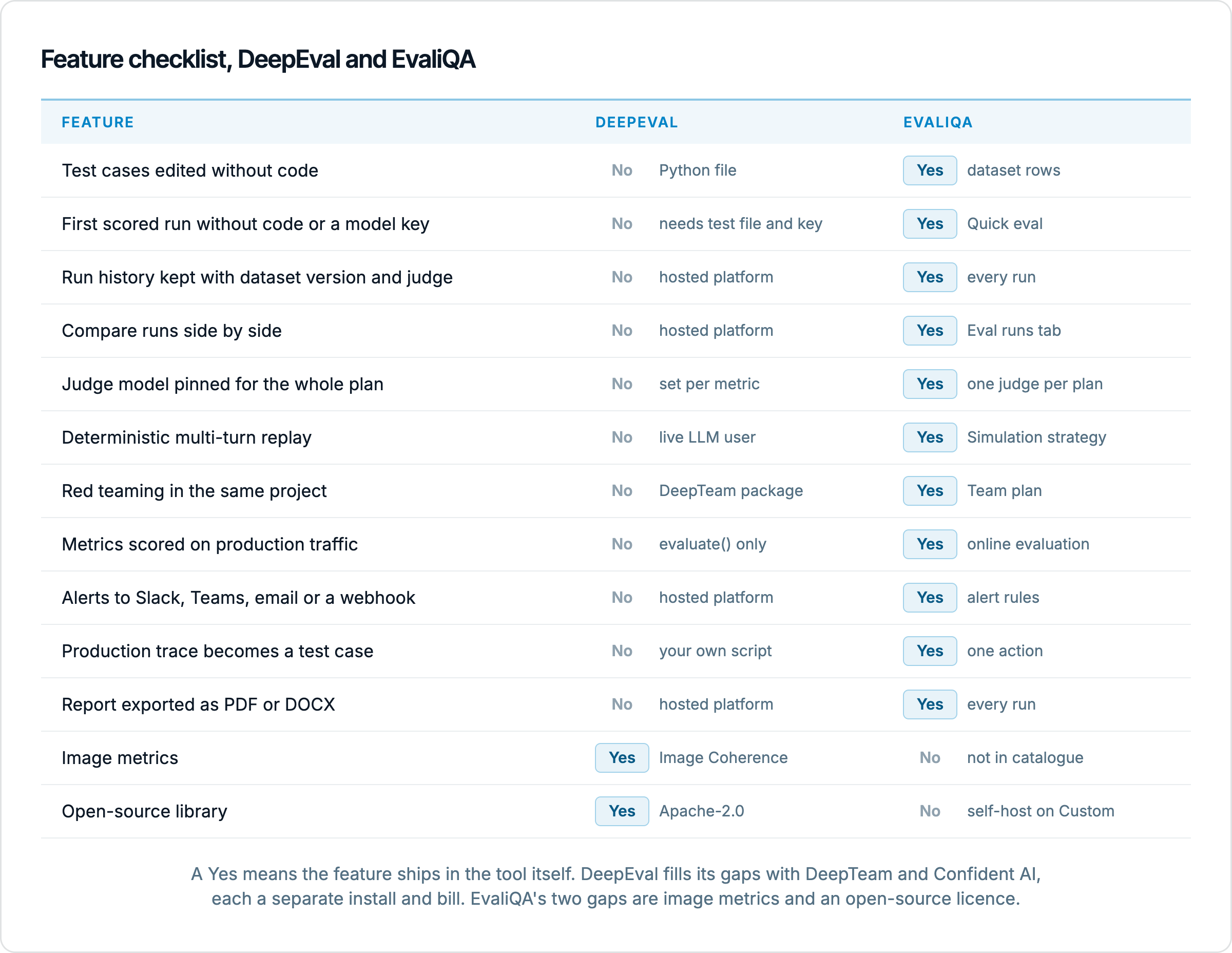
Dimension | DeepEval | EvaliQA |
|---|---|---|
Form | Python library (Apache-2.0), TypeScript port; hosted layer is a separate product | Hosted platform with browser UI, API trigger and Python SDK; self-hosting on the Custom plan |
Where a test case lives | LLMTestCase or Golden in a Python file, edited by developers | Row in a versioned dataset, edited by anyone with a seat |
How you run it |
| Run eval in the UI, CI trigger endpoint, or scheduled run |
Judge model | OpenAI by default, set per metric | Platform model on credits or your own credential, pinned per plan |
Custom metrics | G-Eval, DAG, JevEval, your own code | G-Eval and Custom Eval, built in a form, saved as workspace presets |
Multi-turn | ConversationSimulator, live LLM user, non-deterministic | Simulation, Scripted and Adaptive strategies, 15 personas |
Red teaming | Separate DeepTeam package | Two built-in plan modes, no metrics to configure, Team plan and up |
Production | @observe tracing; metrics do not run outside evaluate(); monitoring is a separate product | SDK or OpenTelemetry traces, online evaluation, alerts, trace promotion, same plan |
Run history | Whatever you store from the CI log | Every run kept with dataset version, judge and cost; Compare on the Eval runs tab |
Reports | Via the hosted platform | AI-generated report per run, editable, exported as Markdown, HTML, PDF or DOCX |
Voice | Voice metrics listed in the docs | Voice as a channel, outbound calls with transcript and scoring, Team plan |
Image metrics | Yes (Image Coherence, Image Helpfulness and others) | Not in the catalogue |
The table reads the same way the sections above do: on the metric layer the two are close, and everything that separates them is about who edits the test bank, what survives between runs, and whether production is inside the loop. The one row that goes the other way is image metrics, which we cover below so nobody is surprised by it.
What each one costs
The library itself is free, and that is a genuine advantage for a solo engineer. The judge is not free on either side; every LLM metric is a model call, and 3 LLM metrics on a 300-row dataset is 900 judge calls whichever tool made them. Where money enters the DeepEval story is the hosted half. Confident AI's Free tier allows 5 test runs per week, 2 seats and 1 project; Starter is $200 a month with 5 projects; Team is $2,000 a month. Five test runs a week is enough to try the dashboards and not enough to run a pull-request gate, so a team that wants shared results, run history and monitoring in real use is on the $200 tier at least, on top of the separate DeepTeam setup for red teaming.
EvaliQA's Free plan is permanent rather than a trial and is metered by volume instead of run count: 2 projects, 2 seats, 1,000 evaluated cases and 5,000 runtime traces a month, which is enough for a daily 30-row gate and a sample of production. Team is $99 a month (or $948 a year) for 10 projects, 5 seats, 10,000 cases and 25,000 traces a month, and adds the two features Free does not have, voice evaluation and red teaming. Custom is unmetered and adds self-hosted deployment, SSO, extended RBAC and a signed DPA. Model calls are never billed by EvaliQA: with your own key they land on your provider invoice, and if you prefer not to hold a key, platform credits pay for judge scoring, dataset generation and the adaptive simulator, with 5,000 welcome credits on your first workspace and packs bought separately.
The comparison that matters is the total. A team of four that wants evaluation, red teaming and production monitoring with shared results pays $99 a month on EvaliQA Team, with all three in one project. The equivalent on the DeepEval side is a free library, a second free package to install and maintain, and a hosted tier from $200 a month for the shared half, plus the engineering time to wire the three together and to keep run history and trace promotion working. That engineering time is the cost that never shows on an invoice and is the one most teams pay without noticing.
When DeepEval is enough
There are cases where the library is the right size and we would say so. If one engineer owns the AI system, the test cases are small enough to write by hand, and the strongest requirement is that the evaluation lives in the same repository as the prompt and fails locally before a push, a library is the least ceremony you can have. If you evaluate image outputs, DeepEval's image metrics are a real gap on EvaliQA's side: nothing in our five categories scores a text-to-image pipeline. And if open source is a hard requirement, EvaliQA's self-hosted option is a Custom-plan deployment rather than a public repository.
Even then, the two are not exclusive. Keep a handful of DeepEval assertions in the repository as unit tests for the prompt, the kind of check a developer wants to fail locally before pushing, and put the release gate, the nightly run, the red-team cadence and production monitoring in EvaliQA, where the golden set is curated by the person who owns it and the report goes to the person who decides. The metric definitions translate almost one to one, so nothing is lost in the split. What you avoid is asking a unit-test library to be a team's system of record, which is the job it was never built for and the reason teams outgrow it.
If you are moving from DeepEval or deciding between the two, run the same 30 rows through both before you commit. Take your best 30 golden cases, the ones where you know what a right answer looks like, and score them with Answer Relevancy plus one product-specific rubric in each tool, with the same judge model. Compare the per-row verdicts rather than the aggregate, read the judge's reasoning on the rows where the two disagree, and time how long it takes each person on your team, not just the developer, to add a row and to read a failure. That last measurement is the one that decides it, and it is the one a feature table cannot show.
To run the EvaliQA side of that, Quick eval gets you from an endpoint to a scored run in about two minutes on the welcome credits, and the evaluation pipeline guide lays out the ladder from manual runs to a CI gate of 20 to 50 rows, nightly runs and production traces, one rung at a time. Start with a single-turn plan on your existing golden rows, wire it into a pull request, then add a Simulation multi-turn plan and a 90-row red-team plan on a schedule. Whatever you pick, the practice that matters most is the one neither tool can do for you: someone reads the failing rows every week.