
Most of what makes an answer good for your product is not in any metric catalog. "The reply sounds like us", "the explanation is pitched at a first-time user", "the agent apologised once and then got on with it": every team has a list like this, and it usually lives in the head of whoever reviews outputs by hand. When that person reads 40 answers before a release, the list is applied consistently. When the dataset grows to 500 rows, or when the review has to run on every pull request, the list stops being applied at all, and the quality it described drifts without anyone noticing.
G-Eval is the method that moves that list out of the reviewer's head and into a metric. You write the criteria as a paragraph of plain language, an LLM judge reads them alongside the input and the answer, and you get a score per row that you can threshold, trend and gate on. This post explains what G-Eval actually does, how the score is produced, how to write criteria the judge can apply the same way every time, and what the method does not catch. We use the G-Eval metric in EvaliQA for the concrete settings, but the reasoning applies to any implementation.
What G-Eval is
G-Eval was introduced in a 2023 paper by Yang Liu and colleagues at Microsoft, G-Eval: NLG Evaluation using GPT-4 with Better Human Alignment. The problem it set out to solve was the poor agreement between automatic metrics and human raters on open-ended text such as summaries and dialogue turns. Reference-based metrics like ROUGE need a gold answer and reward word overlap, which punishes a good paraphrase and rewards a bad copy. The authors proposed using a large language model as the rater instead, and gave the method a specific shape: a task description, a set of chain-of-thought evaluation steps, and a scoring function based on the probabilities the model assigns to each possible score.
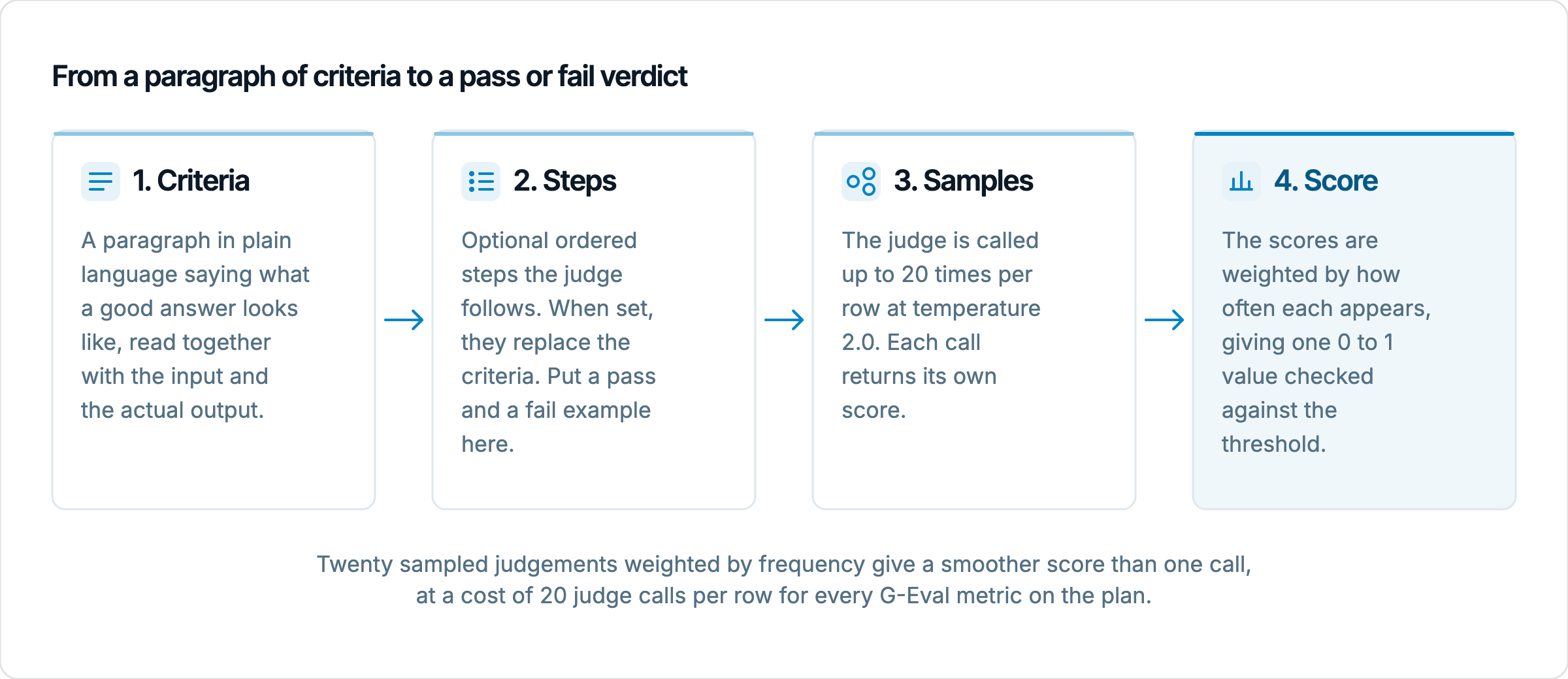
The criteria are the part you write. In the paper they are short: a sentence or two naming the dimension (coherence, consistency, fluency, relevance) and what it means for the task. From that description the model is asked to generate evaluation steps, an ordered procedure for arriving at a judgement, and those steps are then included in the scoring prompt. The judge fills in a form: it reads the source, reads the candidate, follows the steps and emits a score on a 1 to 5 scale. The paper reports that with GPT-4 as the judge this reached a Spearman correlation of 0.514 with human ratings on the SummEval benchmark, which was a large step over the metrics it was compared against, as described in the paper's abstract.
The idea that matters for practitioners is the separation between the rubric and the procedure. A rubric says what good looks like; a procedure says how to check. A human reviewer does both without noticing, which is why their judgements are consistent and why they are hard to hand over. G-Eval makes the procedure explicit and hands it to the judge, so a second person reading the metric configuration can see not only the standard but the way it is applied. In EvaliQA the two parts map directly onto the metric's fields: Evaluation criteria holds the paragraph and Evaluation steps holds the optional ordered list, as documented on the Custom metrics page.
How the score is produced
If you ask a judge model for a single number once, you get a coarse answer. The paper's authors observed that scores clustered on one integer for most inputs, which produced a great many ties and made the metric useless for ranking two answers that were both roughly fine. Their fix was to score with the model's token probabilities rather than its single output: if the model gives a 4 with probability 0.6 and a 5 with probability 0.4, the score is 4.4, not 4. At the time GPT-4 did not expose those probabilities through its API, so they approximated the distribution by sampling the judge 20 times at a raised temperature and counting how often each score came out, as the paper describes.
That sampling approach is what EvaliQA implements. The G-Eval metric has a Sample count parameter, which defaults to 20 and is capped at 20, and a Sampling temperature, which defaults to 2.0 and is deliberately high so that the 20 samples do not all say the same thing. Each sample is one judge call that returns a score; the scores are then combined by weighting each value by how often it appeared, and the result is normalised into the 0 to 1 range that every EvaliQA metric uses. The Metrics page calls this confidence-weighted scoring, and it is why G-Eval rows get a smooth value such as 0.76 rather than a flat pass or fail.
A small worked illustration of the rule, with made-up sample counts to show the arithmetic rather than any measured result: suppose 12 of the 20 samples score an answer 4, 6 score it 5 and 2 score it 3. The weighted score is (12 × 4 + 6 × 5 + 2 × 3) / 20, which is 4.2 on the 1 to 5 scale, and sits a little above the plain majority answer of 4. A second answer where 12 samples say 4, 2 say 5 and 6 say 3 would come out at 3.8. A single-call judge would have given both answers a 4 and told you nothing about the difference; the sampled judge tells you the first answer is the one the model is more sure about. That difference is what you are paying 20 calls per row for.
The score then meets the threshold, the pass bar you set per metric, which defaults to 0.5 for G-Eval in EvaliQA. A row passes the metric when its score is at or above the threshold; the row's overall verdict is the AND of every metric on the plan, so one failing G-Eval metric fails the row. The threshold is a legitimate tuning knob. If your first run shows every row passing, the bar is not where your reviewer's bar was, and raising it to 0.7 or 0.8 is the right response, not a sign that the metric is wrong.
Writing criteria the judge can score
The quality of a G-Eval metric is almost entirely the quality of its criteria. The judge will apply whatever you give it with great consistency, which means a vague paragraph is applied vaguely and consistently, and every row passes. "The response should be helpful and professional" is the standard example of a rubric that fails this way: helpful is not a threshold, it is a mood, and the judge will find most readable answers helpful. Criteria that work name observable properties of the text. "The response answers the question in its first sentence, gives at most two supporting details, and ends with one concrete next step the user can take" gives the judge three things to look for and three ways to fail.
Because G-Eval takes a paragraph rather than a list, the paragraph has to do the work a list would do. Write it as a description of the answer you would accept, in the order a reader meets it: what it opens with, what it must contain, what it must not contain, how it should end. Keep the register consistent with the product. If your brand voice avoids exclamation marks and never uses "we're sorry", say that, because the judge cannot infer house style from the word "professional". A three-sentence paragraph with concrete conditions scores more consistently than one sentence of adjectives, and the Custom metrics docs make the same point: long criteria are fine, vague criteria are not.
The Evaluation steps field is where you give the judge its procedure. When set, the steps replace the criteria in the prompt, so they need to carry the standard as well as the method. A good set of steps for a support-reply metric looks like this:
Read the user's message and identify the single question or request in it.
Check whether the first sentence of the response addresses that request directly. If the response opens with a greeting or a restatement of the question, note it.
Count the supporting details after the first sentence. More than two is a mark against the response.
Check that the response ends with one action the user can take now, named specifically (a link, a step, a thing to reply with).
Check the tone against the examples. Pass example: "Your refund for order 12345 was issued today and will show on your card within 5 working days. Reply here if it has not appeared by Friday." Fail example: "We're so sorry for the inconvenience! Refunds can sometimes take a while to process depending on your bank."
Give a score from 1 to 5, where 5 means every check passed and 1 means the response does not address the request.
The pass and fail examples in step 5 are not decoration. The docs note that explicit examples cut the judge's variance more than raising the sample count does, and that matches what we see: a judge that has been shown the boundary applies it, a judge that has been told about it in the abstract draws the boundary somewhere different on each row. Put one clear pass and one clear fail in every G-Eval metric you care about. Keep them short, keep them in your domain, and make the fail example a plausible answer rather than an obviously broken one, because the obviously broken answers are not the ones the metric is for.
A worked example
Take a customer support assistant for an online shop, and a criterion the team cares about but no built-in metric covers: replies should be short, direct and specific, and should never promise what the assistant cannot verify. The G-Eval criteria paragraph reads: "A good response answers the customer's question in the first sentence using the information available in the conversation. It gives at most two supporting details, each of them specific to this customer's order rather than general policy. It does not promise an outcome or a timeline the assistant has not confirmed. It ends with one concrete next step. It does not apologise more than once and does not use exclamation marks." The evaluation steps are the six above, with the pass and fail examples adapted to refunds.
Now two answers to the same input, "Where is my refund for order 12345? It has been a week." Answer A: "Your refund for order 12345 was issued on 24 September and will appear on your card within 5 working days of that date, so by 1 October. If it is not there by then, reply with the last 4 digits of the card and we will chase it with the bank." Answer B: "I'm so sorry to hear that! Refunds normally take 5 to 10 working days to process, and sometimes banks can take a little longer. Don't worry, it will definitely arrive soon. Is there anything else I can help you with today?"
Read against the steps, Answer A opens with the request, gives two details that are specific to the order, promises nothing beyond what the refund record shows, and ends with a named action. Answer B opens with an apology and an exclamation mark, gives general policy rather than the state of this order, promises an outcome ("it will definitely arrive soon") the assistant has not checked, and ends with a question rather than a next step. Across 20 samples, you should expect the judge to put almost all of its weight on 5 for A and spread between 1 and 2 for B, which after normalisation lands A well above a 0.7 threshold and B well below it. If the judge does not separate these two, the criteria are not saying what you think they say, and the judge's reasoning in the run results will usually show you which sentence it misread.
The useful part of the example is the second answer. It is polite, fluent and on-topic; Answer Relevancy would pass it, Toxicity would pass it, and a reviewer skimming quickly might pass it too. It fails on exactly the properties the team wrote down, and it would keep failing them in a thousand variations. That is the case G-Eval exists for: a quality that is real, that you can describe, and that no generic metric will score for you.
G-Eval or Custom Eval
EvaliQA ships two custom metric bases, G-Eval and Custom Eval, and the choice between them is about the shape of your rubric, not about which judge is better. G-Eval takes a paragraph and returns one holistic score. Custom Eval takes a list of criteria, one per line, and by default scores each one separately on a five-level scale (none, minor, partial, mostly, fully) before combining them. If your rubric naturally splits into independent checks, you want to see which check failed on which row, and Custom Eval gives you that in the run results per criterion. If your rubric is a feel, a tone or a judgement that only makes sense as a whole, splitting it into lines loses something, and G-Eval is the right base. The Custom metrics page gives the full comparison; the table below is the short version.
Dimension | G-Eval | Custom Eval |
|---|---|---|
Rubric shape | One paragraph, optional ordered steps | A list of criteria, one per line |
Score | One holistic 0 to 1 score, weighted across samples | Per-criterion verdicts combined into one score, or a single 0 to 10 number with the direct strategy |
Judge calls per row | Sample count, default 20 | 1 by default; more only with the consensus toggle |
Placeholders such as {{order_id}} | Not supported; typed text reaches the judge literally | Supported, and every criterion must contain one |
Debugging a failure | Read the judge's summary for the row | See which named criterion failed and why |
Best for | Tone, style, overall quality, anything hard to itemise | Checklists, compliance rules, anything referencing a dataset column |
The placeholder row deserves a second look because it changes which base you can use at all. Custom Eval criteria can reference dataset columns and connector output fields with {{name}} syntax, so a criterion can say "the response quotes the customer's order number ({{order_id}})" and have the real value substituted on every row. G-Eval does none of this: its prompt is built from the input, the actual output, and the expected output and retrieval context where present, and a {{name}} typed into its criteria is sent to the judge as literal text. If your standard depends on a per-row fact that is not in the input or the expected output, G-Eval cannot see it and you need Custom Eval.
Both bases can be attached to the same plan more than once, which is how you build a small suite of product rubrics rather than one overloaded paragraph. A plan for the support assistant might carry a G-Eval metric for tone and directness, a second G-Eval metric for "never promises an unverified outcome", and a Custom Eval metric with three placeholder criteria about the order details. Each scores independently, each shows up as its own pass rate in the run, and a regression in one does not hide behind a pass in another.
What G-Eval does not catch
The first limit is factual correctness. A G-Eval judge reads the answer and the criteria; unless the expected output is on the row, it has nothing to compare the facts against, so a criterion like "the response is accurate" is scored on plausibility. A confident, well-structured, wrong answer will pass it. Correctness belongs to a reference-based metric such as Answer Precision, or to Faithfulness when there is retrieved context to check against, and G-Eval should sit next to them rather than replace them. The paper itself is explicit that the method is reference-free, which is a strength for open-ended text and a weakness for anything with a right answer.
The second limit is one the original authors flagged in their own analysis: an LLM judge tends to prefer text written by an LLM. In the paper's experiments, GPT-4 as a judge rated model-generated summaries above human-written ones in cases where human raters disagreed. For most product evaluation this does not bite, because you are comparing versions of the same system rather than a model against a person. It does bite when you use a G-Eval metric to decide whether a model answer is better than a human agent's answer, or when the judge model and the model under test are the same family and share the same stylistic habits. Pin a judge that is different from the system under test where you can, and do not read a G-Eval score as a verdict on human writing.
The third limit is cost and reproducibility. Twenty samples per row per metric is the point of the method and also its bill: on a 500-row plan with two G-Eval metrics that is 20,000 judge calls on top of the 500 calls to the system under test, which the Custom metrics page docs call out as the common source of cost creep. Reducing the sample count to 5 or 10 during iteration and restoring 20 for release runs is the usual compromise. Even at 20 samples the score is a sampled estimate, so two runs on the same rows will not agree to the third decimal, and a change of 0.02 in a pass rate is noise, not signal. Compare runs with the same judge model, the same sample count and the same criteria, and read the per-row reasoning before you believe a movement.
The last limit is the one that produces the quietest failures. G-Eval is only as good as the paragraph, and a paragraph that describes your current product's answers rather than the standard will happily pass everything the product already does. If every row passes on the first run, that is the diagnosis to check first. The metric is not confirming quality; it is confirming that the criteria do not discriminate. Rubrics also age: a paragraph written for the first version of an assistant describes behaviours that a later version may have outgrown or dropped, and the docs suggest revisiting custom metrics quarterly for that reason.
Setting up G-Eval in EvaliQA
There are two places to create a G-Eval metric. You can configure it inline on Step 4 of the test plan wizard, where it lives only on that plan, or you can save it as a workspace preset on the Custom metrics page so every plan can attach it from the Custom section. Presets are the better path once the criteria have stabilised, because the rubric then lives in one place with a description your teammates can read. The steps below take the preset route.
Open Custom metrics and click New custom metric. Give it a short Name such as "Support reply directness" and a Description that says what it judges; the description is what teammates see when they browse the library.
Set Base to G-Eval. The base's own description appears under the selector. Leave Threshold blank to use the base default, or type a value between 0 and 1 if you already know where your bar sits.
Fill in Evaluation criteria with the paragraph, or Evaluation steps with the ordered procedure, or both. At least one is required; the form refuses to save with both empty. Remember that steps override criteria when both are set.
Leave Sample count at 20 and Sampling temperature at 2.0 unless you are iterating on cost, in which case drop the sample count to 5 to 10 and restore it before a release run. The temperature goes straight to the provider and is bounded to 0 to 2.
Save, then open a single-turn evaluation plan, go to the Metrics step and tick the preset under the Custom section. Attach it a second time with different criteria if you need a second rubric on the same plan.
Run the plan on a small dataset first, 20 to 50 rows, and open the failing rows. Expand a row, find the metric under Metrics and click its name to open the judge's log, which shows the criteria used, the final score, the threshold and the judge's summary.
The log is where the iteration happens. If the summary on a failed row names the right problem, the metric is working and the row is a real failure. If the summary names something you did not mean to measure, the criteria said something you did not intend, and the fix is in the paragraph, not the threshold. If the summary is reasonable but the score is close to the bar, the threshold is the knob. Keep the judge model fixed through all of this: the judge is set once on Step 3 of the wizard for every LLM-based metric on the plan, and swapping it while you are also editing criteria leaves you unable to tell which change moved the numbers.
Pick one quality your reviewers check by hand today that no catalog metric covers, and write it down as a paragraph with one pass example and one fail example. Create it as a G-Eval preset, run it on 5 rows whose verdicts you already know, and read the judge's summary on each one before you look at the scores. Once it agrees with you on those 5, attach it to the plan that gates your releases next to the correctness metrics that already live there, with the sample count at 20 and the judge pinned. Then take the next item off the reviewer's list and do it again; the point is not one metric, it is turning a standard that lived in a person into one the run applies on every row.