
Most custom LLM judges fail quietly. You write an instruction for the judge, attach it to a test plan for your AI system, run 300 rows, and get a pass rate that is either suspiciously high or impossible to act on. The judge reasoning says the AI answer "could be more complete" without saying what was missing, or it fails a good answer because one sentence rubbed it the wrong way. The usual response is to rewrite the wording. In our experience the wording is rarely the first problem. The first problem is the shape of the instruction, because the shape decides what the judge is allowed to tell you about the AI system.
There are two shapes. A single rubric is one paragraph that describes what a good answer looks like, and the judge forms one holistic judgement against it. A criteria list is a set of discrete statements, one per line, and the judge grades each statement on its own before the scores are combined. In EvaliQA the first shape is the G-Eval base and the second is the Custom Eval base. Both turn plain-language instructions into a 0 to 1 score for the AI system's answer and both can be attached to any test plan, but they score differently, cost differently, and expose different information in the results. This post explains how each works, where each wins in AI evaluation, and the mistakes that make either one useless.
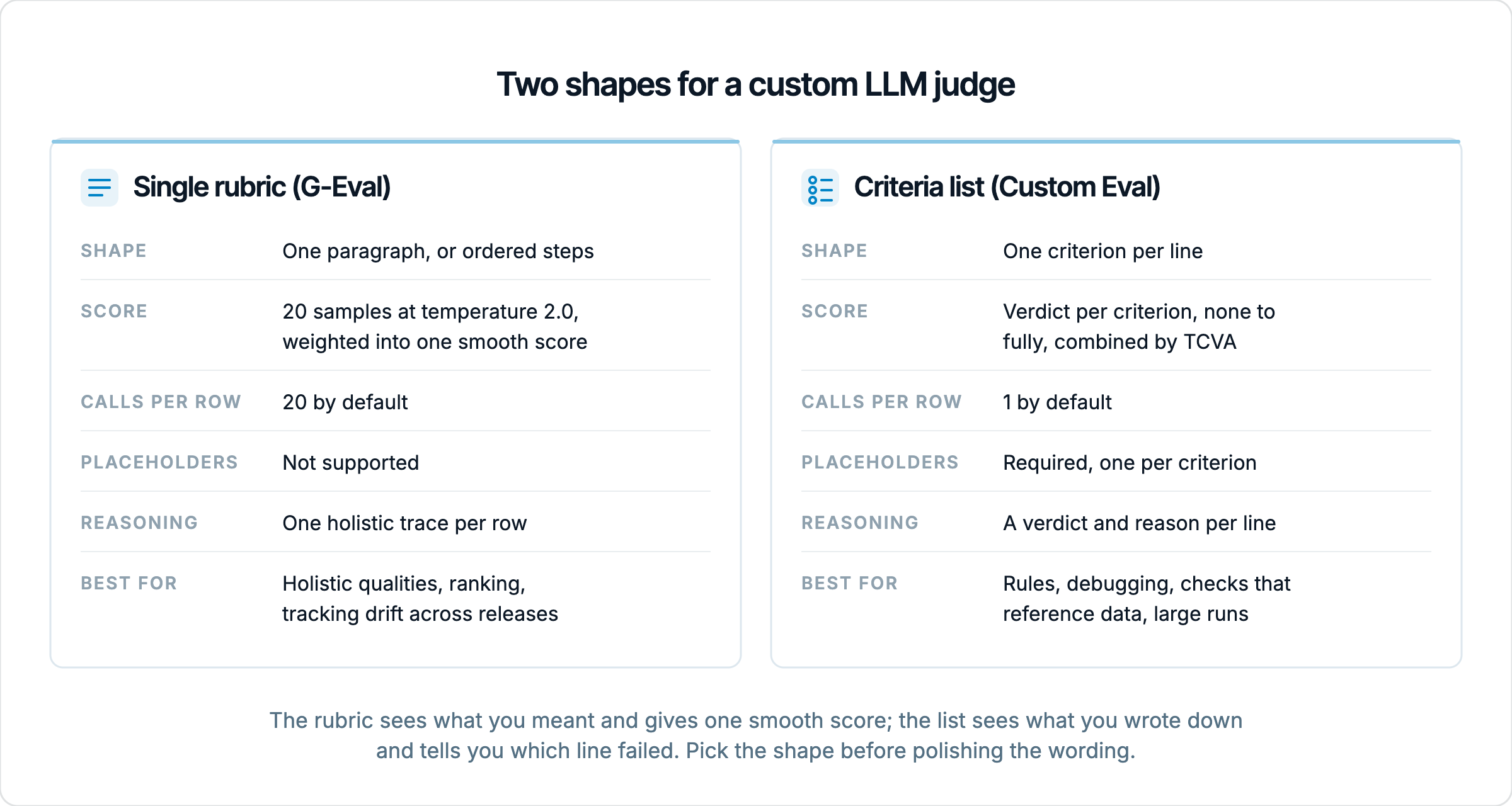
Two shapes for an AI evaluation instruction
An LLM judge is a model that reads the input, the AI system's answer, and any reference material, then produces a score and a short reasoning trace according to an instruction you wrote. Built-in metrics such as Faithfulness or Role Adherence carry their own instruction. A custom metric is the case where you write it yourself, because the question you want to ask ("does this AI assistant keep our brand tone", "did the AI agent collect all three fields before booking") fits no entry in the catalog. The instruction is the metric, so its shape matters more than any threshold you set afterwards.
The single rubric is the older and more intuitive form. You describe the quality you want in a paragraph, much as you would brief a human reviewer, and the judge decides how well the AI system's answer lives up to it. In EvaliQA this is G-Eval, whose primary field is Criteria, a free-text paragraph. An optional Evaluation steps list lets you give the judge ordered instructions to follow, and when it is set it replaces the paragraph. There is one judgement per row, and the score reflects the whole answer at once.
The criteria list breaks the same quality into separate claims. "The response is polite." "The response acknowledges the order number." "The response does not mention competitors." In EvaliQA this is Custom Eval, whose required field is Evaluation criteria, one criterion per line. The judge grades each line, and the per-line results are combined into the row score. The difference is not cosmetic. With a rubric you get one verdict about the AI system's answer; with a list you get one verdict per claim, and the run results show which claim failed on which row.
Both bases share the plumbing. Both need the input and actual_output columns, both default to a threshold of 0.5, and both can be attached in two ways. You can tick G-Eval or Custom Eval under the Custom category on the Metrics step of the test plan wizard and configure it inline, or you can save it once on the Custom metrics page and attach it as a preset to any plan in the workspace. The custom metrics documentation covers the fields in full. What follows is about the choice between the two shapes.
How a single rubric is scored
G-Eval does not ask the judge once. By default it draws 20 samples per row (the Sample count field) at a deliberately high Sampling temperature of 2.0, then weights the samples by their log-probabilities to produce one confidence-weighted score. The high temperature is on purpose. It widens the spread of answers so that the aggregation has variance to work with, and the result is a smooth score rather than a hard pass or fail. An AI answer the judge is sure about lands near 0 or 1; an answer it is torn about lands in the middle, and the middle is informative.
That smoothness is the main thing you buy with a rubric. If you are tracking brand tone across releases of an AI system, a score that moves from one release to the next tells you something a binary verdict cannot, because tone rarely breaks outright. It erodes. The same property helps when you want to rank answers rather than gate them, for example to pick the 20 worst rows for a human to read. A single number per row that reflects an overall impression is exactly what a holistic question calls for.
The price is paid in two currencies. The first is cost. Twenty samples per row is 20 judge calls per row per metric, so a 500-row plan with 2 G-Eval metrics adds 20,000 judge calls to a run. You can lower the sample count to 5 or 10 while iterating and restore it for release runs, but a rubric is never the cheap option. The second currency is information. The judge reasoning is one holistic trace, so when a row scores low you learn that the AI system's answer fell short of the paragraph, not which sentence of the paragraph it fell short of. If the rubric asks for five things, you will be rereading answers by hand to find out which one was missing.
One more limit is easy to miss. G-Eval's Criteria and Evaluation steps do not support placeholders. The prompt interpolates the input, the actual output, the expected output and the retrieval context directly, and a {{name}} typed into the paragraph reaches the judge as literal text. If your instruction needs to point at a dataset column or a field your AI system's connector returns, the rubric shape cannot do it, and that alone can settle the choice.
How a criteria list is scored
Custom Eval reads the Evaluation criteria line by line and offers two Scoring strategy options. The default, verdict, has the judge grade each criterion separately on a five-level scale of none, minor, partial, mostly and fully. Those per-criterion verdicts are then combined by TCVA, Threshold-Calibrated Verdict Aggregation, which is controlled by a Temperature field. At the default of 0.8 the combination is a lenient average, so one weak criterion does not sink an otherwise good answer. Lower values let the weakest criterion weigh more, and at 0.3 a single criterion judged "none" brings the row score to 0.
The form exposes that strict end as a switch called Every criterion must pass, described on the page as "Use for rules: one violated criterion fails the row." Turning it on saves the preset with a temperature of 0.3 and locks the field. This is the setting for criteria that are rules rather than qualities, such as "never promises a refund" or "always asks for the order number", where one violation is a failure regardless of how good the rest of the AI system's answer was. Leave it off for a quality rubric, where you want the average.
The second strategy, direct, has the judge return a single integer from 0 to 10 for all criteria together, normalised to 0 to 1. It is faster and coarser, and the judge does not have to reason about each line separately, so the per-criterion breakdown disappears. Direct is the right choice for smoke-test runs where you only want a number. It also unlocks the Enable consensus aggregation option, which calls the judge several times (n_runs from 1 to 10, with 3 or 5 as the usual settings) and combines the runs by majority, median or mean. Consensus is worth its multiplied cost on compliance and safety metrics, where you want agreement before trusting a verdict about an AI system.
By default Custom Eval is one judge call per row, which is the cheapest a judge metric can be. The catch is the placeholder rule. Every criterion must contain at least one {{placeholder}} that resolves on that row, otherwise the library drops it from the run and lists it under skipped_criteria in the metric's verbose log. A criterion written as plain prose with no placeholder is dropped. A criterion with a misspelled placeholder is dropped. When no criterion is left on a row, the metric shows n/a for that row, spends nothing, and does not count toward the row's verdict or the pass rate. The create form and the plan wizard warn about both cases with an amber box under the criteria field, so the fix is usually visible before you run.
The same metric written both ways
Take an AI customer support assistant that handles refund questions. The product team's definition of a good answer is that it acknowledges the customer's order number, states the current refund status, stays polite, and never mentions a competitor. Here is that definition as a single G-Eval rubric.
Score how well the response handles a refund enquiry. A strong response acknowledges the customer's specific order, states where the refund currently stands (processing, complete or refused) with a date where possible, keeps a polite and calm tone throughout, and never refers to other retailers or their policies. A weak response is vague about the refund, ignores the order, is curt, or compares the company to competitors.
Here is the same definition as a Custom Eval criteria list, one line each, with the placeholders that the rule above requires.
{{actual_output}} acknowledges the customer's order number {{order_id}}.
{{actual_output}} states the current refund status (processing, complete or refused). Fully means it also gives a date; mostly means status without a date; partial means it mentions the refund but not where it stands; none means refunds are not addressed.
{{actual_output}} is polite and calm in response to {{input}}.
{{actual_output}} does not mention any competitor or another retailer's policy.
Run both over the same dataset of AI system outputs and the difference shows up in the rows you have to read. A low G-Eval score on a row tells you the answer was weak overall, and the reasoning will usually name the biggest problem, but you cannot filter the run for "rows that forgot the order number". The Custom Eval verdict strategy gives you that directly. Each row shows a verdict per criterion, so you can see that the status line is mostly "fully" while the order-number line is frequently "none", which points at a prompt that never passes the order id to the model rather than at the model's writing. That is a bottleneck you can fix in an afternoon, and the rubric would have hidden it inside one averaged score.
The rubric wins a different row. Suppose an AI answer ticks every box and still reads like a form letter, stiff and over-apologetic in a way the criteria never anticipated. The list grades it fully on all four lines, because it does everything that was asked. The holistic judge, briefed on "polite and calm tone throughout", is more likely to mark it down, because it is reading the answer as a whole and the whole is off. This is the trade in one sentence. The list sees what you wrote down; the rubric sees what you meant, as long as the judge agrees with you about what you meant.
When the single rubric wins
Pick the rubric when the quality is holistic and resists decomposition. Tone, empathy, "does this AI assistant sound like us", whether an explanation is pitched at the right level for a beginner, whether a summary reads as fair to both sides of an argument. These judgements are made about the answer as a whole, and every attempt to break them into lines produces a checklist that a stilted answer can pass. A judge reading a paragraph about warmth will notice a cold answer; a judge grading "uses a friendly greeting" and "thanks the user" will pass a cold answer with a greeting and a thank-you bolted on.
Pick it when you want a smooth score more than a verdict. G-Eval's confidence-weighted number is what you want for ranking, for watching drift across releases of an AI system, and for spotting the rows a human should read. A quality that degrades gradually, like tone or readability, deserves a metric that degrades gradually with it. Pair that with a threshold tuned on your own data and you also get a pass or fail, but the underlying number carries more than the verdict does.
Pick it when the instruction benefits from a chain of thought rather than a list of checks. Evaluation steps let you tell the judge how to read the answer in order, for example to first identify what the user actually asked, then check whether the answer addresses that and not a neighbouring question, then weigh completeness. That ordering is a different thing from a criteria list. The steps shape the judge's reasoning; the criteria shape its output. For questions where the reading order matters, such as judging whether an AI agent's final message is consistent with everything it said earlier in the conversation, the steps are the better tool.
Be honest about what the rubric does not catch. It will not tell you which requirement failed, so it is a poor instrument for debugging and a poor instrument for rules. It cannot reference a dataset column or a connector output, so "matches the reference answer" has to rely on the expected output being interpolated into the prompt rather than named in the text. And it is expensive by default, which means teams quietly cut the sample count to save money and then wonder why the scores got noisier. If any of those three is your main concern, the rubric is the wrong shape.
When the criteria list wins
Pick the list when the definition of good is a set of requirements. Mandatory disclosures, required fields collected before an AI agent acts, forbidden topics, format conventions that are not quite rigid enough for a Regex Match. Each of these is a claim that is either met or not, and grading them separately is both more accurate and more useful. The Every criterion must pass switch turns the list into a rule set where one violation fails the row, which is the behaviour a compliance owner actually wants and the behaviour an averaged rubric score can never guarantee.
Pick it when you expect to debug. The verdict strategy names each criterion in the judge reasoning and shows per-criterion verdicts in the row detail view, which turns "this metric is failing 30 percent of rows" into "this one line is failing 30 percent of rows and the other three are fine". That is the difference between a number and a diagnosis. On a run with a few hundred rows it is the difference between reading reasoning for an hour and filtering for the failing criterion in a minute.
Pick it when the criterion needs to point at data. Custom Eval is the only place in the platform where {{placeholder}} substitution happens. A criterion can reference the built-in {{input}} and {{actual_output}}, the {{expected_output}} and {{retrieval_context}} on rows that carry them, any dataset column you tick under Extra fields when starting the run, and every custom output field defined on the connector's Response tab. That last one is how you judge something your AI system's API returns beyond the answer itself, such as a confidence value or a routing decision. "The response matches the reference answer {{expected_output}}" is a concrete comparison the judge can make. "The response is factually correct" is a plausibility guess, and the judge will score plausibility.
Pick it when cost or scale is the constraint. One judge call per row by default means a Custom Eval metric costs the same as any built-in judge metric, and the direct strategy with consensus lets you choose exactly how much more to spend on the metrics that deserve it. The list does not catch holistic quality, and it will pass an AI answer that meets every line while missing the point. When that is the risk, add a G-Eval metric for the overall impression alongside the list. Both bases can be attached to the same plan, and several instances of each can sit on one plan with different configurations, so a small suite of a rules list plus a tone rubric is a normal setup for an AI system rather than a workaround.
Side by side
The table below collects the differences that decide the choice. Everything in it is a default you can change, except the placeholder support and the shape of the reasoning, which are properties of the base itself.
Dimension | Single rubric (G-Eval) | Criteria list (Custom Eval) |
|---|---|---|
Instruction shape | One paragraph, or ordered Evaluation steps that replace it | One criterion per line |
How the score is formed | 20 samples at temperature 2.0, log-probability weighted into one smooth score | Verdict per criterion (none to fully) combined by TCVA, or one direct 0 to 10 score |
Judge calls per row by default | 20 | 1 |
Placeholders | Not supported, text reaches the judge literally | Required, at least one resolving placeholder per criterion |
Reasoning you get back | One holistic trace | A verdict and reason per criterion (verdict strategy) |
Strictness control | Threshold only | Temperature 0.8 lenient to 0.3 strict, or Every criterion must pass |
Stability option | Raise or lower the sample count | Consensus with 3 or 5 runs (direct strategy) |
Best for | Holistic qualities, ranking, drift tracking | Rules, debugging, data-referencing checks, scale |
Two rows deserve a second look. The judge-calls row is why teams drift toward Custom Eval for every AI metric they write, and the reasoning row is why they are often right to. But the placeholder row cuts both ways. It is the feature that makes the list the only option for data-referencing checks, and it is the rule that silently drops a criterion you forgot to anchor, which brings us to the mistakes.
Mistakes that break either shape
The most common failure in a criteria list is the stacked AND. "The response is polite AND acknowledges the order AND gives the refund status AND does not mention competitors" is one line, so it gets one verdict, and that verdict averages four unrelated things into a mush you cannot act on. Split it into four lines. The second most common failure is the missing placeholder. A line written as plain prose is skipped, a line with a misspelled name such as {{folow_up}} is skipped, and a metric made entirely of such lines is n/a on every row. The run page warns about the all-rows case and the create form warns before you save, but a single dropped line in a list of six is only visible in the verbose log, so check skipped_criteria after the first run of any new metric.
The most common failure in a rubric is vagueness. "The response should be helpful" is a mood, not a threshold, and the judge will pass almost any readable AI output. Write the pass condition instead, with the concrete things a good answer does, and add one pass example and one fail example to the paragraph or the Evaluation steps. Explicit examples cut judge variance more than raising the sample count does, and they cost nothing per row. The second rubric failure is treating the sample count as a free dial. Cutting it from 20 to 3 to save money removes most of the smoothing that justified choosing G-Eval in the first place.
Some mistakes affect both. Unanchored levels are one. For the verdict strategy, if you do not say what "fully" and "partial" mean for a criterion, the judge improvises a scale per row, and the same AI answer gets different grades on different days. The order-status line in the worked example shows the fix. Another shared mistake is asking the judge to verify facts it has no way to check. Either point it at the reference with a placeholder or pair it with a reference-based metric such as Answer Precision or Semantic Similarity. A third is changing two things at once. If you tune the criteria and switch the plan's judge model in the same iteration, you cannot tell which change moved the numbers; on platform credits the judge model is fixed for you, so only the rubric moves, but on your own key you have to hold it still yourself.
The last mistake is organisational rather than textual. Attaching a preset copies its settings into the plan, so editing the preset on the Custom metrics page does not change plans that already use it. Teams fix a rubric, see no change in the next run, and conclude the fix did not work. It did; the plan is still running the old copy. Open the plan's Metrics step, remove the preset and add it again, and tell the owners of other plans that depend on it.
How to decide for a new metric
The choice is usually clear once you have written down the question the metric answers about the AI system, but the order of operations matters, because the shape should be chosen before the wording is polished. We use the following sequence for every new custom metric.
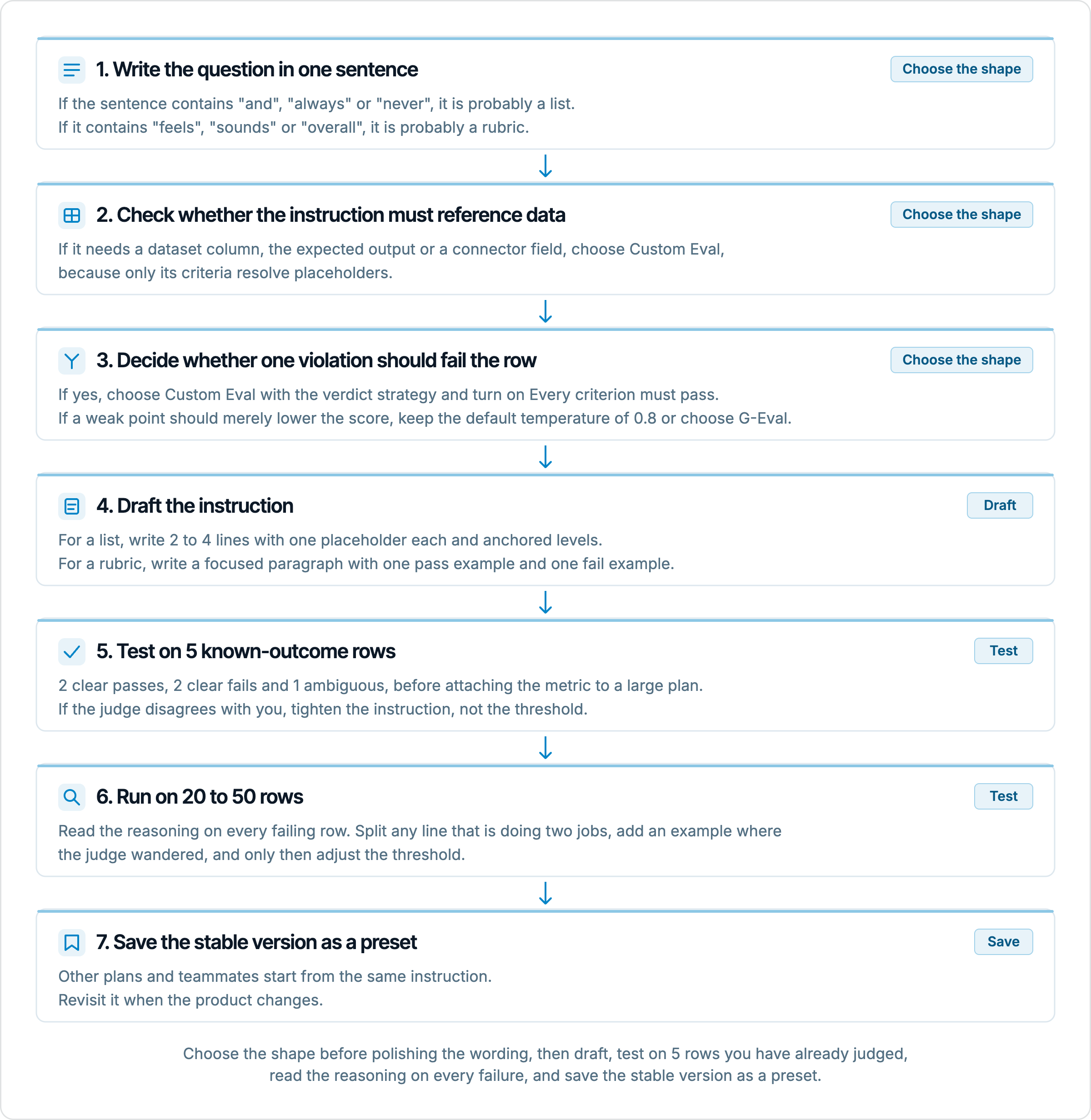
The five-row test is the step people skip and the one that saves the most money. A Custom Eval preset tested by hand on 5 rows takes minutes and catches the loose rubric that would otherwise pass 500 rows of AI output with nothing to show for it. It also catches the dropped criterion, because a line that is never judged never appears in the reasoning, and on 5 rows you will notice.
Summary
The shape of a judge instruction decides what the score can tell you about an AI system, and that is why it should be chosen before the wording. A single rubric produces one smooth, confidence-weighted score from 20 samples per row and sees the answer as a whole, which makes it the right instrument for holistic qualities, ranking and drift, and the wrong one for rules, debugging and anything that must reference data. A criteria list produces a verdict per line from one judge call per row, names the failing criterion in its reasoning, can be made strict with the Every criterion must pass switch, and is the only shape that resolves placeholders, which makes it the default for requirements and the wrong one for qualities that fall apart when decomposed.
In practice the question in AI evaluation is rarely either-or. A rules list for the mandatory behaviours and a rubric for the overall impression, on the same plan, covers both what you wrote down and what you meant. Whichever shape you pick, write the pass condition concretely, anchor the levels, test on 5 rows of AI output you have already judged yourself, and read the reasoning on the failures before trusting the number. The metric is the instruction, and an instruction the judge can apply consistently is worth more than any threshold.