
Most AI teams have a version of the same story. A user reports that the AI agent gave a wrong answer, someone finds the trace, reads the transcript, adjusts the prompt, confirms the fix in a chat window and closes the ticket. Three weeks later a model update or an unrelated prompt edit brings the same failure back, and nobody notices until the next complaint. The fix was real. What was missing was a test that would have failed the moment the behaviour returned. The trace that started the whole episode contained almost everything that test needed, and it was left behind on a monitoring page.
This post is about closing that gap in EvaliQA. The problem is specific, so the method is specific. A production trace records what the AI system did say; a regression test has to record what it should have said, which metric decides the difference, and why the row exists. The distance between those two things is small but it is not zero, and skipping it produces a dataset that passes by construction. We will walk one failure from the Traces tab to a row in a golden set that a CI run checks on every pull request, and we will be clear about what that row will and will not catch.
A trace in EvaliQA is one invocation of your AI system as reported by the SDK or an OpenTelemetry exporter. On the trace page you see the input and output rendered as the user saw them, the span tree with each tool call and its timing, the model, token counts, cost, response time, and any metadata your integration attached, such as tenant, environment or prompt version. If online evaluation is switched on for the project, the page also shows a Trace metrics card with each bound metric's score, threshold and verdict, and an AI analysis card with findings that concern this trace. That is a lot of evidence about one moment in production, which is why it is the best raw material for a test you will ever get.
A regression test in EvaliQA is a dataset row that a test plan runs against your AI system and scores with one or more metrics. For a single-turn evaluation plan the minimum row is an input and, for correctness-style metrics, an expected_output. The row also wants metadata it can be sliced by later, at least a category, a difficulty and a source, plus a one-sentence note saying why it is there. The golden dataset guide puts it bluntly: a raw trace snapshot is a starting point, not a finished row, and the editing before promotion is the whole job.
Lay the two side by side and the gap is obvious. The trace supplies the input, verbatim and with the real user's phrasing, which is more valuable than anything you would write from memory. It supplies the output, but the output is the thing that was wrong, so it cannot be the expected answer. It supplies the model, cost and latency, which are useful context but not a verdict. It does not supply an expected outcome, a category, or a reason. Every one of those has to come from a person who read the transcript and decided what correct looks like. The rest of this post is that work, done once, properly.
Take a concrete case we will carry through the whole post. A support AI agent for an online shop receives the message "How much will I get back for order 48213? I'm returning the lamp." The order was paid in euros. The agent answers "You'll receive a refund of $64.00 within 5 to 7 business days." The amount is right, the delivery window is right, the currency symbol is wrong, and the customer now expects dollars. It is a one-character failure with a real cost, and it is exactly the kind of thing a judge reading for overall helpfulness will wave through.
Which traces are worth promoting
Not every trace deserves a row. The golden set is small on purpose, 10 to 50 rows for a new project and 50 to 150 for a mature one, and every row has to earn its place because a real failure or a canonical success is behind it. Promoting every slightly odd conversation turns the golden set into a living dataset with a flattering name, and the pass rate stops meaning anything release to release. So the first decision is a filter, and the filter is a question you ask of the transcript. Does this trace represent a class of interaction the product must handle, and would you be upset to see this exact failure again?
EvaliQA gives you four places where candidate traces surface. The Trace metrics card marks a trace whose bound metric fell below its threshold, with the judge's reasoning one click away, so a failed Answer Relevancy or PII Leakage verdict is a direct pointer. The session page's Analysis panel lists findings from the deterministic detectors and the AI Analyst, each with a severity and the traces it points at; a retry_loop or a cost_outlier finding often leads to a trace where the AI agent did something wasteful that a test should pin down. The Traces tab's red error badge finds anything whose spans failed in the last hour. And the toolbar's search matches free text across inputs and outputs, so you can paste a phrase from a support ticket and land on the conversation behind it. The sessions and traces guide covers each of these pages.
Alerts are the fifth source and often the most useful, because they arrive with context. When an alert rule fires on a metric drop, the message carries the session, and the trace behind that session is the one to promote. The production monitoring overview describes this as the one place the two roads meet, the live road and the testing road, and it is deliberate. Nothing in production ever moves a release-gate number on its own. A person reads the trace, decides it matters, and only then does it become a test.
In our currency example the trace surfaced through a support ticket, not a metric, which is common. A bound Answer Relevancy metric would have scored the refund answer well, because it is on topic and complete. That tells you something before you have even promoted the row. Whatever metric you attach to the new row has to be more specific than the one that missed the failure live, or the regression test will miss it in the same way. Keep that thought; it decides the metric section below.
How to promote a trace in EvaliQA
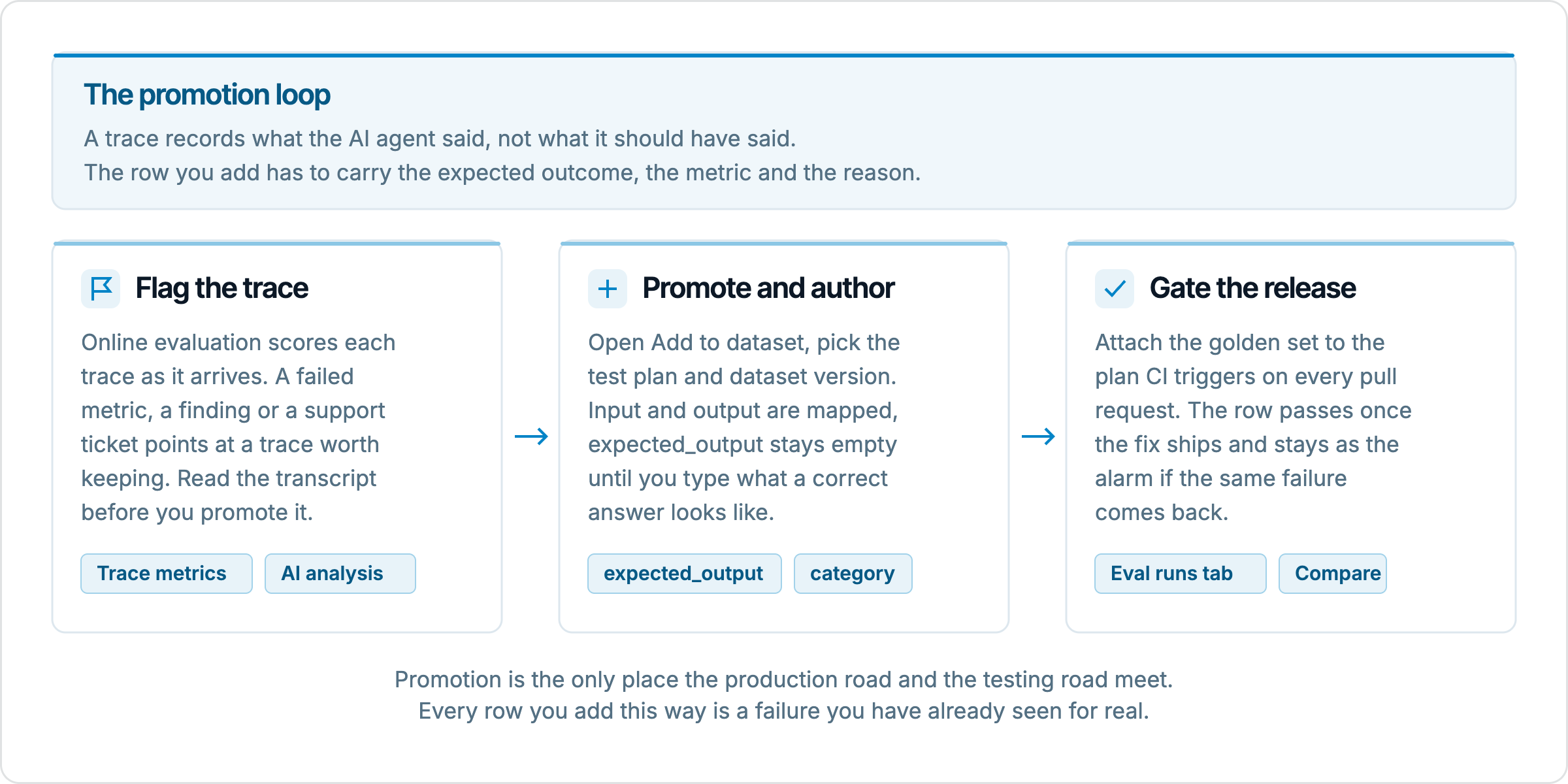
The mechanics take under 2 minutes once you know what you want the row to say. Open the trace on the Traces tab of Runtime eval and click Add to dataset in the header. A sheet titled Add trace to dataset opens on the right with three stages in one scroll. The steps are these.
Pick the Test plan. Datasets belong to a plan, so the plan decides the row's shape. For a one-shot failure like the refund answer, pick a single-turn evaluation plan; its rows are
input,expected_outputandtest_typeplus whatever columns you have added.Pick the Dataset version. The list shows each version with its status and row count. Versions that are still generating are hidden, because the generator would overwrite anything you wrote into them.
Check the Field mapping. Every column of the dataset gets a source. The obvious pairs are filled for you, so a column named
input,question,queryorpromptbinds to the trace's Input, andactual_output,output,responseoranswerbinds to its Output. Columns namedmodel,session_id,user_id,trace_id,cost_usdandlatencybind to the matching trace fields.Fill the columns the trace cannot fill. Each column's source can be any trace field, including every key of the trace's metadata, or Leave empty, or Custom value…, which opens a box where you type the value yourself. A preview line under each column shows what will actually be written.
Click Add row. The row lands in the dataset and the next run of that plan covers it.
Two details in that flow are worth understanding rather than just following. First, expected_output is never auto-bound. The sheet says so in its own help text, and the reason is the one we started with. A trace only holds what the AI agent did answer, and binding that to the expected answer would produce a row that every evaluation passes by construction. The column starts empty so you have to say what good looks like. Second, values are coerced to the column's declared type, so a trace field dropped into a number column becomes a number and a list such as Tools called dropped into a text column becomes a comma-joined string. Anything that cannot convert falls back to the type's empty value instead of failing the submit, which means a half-filled row you can fix in the editor beats a lost mapping.
For the refund trace, the mapping is input from Input, expected_output as a Custom value, and three columns we add for metadata, category, source and note, each as a Custom value. If the dataset does not yet have those columns, add them first in the dataset editor through the + Column button; the sheet can only write to declared columns and will tell you so if the dataset has none.
Writing the expected outcome
The expected output is the part of the row that only a person can write, and it is where most promoted rows go wrong. The temptation is to copy the agent's answer and fix the one bad word, which for the refund case would give "You'll receive a refund of €64.00 within 5 to 7 business days." That is a fine expected output for a metric that compares meaning, and a terrible one for a metric that compares strings, because the next correct answer might say "64 euros" or "EUR 64.00" and fail. So the expected output has to be written with the metric in mind, and the metric has to be chosen with the failure in mind. They are one decision, not two.
A useful discipline is to write the expected outcome at the level of the fact that was wrong, not the level of the whole sentence. The fact here is "the refund for order 48213 is 64.00 euros". Everything else in the agent's reply, the tone, the delivery window, the contraction, is incidental and will vary between correct answers. If the expected output states the fact plainly and the metric scores whether the answer agrees with it, a correct answer phrased many ways passes and an answer with the wrong currency fails. If instead you encode the whole sentence, you are testing phrasing, and phrasing is what changes most between model versions.
Some failures do not have a single gold answer, and then the expected outcome is a rubric rather than a string. An AI agent that should have refused to discuss a competitor's pricing, or should have escalated a legal threat to a human, is best described by criteria. In EvaliQA those go into a Custom Eval or G-Eval metric whose criteria read the row's columns, so the expected outcome can live partly in the row (the facts) and partly in the metric (the judgement). For the refund case a one-line rubric would be "The answer states the refund amount in the currency the order was paid in, which is given in expected_output." That rubric will keep working when the next row is a dollar order and a euro slip.
Write the note at the same time, while the transcript is in front of you. One sentence is enough and it should name the failure, not the feature. "Refund quoted in USD on a EUR order; support ticket, October 2026" tells the person reading the row next spring exactly why it exists and what a failure would mean. "Refund flow" tells them nothing. The golden dataset guide is firm that rows without a reason turn into noise once the person who added them leaves, and promoted traces are the rows most at risk, because the context lived in someone's head for the twenty minutes between reading the ticket and clicking Add row.
Which metric catches the failure
The metric is the half of the test that does the work, and the live miss tells you what not to pick. Answer Relevancy scored the wrong refund answer well because the answer was relevant. A regression row scored by Answer Relevancy would pass the same wrong answer again. So we need a metric that is sensitive to the one fact that was wrong, and there are several candidates in the EvaliQA catalog with different costs and blind spots. The comparison below is for the currency slip specifically; another failure would rank them differently.
Metric | Needs expected_output | Uses an LLM judge | Catches the currency slip | What it misses |
|---|---|---|---|---|
Exact Match | Yes | No | Yes, but fails every correct rephrasing too | Any free-text variation |
Semantic Similarity | Yes | No, local embedding | Unlikely; one changed symbol barely moves cosine similarity | Single-fact errors inside a mostly correct answer |
Contains, mode none | No | No | Yes, if "$" is a forbidden keyword for this row's plan | Anything not in the keyword list |
Answer Precision | Yes | No | Yes, when expected_output states the currency plainly | Judge variance on borderline rows |
Custom Eval with a rubric | Optional | Yes | Yes, with a criterion about currency matching the order | Whatever the rubric does not say |
The deterministic metrics are free, run in milliseconds and give the same verdict every time, which makes them the right floor. Contains in none mode with a dollar sign as the keyword is a one-line guard that would have flagged the wrong answer the instant it appeared. Its weakness is that it only works because this plan's dataset is euro orders; put a dollar order in the same dataset and the rule is wrong. That is the general shape of a rule check. It catches precisely what it names and nothing else, and it has to be true of every row in the dataset it is attached to, because metrics attach to the plan, not to the row. Semantic Similarity is the one to be wary of here. The docs give an example where a sentence and its negation score 0.93 against each other with the default embedding model, and a currency symbol is a smaller change than a negation.
Answer Precision scores the actual output against the row's expected_output and is the closest thing to a general correctness metric in the catalog; with an expected output that says "64.00 euros" it will mark "$64.00" as wrong and explain why in the reasoning. A Custom Eval rubric does the same with a criterion you control, and it carries across rows where the currency differs. Both cost one judge call per row per run and both carry judge variance, so on a golden set the sensible pairing is one cheap deterministic floor plus one judge metric that reads for the fact. The first makes the structural regression free to catch; the second makes the semantic regression visible with a reason attached.
There is a version of this decision for the live side too. If a metric you now trust to catch the failure is not bound in online evaluation, the next occurrence will again come in through a ticket rather than through Trace metrics. The online evaluation guide is explicit that an alert rule can only watch a metric the project actually scores, so bind the metric there as well, with a Rule scope that limits it to the refund path if cost matters. The regression row and the live binding are the same lesson applied on both roads.
Metadata, versions and the golden set
A promoted row is only useful if you can find it again and if its pass rate stays comparable over time. Both depend on choices made at promotion, not later. The metadata question is simple: tag the row with category, difficulty and source, and set source to production or incident depending on how it reached you. The golden dataset guide treats the subset of source = incident rows as the regression checklist, the one whose pass rate should stay at 100 percent for the life of the product, and that only works if the tag is on the row. The trace's own metadata keys appear in the mapping sheet as sources, labelled "Metadata · key", so if your integration already attaches a tenant or a prompt version, bind those too; they are the dimensions you will want to slice a failure by in the results view.
The version question is less obvious. Datasets in EvaliQA are versioned, and an eval run points at the version it used, so old runs stay reproducible after you edit. But a pass rate is only comparable between two runs if the rows are the same, and adding a row changes the denominator. Adding one hard row to a 40-row golden set can drop the pass rate from 100 to 97.5 percent with no change in the product at all. The comparing runs guide calls this a coverage expansion, not a regression, and recommends you communicate it that way. The practical rule is to promote rows in batches, use Duplicate on the dataset page before a batch so the frozen version stays linked to the old runs, and read the next run's compare view knowing which rows are new.
New rows that fail immediately are the point, not a problem. If the fix for the currency slip has not shipped yet, the promoted row should fail on the next run; that is the row confirming it reproduces the bug. Once the fix merges, the row flips to pass and stays there. If it never failed, either the fix was already live when you promoted it, which is fine, or the metric is not sensitive to the failure, which is not, and you should check by reading the judge's reasoning on that row. A regression test you have never seen fail is a test you cannot trust, and a promoted trace gives you a rare chance to watch it fail against a known-bad behaviour before you depend on it.
Cadence keeps this from becoming a one-off. The evaluation pipeline docs put trace review at weekly, 10 to 30 traces per session, with the golden set growing by 3 to 15 rows a month. That rate is slow enough that each row still gets the expected output, the metric check and the note, and fast enough that the set tracks what production actually does rather than what the team imagined in week one. Assign a single golden-set editor; the failure mode the docs name is that everyone can add rows and no one prunes.
A row that nobody runs is a note, not a test. The golden set earns the name when a test plan runs against it on a trigger you do not have to remember, and in EvaliQA that trigger is one HTTP call from CI. The evaluation pipeline guide walks the setup: create an API token on the Integrations page, store it in your CI secrets, pick your tool under CI/CD tools, choose the plan, dataset and connector, and paste the generated step into your pipeline. The call returns as soon as the run is queued, so the CI job does not block on results; you read the run on the plan's Eval runs tab and compare it with the previous one before merging. The plan to trigger per pull request is the one that finishes in under a minute against 20 to 50 golden rows. A 300-row gate that takes 6 minutes gets bypassed on urgent pull requests, which is exactly when the regression ships.
Reading the result is where the promoted row pays off, and it is a row-level read, not an aggregate one. Tick the new run and the last one on the Eval runs tab and open Compare. The rows that passed before and fail now are the regression list; the rows that failed before and pass now are the wins. Open the refund row, read the actual output next to the expected output, and read the judge's reasoning under the metric. Three transcripts tell you more than the aggregate pass rate, and the aggregate on a small golden set moves by a couple of points between identical runs anyway because LLM judges sample at a non-zero temperature. The docs put the noise floor at roughly plus or minus 2 to 3 percentage points per metric on a 100-row plan; on a 40-row plan a single flipped row is 2.5 points, so gate on the rows, not the decimal.
Gating on rows means the rule for the pipeline is "no row with source = incident may fail", rather than "pass rate may not drop by more than 1 point". The first rule is unambiguous and is what the row was promoted for. The second swallows a real regression in judge noise half the time and blocks a harmless pull request the other half. If a pull request fails the incident subset, the compare view shows which row, the row's note says what it represents, and the judge's reasoning says what the AI agent did instead. That is a complete bug report produced by a test that took twenty minutes to write.
Nightly runs against the full golden set close the remaining gap. Per-pull-request runs catch what your change did; they cannot catch what the provider did, and a model update behind the same API name is one of the common ways a fixed failure returns. A scheduled run against the production connector, with the same plan and the same golden set, turns the promoted row into an alarm for drift you did not cause. The pipeline docs recommend running nightlies against production and pull-request runs against staging, so the two signals stay separate.
What a promoted trace does not catch
A regression row is a point, and a point does not cover a region. The refund row proves the AI agent quotes euros on order 48213 when asked that way. It says nothing about dollar orders, about the same question asked in German, about a refund request two turns into a conversation where the order number was given earlier, or about the agent quoting the right currency and the wrong amount. Each of those is a different row, and some of them are a different plan. The multi-turn version of this failure needs a multi-turn evaluation plan whose rows are scripted user turns and an expected outcome, and the trace you promoted was a single invocation. If the real bug was conversational, promoting one trace from the middle of the session tests the wrong thing.
The rephrasing problem has its own tool. A single promoted row tests one phrasing of the request, and the metamorphic testing approach generates variants of it that should produce the same answer, in a separate dataset, so the golden set does not fill with near-duplicates. The golden dataset guide is specific that rows duplicating existing ones with a slight tweak inflate pass rate artificially and belong in a metamorphic set instead. Promote the canonical phrasing, then let the generator produce the paraphrases.
There is also a class of production failures a trace cannot carry into a test at all. A failure caused by the retrieval index returning a stale document will not reproduce against a fixed dataset once the index is updated, and it should not; the test for it is a nightly run against the production connector, not a frozen row. A failure that depends on a specific user's history, a time of day, or a rate-limited upstream tool is likewise live-only. For those, the right move is a bound metric and an alert rule in online evaluation, so the signal arrives from production the next time, rather than a row that can only pass. Knowing which failures belong to which road is most of the skill here, and the honest answer is that some belong to both and some to neither.
Finally, the row is only as good as its expected output, and expected outputs go stale. If the refund policy changes to store credit, the row is now asserting the wrong thing and will fail on a correct answer. The quarterly review the golden dataset guide describes, reading every row untouched in 6 months and refreshing or deleting it, is what keeps promoted rows from turning into archaeology. The note you wrote at promotion is what makes that review possible without re-reading the original ticket.
Summary
A production trace is the best test case you will get and an unfinished one. It carries the real input and the real wrong answer; it does not carry the right answer, the metric that tells them apart, or the reason the row exists, and those three are the work. In EvaliQA the mechanics are a single sheet on the trace page, Add to dataset, with the plan, the dataset version and a field mapping that fills the obvious columns and deliberately leaves expected_output for you. Write the expected outcome at the level of the fact that was wrong, pick a metric that is sensitive to that fact rather than the one that missed it live, tag the row with its source and a one-line note, and promote in batches with a duplicated version so old runs stay comparable.
Then run it. A golden set that CI triggers on every pull request, read row by row in the compare view, turns the promoted trace into a permanent alarm for the one failure you have already paid for once. It will not catch the rephrasings, the multi-turn variant, or the failures that only exist live; those belong to metamorphic sets, multi-turn plans and online evaluation respectively. But the specific failure that reached a customer and cost you a ticket will not reach them twice without a red row telling you first, and that is a better outcome than most teams get from the fix alone.