
An LLM as a judge is a model asked to read another model's output and return a score. Most teams reach for one the moment a built-in metric stops fitting their product, write a rubric along the lines of "rate how helpful this response is", run it over a few hundred rows, see a pass rate they can live with, and ship. The trouble is that the judge was partly grading things the rubric never mentioned: how long the answer was, where it sat in the prompt, and how much it sounded like the judge itself. Those three habits have names, position bias, verbosity bias and self-preference bias, and they were documented in the MT-Bench work on LLM judges in 2023. Newer judge models have reduced them, but none has removed them, and a metric that ignores them produces a pass rate that moves for reasons unrelated to your AI system.
You do not fix a biased judge by asking it to be fair. Adding "ignore length" or "be impartial" to the prompt changes very little, because the bias is not a decision the judge makes, it is a tendency in how it reads. What works is removing the opportunity: writing criteria so specific that extra text cannot lift a score, scoring each response on its own so there is no first and second position, and choosing a judge that has no stake in the answer's style. This post goes through each bias, how to recognise it in a finished run, and then builds a Custom Eval metric in EvaliQA, step by step, that closes off all three, with a deterministic length check and the judge choice covering what a rubric alone cannot.
What a judge bias is
A judge bias is a systematic preference in the judge's scores that does not track the quality you asked it to measure. The word systematic matters. Every LLM judge is a little noisy: run the same plan twice with the same judge and the per-metric pass rate will wobble by a couple of percentage points, which our documentation on comparing runs treats as the normal noise floor. Noise averages out across rows and across runs. A bias does not, because it pushes in the same direction every time, so it survives averaging, survives consensus sampling and survives a larger dataset. That is what makes it dangerous: the usual tools for making a metric more stable make a biased metric more confidently wrong.
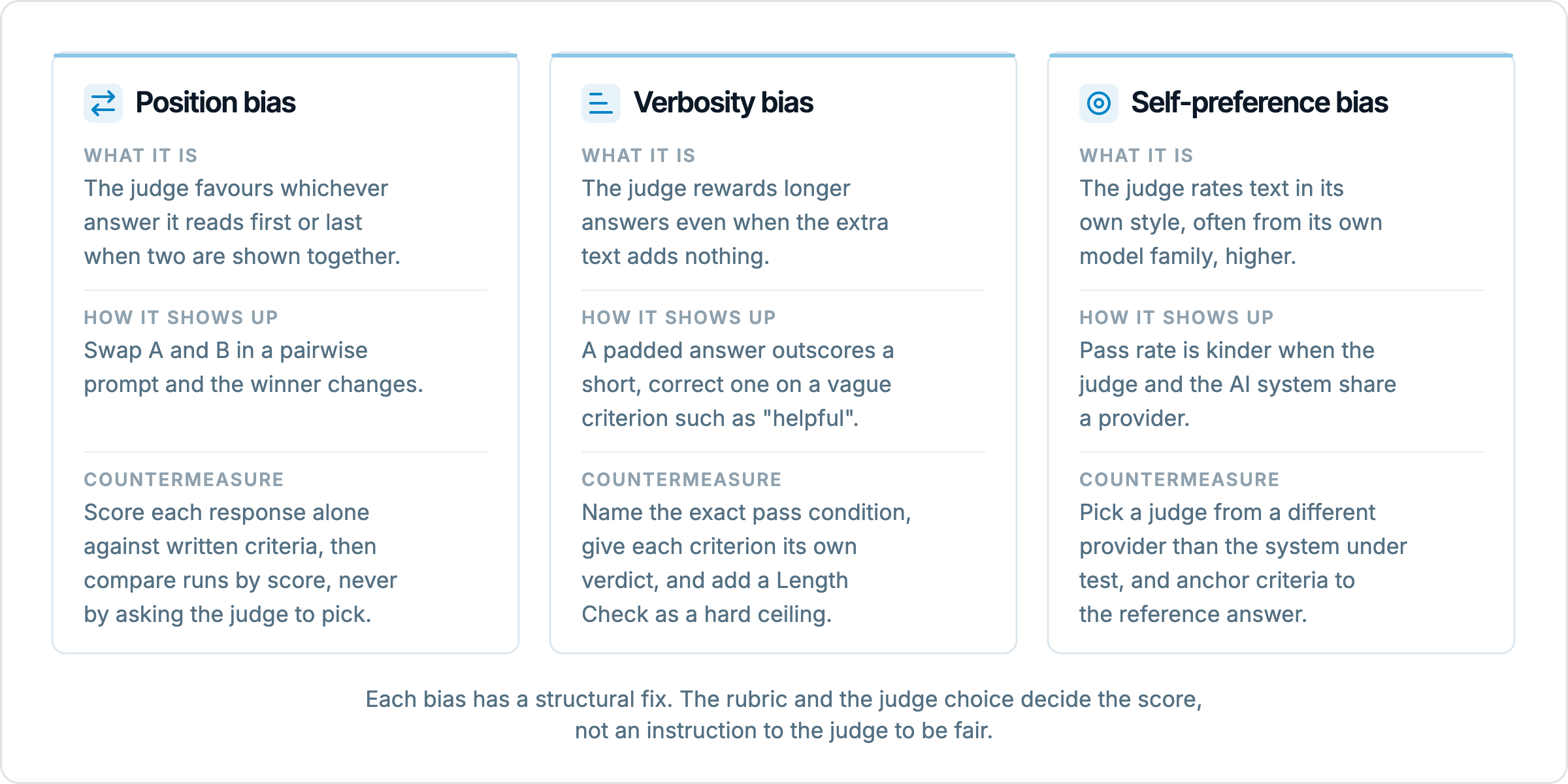
The three biases in this post are the ones with the most evidence behind them and the ones you can actually do something about in a rubric. Position bias is a preference for an answer because of where it appears in the prompt. Verbosity bias is a preference for longer answers independent of what the extra length contains. Self-preference bias is a preference for text that resembles the judge's own writing, which in practice means output from the same model family. They have different causes and different fixes, but they share a mechanism: each one gives the judge a shortcut that is cheaper than reading for the criterion. The fix in every case is to take the shortcut away.
The place to look for all three is the judge's reasoning, not the pass rate. In an EvaliQA run, expanding a row shows one Metrics card per metric with the score, the threshold and the judge's reasoning text, and clicking the metric name opens the verbose log with the full judge prompt and response. A biased judge usually says what it did. "The response is thorough and covers many aspects" on a row whose question had a one-line answer is verbosity bias written out in full sentences. Reading five to ten failing and passing rows per metric is the cheapest audit you can run, and it is the one most teams skip.
Position bias
Position bias appears when a judge is shown two responses in one prompt and asked which is better, the setup called pairwise comparison. Many judges favour whichever response they read first; some favour the last. The test is simple: swap the order of A and B and ask again. If the verdict flips for a meaningful share of pairs, the judge was not comparing the two responses, it was reacting to their order. The MT-Bench authors found this in judges of every size they tested, and it is strongest when the two responses are close in quality, which is exactly the case where you most wanted a careful read.
The common mitigation in pairwise harnesses is to ask twice with the order swapped and count only the pairs where the judge agrees with itself, treating the rest as ties. That halves the usable signal and doubles the cost, and it still tells you nothing about why one response won. There is a better option for most product evaluation: do not ask the judge to compare at all. Pointwise scoring, where the judge sees one response and scores it against written criteria, has no first or second position, so there is nothing for position bias to attach to. The comparison you care about, old prompt against new prompt, then happens between two runs on their scores, not inside one judge prompt.
This is how EvaliQA is built. Every metric scores one row at a time, and the Compare action on a test plan's Eval runs tab puts two runs side by side on per-metric pass rates and the rows that flipped between them. The judge never sees run A and run B together. Position bias does not disappear from the world because of this, it still matters if you run your own pairwise harness or write a criterion that asks the judge to decide whether the actual output or the reference answer is "better". The rule for the custom metric that follows is therefore to write every criterion as an absolute check against the response in front of the judge, never as a choice between two texts.
Verbosity bias
Verbosity bias is the preference for longer responses regardless of whether the extra text does anything. It is the most visible of the three because it compounds a model under test that is itself tuned on judge-like feedback has already learned that longer scores better, so the judge and the system agree with each other and the pass rate drifts upward while users get answers they have to scroll through. The classic symptom in a run is a short, correct answer failing a "helpfulness" criterion while a padded answer with the same fact buried in the third paragraph passes it. The judge's reasoning will say the longer one was "more complete" or "more detailed", and nothing in the rubric gave it a reason to care.
The root cause is a vague pass condition. "The response should be helpful" is not a threshold, it is a mood, and a judge with no concrete thing to check falls back on proxies, of which length is the easiest. Our custom metrics documentation contrasts "helpful" with "the response answers the user's question directly in the first sentence, then provides at most 2 supporting details, and ends with an actionable next step". The second version has three things to verify, and a longer answer cannot pass any of them by being longer. In fact it is more likely to fail the first one, because padding tends to push the answer out of the first sentence.
Two structural choices help beyond the wording. The first is to give each criterion its own verdict rather than one combined score, so extra material in the response cannot lift a criterion it has nothing to do with. The second is to stop relying on the judge for length at all and set a hard ceiling with a deterministic metric, which costs nothing and never drifts. Both are built into the metric in the next part of this post. What neither does is catch a response that is long because the question genuinely needed a long answer, and your criteria should not punish that either; the ceiling should sit above the longest legitimate answer in your dataset, not at the median.
Self-preference bias
Self-preference bias is the judge rating text higher when it resembles its own output, in phrasing, structure and the small habits of a model family. The clearest demonstration is to judge the same set of responses with two judges from different providers and look at which system each one prefers; each tends to favour its own relative. The MT-Bench paper called this self-enhancement bias and reported it for several judges, and later work has reproduced it. The reason is not vanity. A judge estimates quality partly by how probable the text looks to it, and text in its own style looks more probable, so it reads as more fluent, more confident and more correct than it is.
This bias is easy to create by accident. The convenient setup is to use one provider for everything: the AI system runs on a model from vendor X, and the judge is the bigger model from vendor X because it is already on the same key. The pass rate from that setup is systematically kinder than a judge from vendor Y would produce, and you cannot see it from inside one run because nothing looks wrong. It becomes visible only when you swap the target model to a different provider and the pass rate falls for reasons the failing rows do not explain, or when a second judge disagrees.
The mitigation has two parts. The structural one is to pick the judge from a different provider than the system under test, and pin it; in EvaliQA the judge is set per test plan, and the metrics documentation is explicit that you can run a cheap model as the target and a stronger model as the judge, which is also the best signal for the cost. The rubric part is to anchor criteria to something the judge cannot have a style preference about: the reference answer in the dataset, a status code from the connector, a named field the response must contain. A criterion that asks whether the response "matches the status in the reference answer" gives the judge a comparison of facts, not of prose. Consensus sampling, which averages several runs of the same judge, does nothing here, because it is the same preference repeated.
Why single-response criteria blunt all three
The three biases look unrelated, but one design decision weakens all of them: score one response at a time against criteria that name a concrete pass condition and the data it refers to. Pointwise scoring removes the position for position bias to act on. A named pass condition removes the proxy that verbosity bias needs. A criterion anchored to the reference answer or a connector field removes the stylistic judgement that self-preference bias lives in. None of this requires the judge to be better behaved; it requires the rubric to give the judge less to misread.
EvaliQA's Custom Eval base is built around this shape. A Custom Eval metric is a list of criteria, one per line, and each criterion must contain at least one {{placeholder}} that names the data it is about: {{input}} and {{actual_output}} are always available, {{expected_output}} and {{retrieval_context}} on rows that carry a value, any custom output field from the project's connector, and any dataset column you tick under Extra fields when the run starts. A criterion with no placeholder is skipped at run time, and a metric made entirely of prose criteria scores 0 with the reason "No criteria could be evaluated". That rule exists for a practical reason, but it also happens to forbid the exact kind of criterion ("be helpful", "be thorough") that lets verbosity and self-preference in.
The other relevant choice is the scoring strategy. With the default verdict strategy, the judge scores each criterion separately on a five-level scale (none, minor, partial, mostly, fully) and the levels are aggregated into one 0 to 1 score. With the direct strategy, the judge returns a single integer from 0 to 10 for all criteria together. Direct is cheaper and fine for a smoke test, but for bias control verdict is the one to use: a long response cannot borrow credit from an unrelated criterion, and the per-criterion reasoning in the run results tells you which check a row failed, which is how you audit the judge in the first place. G-Eval, the other custom base, scores a holistic paragraph and does not support placeholders, so it is the wrong tool for this particular job even though it is the right one for a genuinely fuzzy question like brand tone.
Building the metric in EvaliQA
The worked example is a support assistant that answers refund questions. The dataset has an input column with the customer's message, an expected_output column with the correct refund status written by a support lead, and the assistant's reply lands in actual_output. The goal is a metric that passes a short, correct reply, fails a long reply with the wrong status, and does not care who made the model. The whole build happens on the Custom metrics page at custom-metrics, so the result is a workspace preset any plan can attach.
1. Pick the base
Click New custom metric. The create sheet asks for a Name (workspace-unique; use something a teammate will understand in the plan wizard, such as "Refund status, bias-controlled"), an optional Description, and a Base. Choose Custom Eval, because the rubric is a list of discrete checks and because you need placeholders. Leave the Threshold blank for now; the base default is 0.5 and you will tune it once you have seen a score distribution. Under the base's parameters, set Scoring strategy to verdict.
2. Write criteria that name the data
Each line in Evaluation criteria is one criterion, and each must reference at least one placeholder. The chips under the field insert them at the cursor; the project and connector pickers above the chips only show you which fields exist and are not saved on the metric. Four criteria cover the refund example:
The first sentence of {{actual_output}} states the current refund status for the order described in {{input}}.
The refund status in {{actual_output}} is the same status given in {{expected_output}}. A different status, or no status, is none.
Every sentence in {{actual_output}} is needed to answer {{input}}. One sentence that does not help is partial; two or more is none.
{{actual_output}} does not restate or paraphrase the question in {{input}} before answering it.
Look at what each one takes away from the judge. The first forces the answer to the front, so padding cannot hide a missing status. The second compares the response to the reference, a factual match that the judge's style preference has no purchase on. The third and fourth make extra text a cost rather than a benefit, which inverts verbosity bias instead of merely asking the judge to ignore it. None of them asks the judge to compare two responses, so position bias has nowhere to act. If the amber warning box under the field says a criterion contains no placeholder, fix it before saving; that criterion would be silently dropped at run time.
3. Anchor the verdict levels
The verdict strategy's five levels mean nothing until you say what they mean for your criterion, and a judge left to improvise will improvise generously. Two of the criteria above already carry their anchors ("one sentence that does not help is partial; two or more is none"). Add them to the other two in the same style: for the status criterion, fully is the same status with the same timing detail, mostly is the same status without timing, and none is a different status. Anchors are the single change that reduces judge variance most, more than raising the sample count, because they replace the judge's taste with your definition. They are also where self-preference bias usually sneaks back in if you are not careful: "fully: a clear and professional explanation" is a style judgement, "fully: the status word matches the reference" is not.
4. Add a length ceiling
The rubric now punishes padding, but it is still an LLM judgement, and the last line of defence against verbosity should not be an LLM at all. Attach a Length Check metric to the same plan with a max_length set just above the longest acceptable answer in your dataset and unit set to words. It costs no tokens, runs in milliseconds, returns the same verdict every time, and its purpose is narrow: if a model update doubles the average reply length, this metric fails before anyone notices the cost creep, regardless of what the judge thought of the longer replies. Set the ceiling from your data, not from a guess; sort the expected outputs by length and read the longest few.
5. Choose the judge
The judge is set on the test plan, not on the metric. In the plan editor, the LLM credential field determines which model scores every LLM-based metric on the plan; if your workspace runs on the platform model, the plan notes that judge scoring is paid in credits and that you switch the Platform AI agent in Settings to use your own key. For the bias-controlled metric, use your own key and pick a judge from a different provider than the AI system under test. Then leave it alone: changing the judge changes the measurement instrument, and runs scored by different judges are not on the same scale. Consensus aggregation, which you can enable under the direct strategy with 3 to 5 runs, reduces noise on a high-stakes metric but does not reduce any of the three biases, so do not reach for it as a fix.
6. Test on known rows
Before attaching the metric to a 500-row plan, run it on five rows where you already know the verdict: two clear passes, two clear fails and one ambiguous. Make one of the fails a long, polished reply with the wrong status and one of the passes a two-sentence reply with the right one. If the metric agrees with you on all five, attach it. If the padded wrong answer passes, open the verbose log for that row, read the per-criterion verdicts, and find the criterion that let it through; it is nearly always one whose anchor still allows a style judgement. Then save the preset. Attaching a preset copies its parameters into the plan, so if you later edit the rubric, re-attach it on each plan that should pick up the change.
What this metric does not catch
The rubric above is honest about what it checks and silent about everything else, and you should be too. It does not verify that the reference answer is right. If the support lead wrote the wrong status in expected_output, the metric will confidently fail the correct reply; a judge anchored to a reference inherits the reference's errors. It does not score tone, empathy or whether the reply would satisfy an angry customer, because those are exactly the holistic qualities that invite self-preference bias, and if you need them you should put them in a separate G-Eval metric with its own threshold so that their noise does not pollute the factual one.
It also does not remove bias from the judge, it removes the judge's chances to act on it. A criterion with a placeholder can still be written vaguely ({{actual_output}} is a good answer to {{input}}) and the placeholder rule will not save you. The length ceiling catches padding above a line, not padding below it. And the different-provider rule is a mitigation, not a cure: all current judges share training data and conventions, so a judge from another vendor is less self-preferring, not unbiased. The honest claim is that this setup turns three systematic errors into ordinary noise you can see in the reasoning and average down with more rows, which is as much as any rubric can promise.
Finally, pointwise scoring trades away something pairwise comparison does well. When two responses are both acceptable and you want to know which users would prefer, a pointwise rubric gives you two passes and no ranking. For that question, you need a preference study, with the order swapped and the ties counted, and you should treat it as a different instrument with its own bias budget rather than trying to make one metric do both jobs.