
An AI agent that books, cancels, looks up or sends does its real work in tool calls, and the text it returns is a report on that work, not the work itself. This is where most evaluation setups go wrong. They score the reply, because the reply is what a human reads, and they never look at the calls that produced it. An AI agent asked to cancel order 4471 can answer "Done, your order is cancelled" after calling lookup_order and nothing else, or after calling cancel_order with order 4417, or after refunding first and cancelling second when your payment provider requires the reverse. Every one of those replies passes an answer-quality check. Every one of them is a failure your customer will notice before you do.
The problem, then, is that tool use needs its own evaluation, with its own ground truth, separate from the text. We split that evaluation into three questions. Did the AI agent call the right tool? Did it pass the right arguments? Did it make the calls in the right order? This post works through each question, shows what a wrong answer looks like in practice, and explains how the Tool Correctness metric in EvaliQA scores all three without an LLM judge. It also spends a full section on what that metric does not catch, because a structural check is precise and narrow by design, and you need to know where its edge is.
What tool-call correctness means
A tool call is a structured request the model emits instead of, or alongside, text. It names a function your system exposes and fills in its arguments, and your system runs the function and hands the result back. For an AI system built around tool calls, the sequence of those calls is the most faithful record of what the AI agent actually did. The reply can be paraphrased, hedged or hallucinated. The calls cannot. If the log shows cancel_order with order_id: "4471", the cancellation happened, and if it does not, it did not, whatever the reply claims.
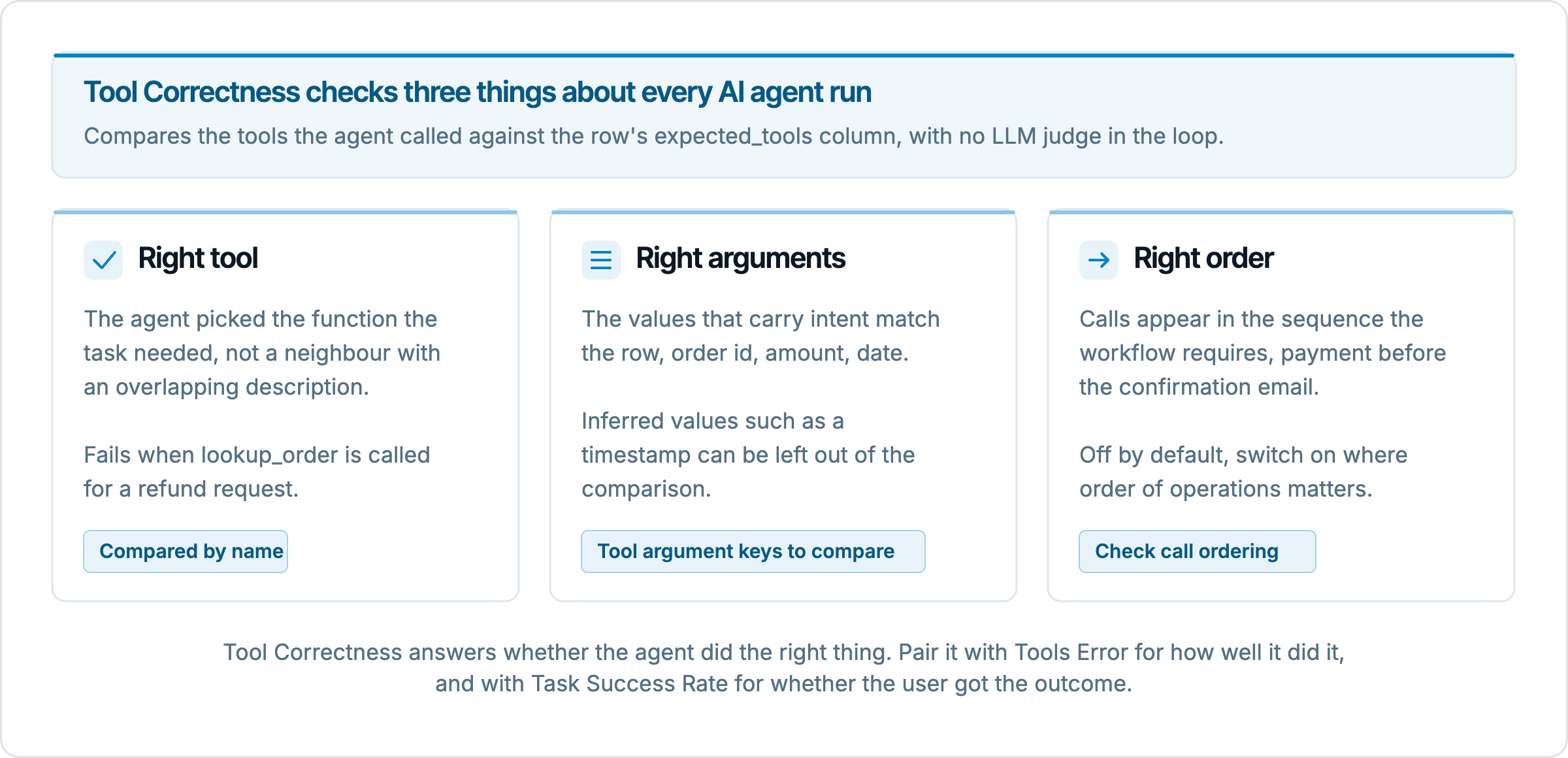
Tool-call correctness is the property that the calls made for a given request match the calls that should have been made. We state it as three conditions because they fail independently and have different causes. The right tool is a selection problem, and it fails when tool descriptions overlap or the prompt steers the model toward a familiar function. The right arguments is an extraction problem, and it fails when the model misreads, invents or carries over a value. The right order is a planning problem, and it fails when the model knows every step but strings them together wrongly. A single pass or fail score hides which of the three went wrong, so when we evaluate we want a metric that can be configured to check each condition separately.
The reference for all three is a set of expected tool calls written per test row, by a person who knows the workflow. For "Cancel order 4471 and refund me" the expected calls might be lookup_order, cancel_order, issue_refund, in that order, with the order id carried through. Writing that reference forces a useful question that answer-only evaluation never asks. What should this AI agent have done, concretely, step by step? Teams that cannot answer it for a row usually find that the AI agent's behaviour on that row is undefined too.
Why the answer text cannot tell you
It is tempting to think a good LLM judge reading the reply would notice a missing cancellation. It will not, because the reply carries no evidence either way. A judge scoring Answer Relevancy sees "Your order 4471 has been cancelled and a refund is on its way" and finds it relevant, polite and complete. The judge has no access to the fact that issue_refund was never called, so it cannot penalise the omission. Text metrics evaluate what the AI agent said. Tool metrics evaluate what it did. The two agree on a well-behaved system and disagree exactly on the rows that matter.
The gap is widest on the confident failures. A model that cannot complete a task will often produce a reply that reads as if it did, because the training signal rewards fluent completion. We see this most on AI agents whose tools return nothing on a miss. A lookup_order that returns an empty object for a mistyped id gives the model nothing to contradict, and it fills the gap with a plausible shipping date. The reply looks fine, the call log shows one lookup with the wrong id, and only the log tells the truth.
There is also a cost argument. A structural comparison of two lists of calls runs in milliseconds and costs nothing per row, while an LLM judge is one model call per row per metric. If you can measure the thing that matters without a judge, you should, and keep the judge budget for the questions that need reading comprehension, such as whether the reply explained the refund timeline clearly. In the EvaliQA metric picker Tool Correctness is one of the few AI agent metrics marked as needing no judge, and that is the reason it belongs in every tool-using plan rather than only the expensive ones.
Right tool
Selection failures come from the catalogue, not the model, more often than teams expect. When an AI agent has search_faq, search_orders and lookup_order available, and the descriptions of the last two both say "find an order", the model has to guess, and it will guess the same wrong way on a fraction of requests forever. The classic symptom in an evaluation run is a cluster of rows for one intent where a neighbouring tool was called cleanly, with valid arguments and no errors. Nothing broke. The wrong function simply ran.
The right-tool check compares the set of tool names called against the set expected. For a cancellation row where the expected set is lookup_order and cancel_order, a run that calls lookup_order and search_orders has one match out of two expected. That number matters because partial credit is informative. A row that scores 0.5 on tool selection tells you the AI agent understood half the task, which points at the second tool's description or the prompt's instruction about when to cancel, rather than at the whole flow. A row scoring 0 tells you the request was misread entirely, which is usually a routing or intent problem upstream of tool choice.
Extra calls are a selection failure too, and an easy one to miss if you only check that the expected tools appear. An AI agent that calls lookup_order three times before cancel_order did call the right tools. It also tripled latency and cost, and in production that pattern is what a retry loop looks like at the start. When you write expected calls, write the full list you want, not the minimum, and decide whether your check should tolerate extras. For most workflows we treat an unexpected call as a defect, because a tool call has side effects, and "it also sent an email" is not a harmless extra.
Right arguments
The right tool with the wrong value is the failure that does damage, because the action still executes. Cancelling order 4417 instead of 4471 is a correct tool call in every respect except the one that matters to two different customers. Argument errors come from three places. The model misreads the request, transposing digits or picking the wrong one of two ids mentioned. The model invents a value the user never gave, such as a refund amount, instead of looking it up. Or the model carries a value from an earlier step, reusing the first order's id when the user has moved on to a second.
Not every argument deserves the same scrutiny, and this is where argument checking needs a decision. Some arguments carry the user's intent, the order id, the amount, the delivery date, and must match the reference exactly. Others are filled by inference and legitimately vary between runs, a request timestamp, an idempotency key, a page size. If you compare every argument, those inferred values fail every row and bury the real signal. The method we use is to list the intent-bearing arguments per tool up front and compare only those. For cancel_order that is order_id and perhaps reason. For issue_refund it is order_id and amount. The rest is noise for this check.
A worked example shows why the distinction matters. Suppose a row asks for a refund of 30 USD on order 4471, and the AI agent calls issue_refund with order_id: "4471", amount: 30 and request_id: "a81f...". Compared on all keys, the row fails because the reference has no request_id. Compared on order_id and amount, the row passes, which is the verdict a person would give. Now suppose the AI agent passed amount: 300. Compared on the intent-bearing keys, the row fails, and it should, because a 10 times overpayment is precisely the bug argument checking exists to catch. The check that ignores the timestamp is the same check that catches the amount.
Right order
Order matters whenever a later call depends on an earlier one's result or side effect. Payment must be captured before the confirmation email goes out, because an email that says "paid" when the capture then fails is a support ticket. The lookup must precede the cancellation, because the cancellation needs the order's current state. For a read-only AI agent that fetches three independent facts and summarises them, order does not matter at all, and enforcing it would fail correct runs for no reason. So the order check is something you switch on per plan, for the workflows where it means something, rather than a default.
Order failures look different from selection failures in the log. All the right tools appear, with the right arguments, and the run would pass a set comparison, yet the sequence is wrong. An AI agent that calls send_confirmation_email and then capture_payment has done everything it was asked, in an order that creates a false promise if the second call fails. This is a planning defect, and in our experience it comes from prompts that describe the tools well but never state the dependencies between them. The fix is usually one sentence in the system prompt, and the evaluation row that caught it becomes the regression test that keeps it fixed.
There is a subtler case where ordering is partly free. A booking flow might require check_availability before reserve, while fetch_user_preferences can happen anywhere before reserve. Strict sequence matching will fail a correct run that fetched preferences first. When the workflow has that shape, write the expected list in the order you consider canonical and accept that the ordered check is stricter than the business rule, or split the plan so the ordered check applies only to rows with a hard dependency. Say in the plan's notes which it is, so the next person reading a failure knows whether the AI agent broke a rule or merely took a different valid path.
How Tool Correctness scores a row
EvaliQA's Tool Correctness metric implements the three checks as a structural comparison between the tools your AI system reports it called and the tools the dataset row says it should have called. No LLM judge is involved, so the score is deterministic, free per row and immune to judge drift. It sits in the AI Agent category of the metric picker and applies to single-turn evaluation plans, where each row sends one request to your AI system through a connector and the connector returns the response. The default threshold is 0.5, and partial matches earn partial credit unless you ask for exact matching.
Two inputs have to exist for the metric to score anything. On the connector side, the Tools called path is a JSONPath into your system's response that resolves to the list of tool names it called. The connectors page gives the example of a response whose steps array mixes tool calls and messages, where the path steps[?(@.type=='tool_call')].tool.name yields ["lookup_order", "get_shipping_eta"]. The path must resolve to names, not whole objects, or nothing ever matches. On the dataset side, each row needs an expected_tools column holding the list of names for that row, which can be a list or text like search, fetch. When you start a run, the Expected tools column (optional) field on the run sheet binds that column, and a column literally named expected_tools is picked up without asking. Without the binding, the metric scores every row 0, which is the first thing to check when a brand-new plan shows a wall of failures.
The three parameters map onto the three questions. The argument keys parameter takes a subset of argument keys to compare, with an empty value meaning every argument, which is how you restrict the comparison to the intent-bearing keys from the previous section when your tool calls carry arguments. The exact match parameter, off by default, requires every expected call to match exactly rather than earning partial credit. The check call ordering parameter, also off by default, requires the calls to appear in the expected sequence, and the docs name the payment-before-email case as the reason to switch it on. Because the connector's Tools called path carries names, the metric's comparison in a connector-driven run is a comparison of names. If you need to pin down one intent-bearing value today, such as the order id, a cheap complement is a deterministic Contains check on the actual output for that value, which also needs no judge.
Building the expected tool calls
The metric is only as good as the reference, and the reference is written by hand. That sounds like a burden until you notice that a tool-using AI agent usually has a small number of distinct workflows, often fewer than 20, and each workflow has one canonical call sequence. The dataset work is to enumerate those sequences and then write several rows per sequence with different surface requests. The datasets guide says to design the dataset to satisfy the metrics you will attach, and for Tool Correctness that means every row states what good looks like as a list of tool names. Here is the order we follow.
List every tool your AI system exposes, with the one-line description the model sees. Overlapping descriptions found here are selection bugs found early.
For each user intent the product supports, write the canonical sequence of tool calls, including the intent-bearing argument for each call, and note which steps have a hard order dependency.
Create the single-turn dataset from the template, which seeds
input,expected_outputandtest_type, and add anexpected_toolscolumn of type string_list.Write 2 to 3 happy-path rows per intent with different phrasings, and fill
expected_toolsfor each from the canonical sequence.Add edge rows where the right answer is fewer calls, such as a request the AI agent should refuse or clarify, with an empty or shorter expected list.
Set the connector's Tools called path, test the connector, and confirm the test response shows the names you expect before activating.
Step 5 deserves emphasis because it is the one teams skip. A request like "cancel all my orders" with no account context should produce a clarifying question and no cancel_order call. If your dataset only contains rows where calls are expected, you never measure over-eager tool use, and over-eager tool use is the failure with the worst side effects. Rows that expect restraint are as much a part of tool-call correctness as rows that expect action.
Keep the reference in step with the product. When a tool is renamed or split, every row that expects it is wrong until it is updated, and a sudden drop to 0 across one intent after a deploy is nearly always a renamed tool rather than a regressed model. The golden dataset guide covers how to treat rows like this as a release gate and review them on a schedule, and tool-call rows are the ones most tightly coupled to the code, so they need that review most.
What the metric does not catch
Tool Correctness answers whether the right calls were made. It says nothing about how well they were made or what the AI agent did with the results. An AI agent can call lookup_order with a valid id, receive a result saying the order already shipped, and then call cancel_order anyway, ignoring what it just read. The call list is correct by name. The behaviour is wrong. That gap is what the Tools Error metric covers. It is LLM-judged and flags six categories, parameter errors, invalid functions, sequence errors, ignored results, repeated failures and error handling. The docs put the division plainly. Tool Correctness catches "wrong tool", Tools Error catches "right tool, called badly", and neither alone catches every tool-use bug, so the recommended starting set for a tool-using AI agent is Tool Correctness, Tools Error and Task Success Rate together.
The metric also does not know whether the task was done. If the reference for a row is itself wrong, a run that reproduces the wrong sequence passes. If the tool returned an error and the AI agent reported success anyway, the call list still matches. Task Success Rate reads the whole exchange and asks whether the user's task was accomplished, and it is the metric that disagrees with Tool Correctness when the calls were right but the outcome was not. Reading the three together is the point, because the disagreements locate the fault. Tool Correctness low with Tools Error fine, in the pattern the bottlenecks guide lists, means the AI agent is calling wrong tools cleanly, which is usually overlapping tool descriptions in the system prompt rather than a model problem.
The last limit is production. Tool Correctness needs an expected list per row, and a live trace carries no expected list, so the metric is not offered for new bindings in online evaluation. What you can run live are the deterministic detectors, which include a redundancy finding for the same tool invoked with the same arguments more than once in a session, and a retry loop finding for runs of identical adjacent spans. Those catch the production shapes of tool misuse without ground truth. When a live session shows a tool-use finding you do not understand, the trace page lists the tools called, and turning that trace into a test case with a hand-written expected list is how a production surprise becomes an offline regression test.
Reading a low score
A Tool Correctness score below threshold is a starting point, and the per-row view is where the reading happens. Each row in the results shows the metric card with score over threshold and, below it, the Tools called chip list for that row. Put that list next to the row's expected_tools and the failure type is usually obvious within a few seconds. A missing name is a selection or routing problem. An extra name is over-eager tool use or a retry. The same names in a different order, on a plan with ordering on, is a planning problem. Clustering those readings across the failed rows turns 40 failures into 3 bugs, which is the step that makes the run actionable.
Filter by category before you read individual rows. If every row tagged with the refund intent fails and every cancellation row passes, the fault is in how the AI agent handles refunds, and the first 5 refund rows will tell you whether it is picking search_orders instead of issue_refund or simply never calling the refund tool. If failures are spread evenly across intents, look at the connector first. A Tools called path that resolves to objects instead of names, or a response shape that changed after a deploy, fails everything at once, and that uniform pattern is the signature of a plumbing error rather than a model error.
When you fix something, compare runs rather than re-reading the new run alone. Hold the dataset, the connector and the metric parameters constant, change one thing in the AI system, and the per-row delta points at the rows your change affected. A prompt fix for overlapping tool descriptions should move the selection failures and nothing else. If it also changes rows that were passing, you have learned something about the prompt that the first run could not show you. The comparing runs guide covers what to hold constant and which differences are noise.
Summary
An AI agent's reply is a claim about what it did, and the tool calls are the evidence. Evaluating only the reply means never checking the evidence, which is why confident, fluent failures survive answer-quality metrics. Tool-call correctness splits the check into three conditions that fail for different reasons, the right tool, the right arguments and the right order, and a structural metric can test all three per row without an LLM judge, cheaply and deterministically, as long as you write the expected calls. In EvaliQA that is Tool Correctness, fed by the connector's Tools called path and the row's expected_tools column, with partial credit and ordering as switches you tighten once the baseline is readable.
The metric is deliberately narrow. It does not see ignored results, bad error handling or whether the task was done, so it runs beside Tools Error and Task Success Rate, and the three disagree in ways that locate faults faster than any one of them could. It cannot run on live traffic, where the deterministic detectors take over, and the traces they flag are the raw material for new rows. The work that makes any of this pay off is the reference list, written by someone who knows the workflow, kept in step with the tool catalogue, and including the rows where the right answer is to call nothing at all.