A judge criterion is a sentence the LLM judge scores a response against, and most of the criteria we see in new custom metrics are written the way you would brief a colleague. "The response is factually correct." "The answer matches the reference." "The agent confirms the order." The trouble is that the judge is not a colleague with the ticket open in another tab. It sees the criterion and the response, and nothing else the criterion does not point at. "The response is factually correct" gives it no reference answer to compare against, so it scores plausibility, and a plausible wrong answer passes. The criterion also reads the same on every row, so it cannot tell the row where the correct order number is 4471 from the row where it is 9120. A metric built from such criteria produces a pass rate, and the pass rate means very little.
The fix is to make the criterion read the row it is scoring, and in EvaliQA the mechanism for that is the placeholder. A placeholder is a name in double curly braces inside a Custom Eval criterion, such as {{expected_output}} or {{order_id}}, that is replaced with that row's value before the judge sees the criterion. You write one metric with one set of criteria, and on every row the judge reads a different, concrete sentence. This post covers what a placeholder can refer to, the rule that decides whether a criterion is judged at all, how to check your criteria before a run and how to read what the judge actually used afterwards. That rule has a sharp edge. A criterion with no placeholder is not judged, and a metric made only of such criteria scores 0, so it is worth understanding in full before you attach a custom metric to a 500-row plan.
What a placeholder does
The syntax is small. A placeholder is {{name}}, where the name starts with a letter or an underscore and continues with letters, digits and underscores. Spaces inside the braces are tolerated, so {{ order_id }} and {{order_id}} are the same placeholder. Substitution happens in exactly one place on the platform, the Evaluation criteria field of a Custom Eval metric. Custom Eval is one of the two custom metric bases in EvaliQA, the one where the rubric is a list of discrete criteria rather than a single paragraph, and each criterion is one line in that list. The other base, G-Eval, does not substitute anything, which we come back to near the end.
At judge time the library works row by row. Each row of the run is a test case, which carries the input, the actual output your AI system returned, an expected output and a retrieval context when the dataset has them, and a bag of extra fields that we describe in the next section. For every criterion, the library looks up each placeholder in that row's values, writes the value in place of the braces, and hands the rendered sentence to the judge. The template "The response acknowledges the user's order number {{order_id}}." becomes "The response acknowledges the user's order number 4471." on one row and "The response acknowledges the user's order number 9120." on the next. The judge never sees the braces, only the finished sentence.
The gain is not only correctness. With the default verdict strategy the judge scores each criterion separately as none, minor, partial, mostly or fully, and writes a reason for each verdict. When the criterion names a concrete value, the reason names it too, so a failing row tells you "the response mentions order 4417, not 4471" rather than "the response does not seem to address the order". That is the difference between a score you can act on and a score you have to re-investigate by hand. A placeholder turns the judge from an impressionist into a checker with the answer key in front of it.
Where the values come from
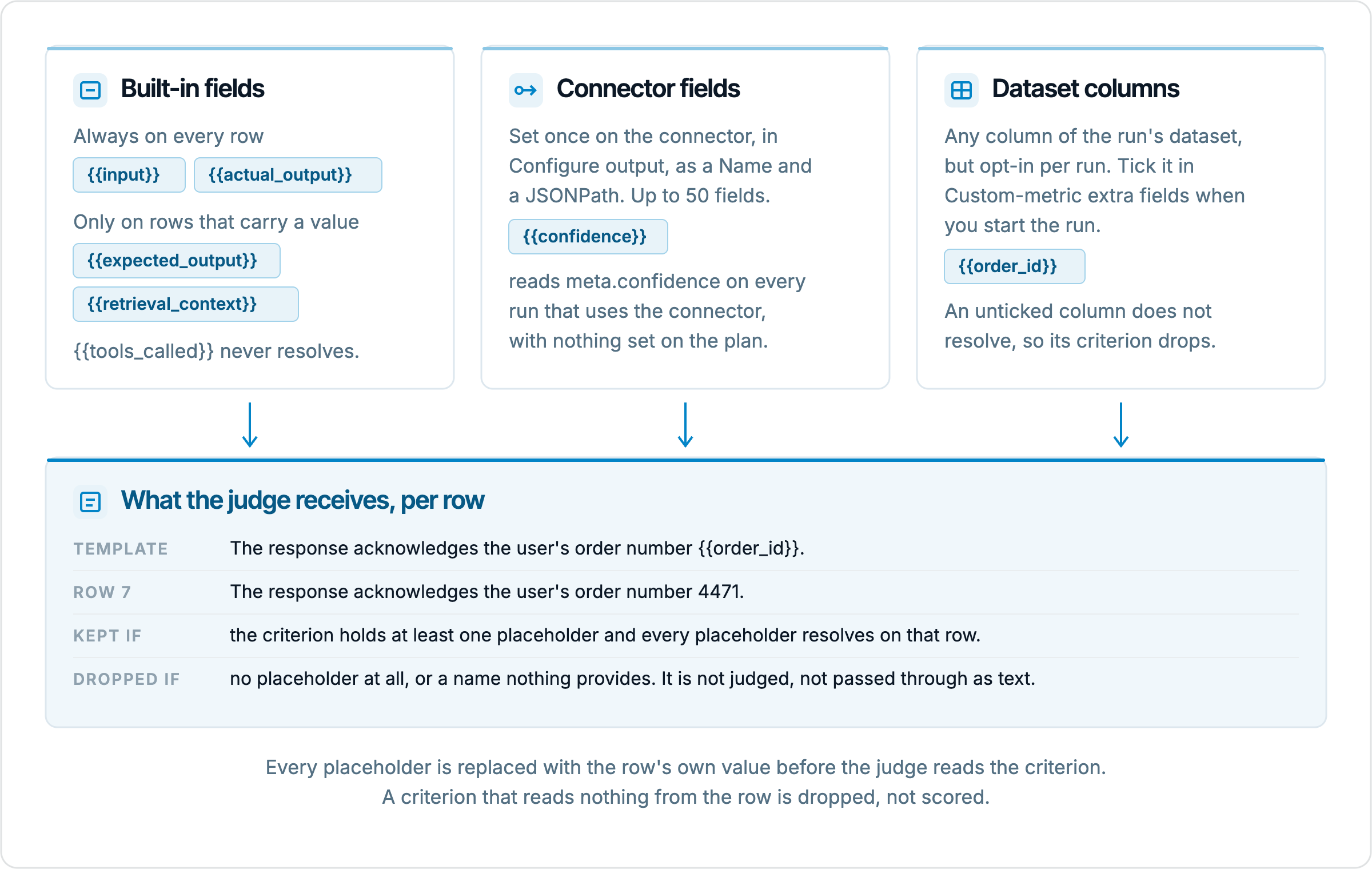
A placeholder can resolve from three sources, and which one you use depends on where the fact lives. The first source is the built-in test case fields. {{input}} and {{actual_output}} are available on every row without exception. {{expected_output}} and {{retrieval_context}} are available only on rows that carry a value, so a row with an empty expected output simply has no such placeholder, and a criterion that references it is skipped on that row alone. One field that exists on the test case is deliberately absent. {{tools_called}} never resolves, because the library does not copy it into the substitution values, so a criterion that references it is dropped on every row.
The second source is the connector. Open the project's connector, go to Configure output, and under Custom output fields add a Name and a JSONPath, which is a path expression that picks one value out of the response your AI system returned. A connector can carry up to 50 of these. The name is the placeholder. Add a field named confidence with the path meta.confidence, and {{confidence}} resolves on every run that goes through that connector, with nothing to configure on the test plan in between. This is the intended way to judge anything your API returns beyond the answer itself, such as a routing decision, a cited document id or a self-reported confidence. The connectors reference lists the path syntax.
The third source is the dataset. Any column of the run's dataset can become a placeholder, but only the columns you opt into for that run. When you start a run on a plan that carries a Custom Eval or G-Eval metric, the new run sheet shows a picker labelled Custom-metric extra fields (optional) with one chip per dataset column. Tick a column and {{column_name}} resolves for that run. Leave it unticked and the placeholder resolves to nothing. This opt-in is per run, not per plan, which is the detail most often forgotten, and the consequence is described in the next section.
Source | Where you define it | When it resolves | What to do at run time |
|---|---|---|---|
Built-in fields | Nowhere, they come with the test case | input and actual_output always, expected_output and retrieval_context only on rows with a value | Nothing |
Connector output fields | Configure output on the connector, a Name and a JSONPath | Every run through that connector | Nothing |
Dataset columns | The dataset editor | Only the columns ticked for that run | Tick the column under Custom-metric extra fields |
Choosing between the three is usually obvious once you ask where the fact comes from. If the value is produced by your AI system on the way to the answer, it belongs on the connector. If the value is a fact about the test case that you knew before the run, the correct order number, the policy that applies, the customer's tier, it belongs in the dataset. The built-ins cover the standard comparisons, and in practice most metrics mix them, a dataset column for the fact and {{actual_output}} for the thing being checked against it.
Why a prose criterion is never judged
Before the judge is called, the library filters the criteria list, and it keeps a criterion only if two conditions both hold. The criterion must contain at least one placeholder, and every placeholder in it must resolve on that row. Everything else is dropped from that row's judgement and listed under skipped_criteria in the metric's verbose log. Nothing about this is loud at run time. The run completes, the metric produces a score, and the score is computed from whichever criteria survived the filter.
The rule looks harsh until you consider what the alternative would be. A criterion with no placeholder reads identically on every row, so the judge would be scoring it from its general impression of the response and nothing else, which is precisely the plausibility scoring the whole mechanism exists to prevent. A criterion whose placeholder does not resolve is worse, because the judge would read a sentence with a literal {{folow_up}} in it and improvise what that meant. Rather than pass either through, the library refuses to judge in the abstract. The design choice is defensible. Its cost is that the failure is quiet, and you have to know to look for it.
Three consequences follow. A typo in a name, {{folow_up}} for {{follow_up}}, silently removes that criterion from every row. A criterion written as plain prose, "The response is polite.", is removed in the same way, and a metric whose criteria are all prose scores 0.0 with the reason "No criteria could be evaluated". And a criterion that references an optional built-in is removed only on the rows that lack it, so {{expected_output}} works on the 80 rows with a reference answer and vanishes on the 20 without one, leaving those rows scored on fewer criteria than you think.
The practical rule we follow is that every criterion references something, even a criterion about style. "The response is polite." has nothing to resolve. "The response {{actual_output}} is polite and does not use sarcasm." always resolves, because {{actual_output}} is present on every row, and it changes nothing about what the judge is asked to assess. The same trick keeps a tone or format criterion alive in a metric that otherwise reads dataset columns. It costs you nothing and it removes the only reason a well-meant criterion would be thrown away.
A worked example
Take a refund support bot. The dataset has the columns order_id, refund_status and expected_output, and the connector exposes a custom output field named confidence that reads meta.confidence from the response. We want one metric that checks four things on every row. The response acknowledges the right order. The response states the right refund status. The response does not name a competitor. The response matches the reference answer on the amount and the date. Written without placeholders, the first, second and fourth of these are unanswerable for the judge, and all four are dropped by the filter.
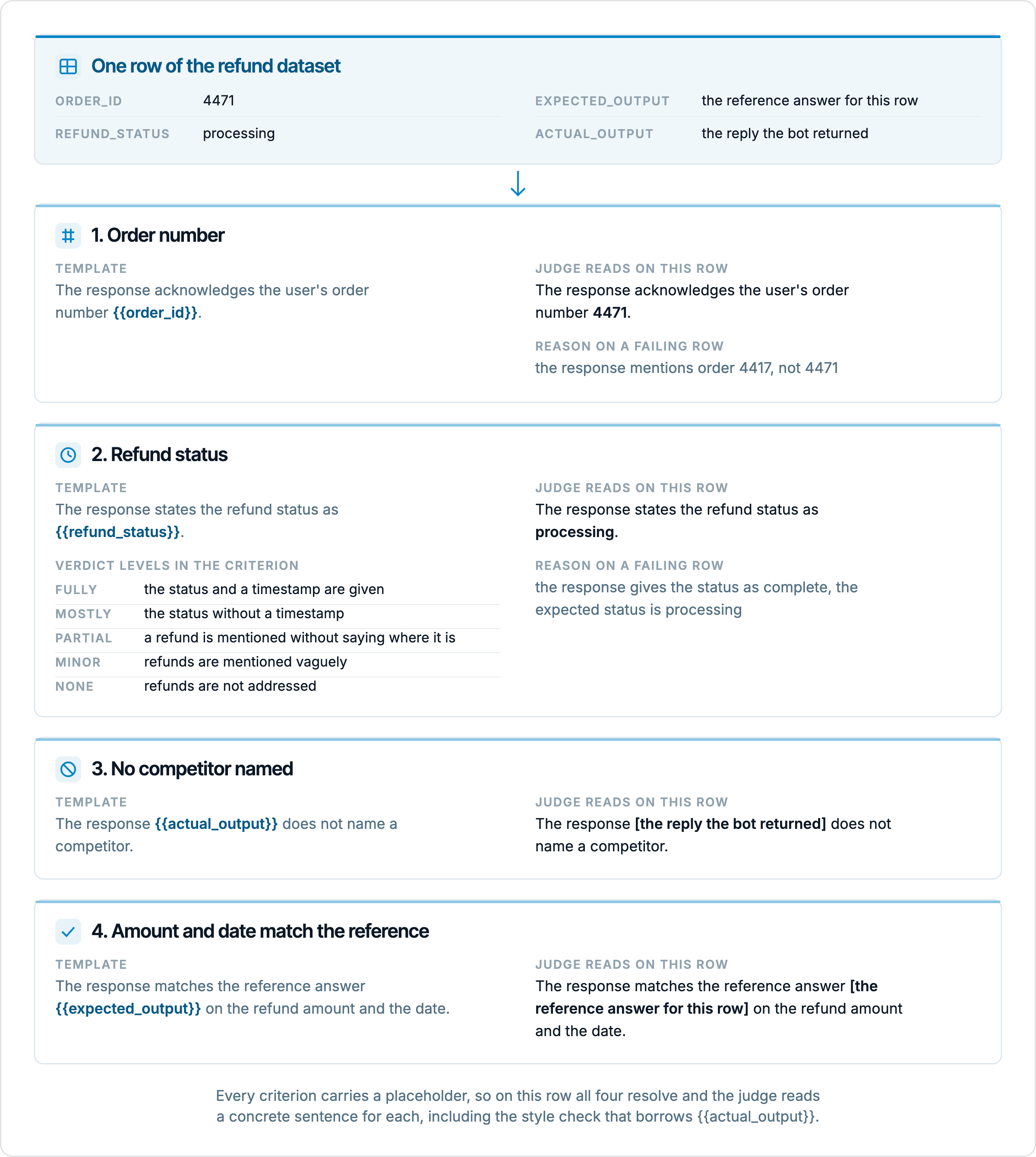
On a row where order_id is 4471 and refund_status is "processing", the judge reads "The response acknowledges the user's order number 4471." and "The response states the refund status as processing." and scores each against the actual output. The second criterion also spells out what each verdict level means, which is the other half of writing a criterion the judge can score consistently. Without the level anchors the judge improvises what "mostly" means, and with them it does not. The reasoning on a failing row then reads "the response gives the status as complete, the expected status is processing", which is a sentence you can act on.
Now the same metric with three small mistakes, each of which we have seen in real workspaces. Criterion 2 is typed as {{refund_staus}}, so it is dropped on every row. The run is started without ticking order_id under Custom-metric extra fields, so criterion 1 is dropped on every row too. Twenty rows have an empty expected_output, so criterion 4 is dropped on those twenty. On most rows the metric is now scored on criterion 3 alone, and since the bot never names a competitor, the pass rate comes out near 100 percent. The summary looks healthy, the per-metric chip is green, and the two checks you cared about never ran. The placeholder mechanism did exactly what it was built to do, and the only way to notice is to look at which criteria survived.
Checking the criteria before the run
Most of these mistakes are visible on the form, if you look. On the custom metrics page, the create sheet renders a placeholder cheat-sheet directly under the Evaluation criteria field whenever the base is Custom Eval. Because the page is workspace-wide and has no project of its own, the cheat-sheet borrows one. A Show fields from project picker chooses a project, and a Connector picker chooses all of its active connectors or one in particular. The choice is reference only. It is not saved on the metric, and a saved preset stays usable in every project, so the pickers only answer the question "what could I write in a criterion right now".
Below the pickers are the chips, in three groups. From your connector lists every custom output field on the selected connectors, and hovering one shows its JSONPath, its description and the value it resolved to in the connector's last successful test, so {{confidence}} next to meta.confidence and 0.82 confirms a mapping without opening the connectors page. Built-in lists the four test case fields, with {{expected_output}} and {{retrieval_context}} greyed out as a reminder that they exist only on rows with a value. Dataset columns appear as a note rather than as chips, because the form cannot know which columns you will tick at run time. Clicking a chip inserts it at the cursor in the criteria box, which is the easiest way to avoid the typo problem altogether.
Under the chips an amber warning box appears when a criterion would not be judged. It covers the two cases from the filter rule, a placeholder that nothing in the selected project provides, with the missing names listed, and a criterion with no placeholder at all. The same chips and warnings show up on the Metrics step of the plan wizard when you configure Custom Eval inline, so whichever route you take to a custom metric, the form tells you before the run what the run would drop.
The last pre-run check is the one we never skip. Before attaching a new metric to a full plan, run it on 5 hand-picked rows where you already know the verdict, 2 clear passes, 2 clear fails and 1 ambiguous case. If the judge agrees with you on all 5, the criteria are reading the right values. If it passes the 2 rows you expected to fail, either a criterion was dropped or it is too loose, and both are cheaper to find on 5 rows than on 500.
Reading the verbose log after the run
After the run, the check moves to the results page. Open any row to reach the row detail, where the right-hand side shows one Metrics card per metric with its pass or fail chip, the score against the threshold and the judge's reasoning. Clicking the metric name opens the verbose log sheet, which shows the score line, the summary, the evaluation criteria the judge used on that row and, for the verdict strategy, the per-criterion verdicts. This list of criteria is the ground truth. If you wrote four criteria and the sheet lists three, the fourth was dropped on that row, and the docs name the field that records it as skipped_criteria.
We read the verbose log on the first run of every new custom metric, on at least one row that should have failed, and we look at the criteria list before we look at the score. The symptom to recognise is a metric that passes rows it should fail while its verdicts all concern the criteria you were least worried about. Compare the surviving criteria against what you wrote, and the dropped one is usually the typo or the unticked column from the example above. A metric scoring 0.0 on every row with "No criteria could be evaluated" is the extreme version, and it means nothing in the list resolved, most often because every criterion was prose.
What this check does not catch is a placeholder that resolves to the wrong value. If the connector field confidence points at meta.score when the number you meant lives at meta.confidence, the placeholder resolves, the criterion survives, and the judge reads a wrong number without complaint. The verbose log shows the rendered criterion, so you can see the value the judge was given, and the row detail shows a Custom outputs block with every custom field the connector returned for that row. Checking those two against each other on a couple of rows is the only way to confirm the mapping, and the hover value on the cheat-sheet chip is a good first hint. The filter protects you from missing values, not from wrong ones.
What placeholders do not fix
G-Eval is the first limit. Its Criteria and Evaluation steps fields do not substitute anything. The G-Eval prompt already interpolates the input, the actual output, the expected output and the retrieval context directly, so you do not need placeholders to point it at those, but it never reads the extra fields, and a {{confidence}} typed into G-Eval criteria reaches the judge as literal text. The run sheet's help text suggests otherwise, and we trust the docs and the library on this one. If your rubric needs a connector field or a dataset column, use Custom Eval. If your rubric is a holistic paragraph that only needs the four built-ins, G-Eval is fine, at the cost of its default 20 judge samples per row.
The second limit is the judge itself. A placeholder gives the judge a concrete comparison, it does not make the judge deterministic. "The response matches the reference answer {{expected_output}} on the amount" is scored by an LLM reading two texts, and an LLM can misread a figure or accept 50.00 for 50 when you wanted an exact string. For comparisons that have a right answer, the deterministic metrics in the catalog, Exact Match, Contains, Regex Match and JSON Schema, do the job without a judge and without variance. The custom metric earns its place when the comparison needs judgement, whether the amount and date are addressed, not whether a string is present.
The third limit is strategy. With the direct strategy the judge returns one integer from 0 to 10 for all criteria together, normalised to a 0 to 1 score. The filter rule still applies, a dropped criterion is still dropped, but you lose the per-criterion verdicts that make a dropped or failing criterion visible in the log, so direct is better kept for smoke runs where you want a number quickly. The verdict strategy is chattier and more expensive to read, and it is the one to use while a metric is new.
The last thing to remember is that presets are copied, not linked. Attaching a Custom Eval preset to a plan copies its criteria into the plan, and editing the preset afterwards does not reach plans that already use it. If you fix a placeholder typo in the preset, open each plan that uses it, remove the preset on the Metrics step and add it again, or the plan keeps judging with the broken copy. The same snapshot rule keeps old runs reproducible, which is the right trade, but it means a fix lands only where you re-attach it.
Summary
A criterion that reads nothing from the row cannot judge the row, and in EvaliQA it does not try. Custom Eval keeps a criterion only when it contains at least one placeholder and every placeholder resolves, so one metric reads a different, concrete sentence on every row it scores, and a prose criterion, a misspelled name or an unticked dataset column removes that check from the run without an error. The three sources are the built-in test case fields, the connector's custom output fields under Configure output, and the dataset columns you tick under Custom-metric extra fields when the run starts. Give every criterion a placeholder, even a style criterion via {{actual_output}}, let the cheat-sheet chips type the names for you, test on 5 known rows, and read the criteria list in the verbose log on the first run before you read the score.