A retrieval-augmented generation (RAG) system has two stages that fail in different ways, and most teams measure only one of them. The retriever takes the user's question, searches an index of document chunks and returns the top few. The generator, the model, reads those chunks and writes the answer. When the answer is wrong, the natural move is to attach Faithfulness, see whether the answer stayed inside the retrieved passages, and start editing the prompt. But Faithfulness judges the generator against whatever the retriever handed it. If the retriever handed it the wrong passages, a perfectly faithful answer is still a wrong answer, and no amount of prompt work will change that.
The problem this post addresses is that gap. You need metrics that look at the retrieved chunks on their own, before the generator touches them, and tell you two separate things. Did retrieval bring back everything the correct answer needs, and did it rank the useful chunks above the useless ones. The first question is context recall, the second is context precision. EvaliQA ships both as LLM judge metrics under the names Contextual Recall and Contextual Precision, and we use the capitalised names below whenever we mean the product metrics specifically. The rest of this post explains what each one scores, how to read them together with the generation metrics, how to get the retrieved chunks into a run so the judge can see them, and what neither metric catches.
Why score the retriever separately
A RAG pipeline is a chain, and a single end-to-end score hides where the chain broke. Suppose Answer Precision, the metric that compares the actual output to a gold answer, comes back at a 71 percent pass rate on your release dataset. That number tells you the system is not ready. It does not tell you whether to spend the next week on chunking and embeddings or on the system prompt and the model. Those are different teams, different costs and different timelines, and guessing wrong burns the week. The reason to score the retriever on its own is to make that decision from evidence rather than from instinct.
The two stages also fail at different rates and for different reasons. Retrieval failures are usually structural. A chunk boundary splits the policy sentence from the exception that follows it, a synonym in the user's question does not match the vocabulary in the index, a date filter excludes the one document that applies, or the reranker pushes the right chunk from position 1 to position 6 where the generator stops paying attention. Generation failures are usually behavioural. The model summarises when it should quote, fills a gap with a plausible guess, or ignores the second chunk because the first one looked complete. Fixing the first kind means touching the index, the embedding model or the retrieval query. Fixing the second means touching the prompt or the model. A metric that cannot separate them cannot route the bug.
There is a third reason that only shows up once you run the retriever metrics alongside the answer metrics. Some systems pass Answer Precision while failing retrieval, because the model already knew the answer from pretraining and produced it without help from the chunks. The single-turn plan guide calls this guessing correctly. It looks like success on the dashboard and it is a latent failure, because the first question whose answer is not in the model's memory will come back wrong with the same confidence. Only a retriever-side metric exposes it, since the answer-side metrics have nothing to complain about.
Faithfulness does not fill this role either, even though it reads the retrieved context. Faithfulness asks whether every claim in the answer is supported by the chunks. It is a generation metric that happens to use the context as its reference. If the retriever returns three irrelevant chunks and the model dutifully says it cannot find the answer, Faithfulness scores 1.0. The answer is grounded, and useless. Pairing Faithfulness with the two contextual metrics is what separates "retrieval was bad" from "retrieval was fine, generation drifted", and that pairing is the whole point of the next three sections.
What context recall measures
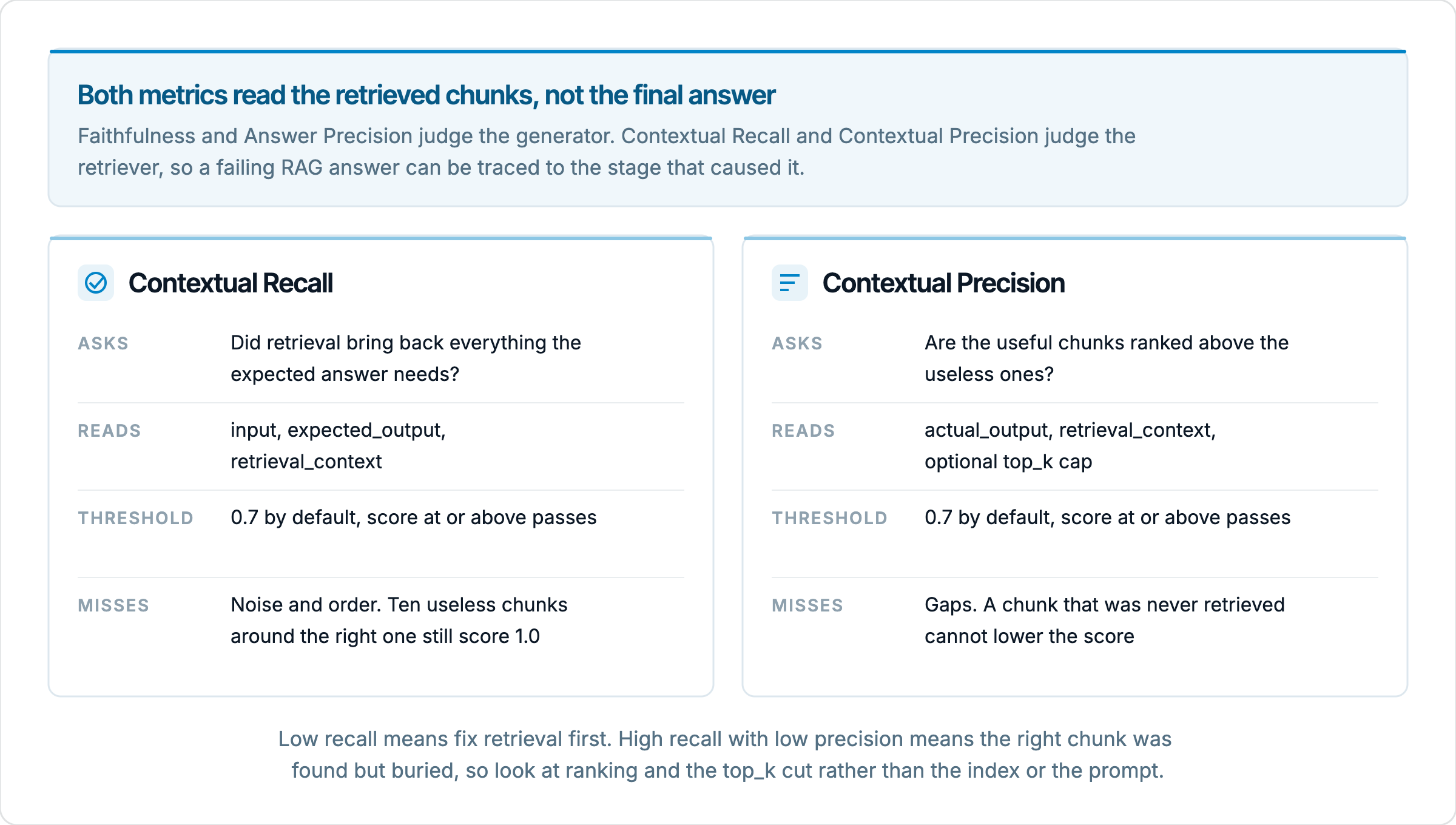
Context recall asks whether the retrieved chunks, taken together, contain everything needed to produce the expected answer. The metric needs a gold answer to work, because "everything needed" is only defined relative to something. In EvaliQA, Contextual Recall reads the row's input, its expected_output and its retrieval_context, breaks the expected answer into individual claims, and checks each claim against the retrieved chunks. The score is the proportion of claims the context supports. A 1.0 means retrieval brought back every fact the answer requires. Anything below that means at least one fact the answer needed was never put in front of the generator.
A worked example makes the arithmetic concrete. Take a support assistant over a refund policy, with a dataset row whose input is "How do I get a refund on an annual plan?" and whose expected output states three things. Refunds are available within 30 days of purchase, they go back to the original payment method, and they take 5 to 7 business days to appear. Now suppose the retriever returns four chunks. Two of them cover the 30-day window and the original payment method; the other two are about plan upgrades. The judge finds support for 2 of the 3 claims and scores the row at 0.67. With the default threshold of 0.7, that row fails Contextual Recall, which is exactly right. The generator could not have written the full correct answer from what it was given, and whatever it did write was either incomplete or invented the missing timing.
The reading rule that follows is simple and worth stating plainly. When Contextual Recall is low, fix retrieval first, because nothing downstream can recover information that was never retrieved. When Contextual Recall is high and Answer Precision is low, retrieval did its job and the generator dropped something, so the prompt and the model are the right place to look. This is the single most useful split the metric gives you, and it is why the RAG metrics guide puts Contextual Recall in the starting set for any RAG assistant alongside Answer Precision and Faithfulness.
Context recall deliberately ignores two things, and you should know them before you trust a high score. It does not care about noise. If the retriever returns the one chunk that supports all three claims plus nine chunks about unrelated products, recall is still 1.0, even though the generator now has to find the needle in a haystack. And it does not care about order. The supporting chunk can sit at position 10 and recall is unchanged, even if the generator only reads the first 5. Both of those gaps are what context precision exists to cover.
What context precision measures
Context precision asks whether the useful chunks are ranked above the useless ones. The docs describe Contextual Precision as precision at k weighted by relevance, where k runs over the positions in the ranked list of retrieved chunks. Rather than counting how many chunks were relevant, it rewards relevant chunks that appear early and penalises relevant chunks that appear late behind irrelevant ones. A 1.0 means the top of the list is exactly the material the answer needed. A 0.0 means the order is inverted, with the noise first and the signal last. In EvaliQA the metric reads the actual_output and the retrieval_context, judging each chunk's relevance against the answer the system actually produced.
The reason order matters is mechanical, not aesthetic. Most pipelines retrieve more than they pass along, so a chunk ranked 8th out of 20 may never reach the generator at all if only the top 5 are fed in. And even among the chunks that do reach it, models attend more to material near the start of the context than to material buried in the middle. A retriever that finds the right chunk and ranks it 5th has, in practice, half-failed, and recall alone would never show that. Precision is the metric for teams working on the retriever itself, on the embedding model, the hybrid search weights or the reranker, because those are the levers that change ordering.
The arithmetic is easier to hold in your head with an example, and the shape of it matters more than the decimals. Say the retriever returns 5 chunks and 3 of them are relevant. The usual construction takes the precision at each position where a relevant chunk sits and averages those values. If the relevant chunks are at positions 1, 2 and 5, the precision at those positions is 1.0, 1.0 and 0.6, for an average of about 0.87. Move the same three relevant chunks to positions 1, 4 and 5 and the values become 1.0, 0.5 and 0.6, for about 0.7, right on the default threshold. Push them to positions 3, 4 and 5 and the score drops to about 0.48. Same chunks, same recall of 1.0 in every case, and a precision score that halves because the retriever buried the good material. The exact weighting in the judge library may differ in detail; the lesson that early relevant chunks are rewarded and late ones are not holds regardless.
Two configuration points follow from how the metric works. First, Contextual Precision needs ranked context. If your dataset or connector stores the retrieved chunks as an unordered set, the metric cannot tell top from bottom and the score is noise. Preserve the order the retriever returned. Second, the metric takes an optional top_k parameter that caps how many chunks are judged. If you retrieve 20 but feed the generator only the first 5, set top_k to 5 so the score reflects what the model actually saw rather than the 15 chunks it never read. Skip the metric entirely when retrieval is a black box you do not own, since you will not be able to act on the result, and when you feed every retrieved chunk to the model without any ranking at all.
Reading the two together
Neither metric is meant to be read alone. Recall tells you whether the material was there; precision tells you whether it was where the generator would see it. Put them next to Answer Precision and Faithfulness and each row of a run becomes a small diagnosis rather than a pass or fail. The combinations below are the ones that come up most often, and each points at a different place in the pipeline.
Contextual Recall | Contextual Precision | Answer Precision | What it usually means |
|---|---|---|---|
Low | Any | Low | Retrieval missed material the answer needed. Fix chunking, embeddings or the query before touching the prompt. |
High | Low | Low | The right chunks were retrieved but ranked behind noise. Look at the reranker or the top_k cut, not the index. |
High | High | Low | Retrieval did its job and generation dropped it. Check Faithfulness; if it is also low, the model is fabricating despite good context. |
Low | Any | High | The model is answering from memory, not from the chunks. Fix retrieval anyway; the next unfamiliar question will fail. |
High | High | High | Both stages working on this row. Tighten thresholds if every row looks like this; a metric that always passes is not discriminating. |
The second row deserves a closer look because it is the one Faithfulness and recall both miss. The retriever found the right chunk, so recall is 1.0. The model's answer may even be grounded in the irrelevant chunks it read first, so Faithfulness is high. Only precision shows that the useful chunk sat at position 6 while the generator worked from positions 1 through 5. Teams that run recall without precision see this row as a generation failure and spend their time on the prompt, when the fix was a reranker setting or a smaller retrieval window with better ordering.
A note on Contextual Relevancy, the third contextual metric in the catalog. It asks whether the retrieved context is on topic for the question, judging the passages without reference to the expected answer or to their order. That makes it the right metric when you have no gold answers, since recall needs expected_output and relevancy does not. But the docs are explicit that it overlaps with the precision and recall pair, and we agree. If you are running both Contextual Precision and Contextual Recall, adding Contextual Relevancy is a third judge call per row that mostly repeats what the other two already told you. Pick the pair when you have gold answers and relevancy when you do not, not all three.
Resist the urge to stack the full RAG category onto one plan. The metrics hub warns that Answer Precision, Answer Relevancy, Contextual Recall and Faithfulness on the same plan ask overlapping questions, and that every LLM judge metric is one more judge call per row. A 300-row dataset with 5 judge metrics is 1,500 judge calls on top of the 300 calls to your system. For a retriever investigation, Contextual Recall, Contextual Precision and Answer Precision is a complete set. Add Faithfulness when you specifically need to tell fabrication apart from omission on the rows where generation failed.
Getting the retrieved chunks into the run
Both metrics read a field called retrieval_context on each scored row, and the way that field gets filled decides whether you are measuring the retriever at all. There is a distinction here that is easy to get wrong. A passage stored on the dataset row ahead of time is a fixed reference, the material the model should ground on, and it is what the datasets guide has in mind when it says the passages must live on the row for a faithfulness check. That is useful for scoring the generator against known-good context. It tells you nothing about what your retriever actually returned at run time, because the retriever was never consulted.
To measure the retriever, the chunks have to come from your system's live response on each run. In EvaliQA this is set on the connector, in the output mapping section where you already tell the platform where the answer lives in the response. The required field is "Actual output path", the expression that locates the model's answer in the response JSON. Below it, under "Eval-library standard paths", there is an optional "Retrieval context path" field, described as where the RAG retrieval context lives in the response and used by the retrieval-quality metrics. Point it at the array of chunks your system returns alongside the answer, in the order the retriever produced them. Each run then captures what was actually retrieved for that input, and the two contextual metrics judge that, not a stored copy.
This has a practical consequence for how you build the system under test. Your RAG endpoint has to return the retrieved chunks in its response, not just the final answer. Many production endpoints do not, because the user never sees the chunks. For evaluation, add them to the response payload as a list of strings in rank order, or expose an evaluation variant of the endpoint that does. If the chunks arrive embedded in the system prompt or streamed through a tool call and never appear in the response body, the field stays empty, the metric has nothing to read, and the row is marked errored for that metric rather than scored. The run page shows errored rows under the "Errors" filter chip, and a plan where every row errors on Contextual Recall almost always means the path is not set or is pointing at the wrong key.
The gold answer side matters just as much for recall. Contextual Recall needs expected_output on every row, and adding expected outputs to a dataset after the fact is slow and tedious work. Decide on the metric mix before you write or generate rows. Write expected answers as the facts a correct answer must contain rather than as polished prose, because the judge breaks the expected output into claims and each claim either finds support in the chunks or does not. Three clear factual sentences give you a recall score you can interpret; one long paragraph with hedges and asides gives you a judge that has to guess what counts as a claim.
Once a run completes, you can see exactly what the judge saw. Expanding a row on the run detail page shows a "Context" block with the count of chunks in brackets and each chunk numbered from 1 in the order it was received. That ordering is the one Contextual Precision scored. When a row fails precision, open it, find the chunk that answers the question, and read its number. If it is 4 or lower out of 5, the problem is the chunk itself or the judge's reading of it; if it is 9 out of 10, the problem is the ranking.
Setting up the test plan in EvaliQA
With the connector returning chunks and a dataset that carries expected outputs, the plan itself is short to build. The steps below follow the test plan wizard, which numbers them the same way; the mode is single-turn evaluation, since both contextual metrics apply only to that mode.
Pick "Evaluation, single-turn" as the mode. One row is one question, one call to your system and one set of retrieved chunks.
Choose the judge model on Step 3 and leave it fixed for every run you intend to compare. The judge is part of the measuring instrument, and a changed judge moves scores on its own.
On Step 4, open the RAG category and tick Contextual Recall and Contextual Precision. Each metric card shows the columns it needs, so you can confirm that input, expected_output and retrieval_context are all covered before you continue. Add Answer Precision so you can read the diagnosis table above.
On Step 5, keep the default threshold of 0.7 for both contextual metrics on the first run. If you truncate the retrieved list before the generator, set top_k on Contextual Precision to the number of chunks the model actually receives.
Attach a dataset of 100 to 300 rows for a release-grade read, or 20 to 50 for a quick first look. Rows should be happy-path questions whose answers exist in the indexed documents; a retriever cannot be blamed for a question the corpus does not cover.
Run the plan, then read the per-metric chart tab for each contextual metric. The score distribution with the threshold marker tells you whether failures cluster just below 0.7, a tuning problem, or sit near 0, a structural one.
Open 3 to 5 failing rows per metric and read the judge's reasoning under the metrics section of the row. For recall, it names the claim that found no support. For precision, it explains why a chunk was judged relevant or not. This is where you learn whether the judge is measuring what you think it is.
The thresholds deserve a second pass after the first run. A metric that passes 100 percent of rows is not discriminating, and the fix is to tighten it, for example from 0.7 to 0.85, and run again. A metric that fails every row is usually broken rather than strict; check the retrieval context path and the expected outputs before touching the threshold. Remember too that a row's overall verdict is the AND of every metric on the plan, so once you add two retriever metrics the headline pass rate will drop even if generation is unchanged. Read the per-metric pass rates in the KPI tiles rather than the aggregate when you want to know what moved.
The payoff comes on the second run. Change one thing about the retriever, a different chunk size, a reranker, a hybrid search weight, and run the same plan on the same dataset with the same judge. The compare view puts the two runs side by side, and because only the retriever changed, any movement in Contextual Recall or Contextual Precision is attributable to that change. Hold everything else constant. A run that changed the retriever and the prompt at the same time has given you two confounded variables and no way to separate them, which is the exact problem these metrics were meant to remove.
What these metrics do not catch
Both metrics are LLM judge metrics, and that carries the usual limits. The judge decides which chunks are relevant and which claims are supported by reading them, not by comparing against a list of gold chunk identifiers. There is no column where you tell EvaliQA which chunks were the right ones; the judge infers relevance from the expected answer for recall and from the actual answer for precision. That is what makes the metrics cheap to set up, since you never have to label chunks, and it is also why a weak judge gives noisy results. A chunk that supports a claim only by implication may be scored as support on one run and not on the next. Average over a dataset of reasonable size and do not chase the per-row wobble.
Context precision has a specific blind spot that follows from reading the actual output. It judges chunks as relevant to the answer the system gave, not to the answer it should have given. If the generator produced a wrong answer and the retriever ranked first the chunk that led it astray, precision can score that row well, because the top chunk was indeed relevant to what was written. Reading precision together with recall and Answer Precision, as in the table above, is the guard against this. A row with high precision, low recall and a wrong answer is a retriever that confidently found the wrong material.
Neither metric measures the index itself. They score the chunks returned for the questions in your dataset, which means a document that is missing from the index, or a question your dataset never asks, is invisible to them. Recall of 1.0 across 200 rows says the retriever handles those 200 questions, not that the corpus is complete or that the chunking works for the section of the manual nobody wrote a test for. Coverage is a dataset problem, and the datasets guide is the place to work on it. Likewise, neither metric says anything about latency or cost; a retriever that reaches 0.95 on both while taking 4 seconds has a problem these scores will not show, though the run page's latency and cost tiles will.
Finally, the metrics assume the question has an answer in the corpus. For a question the system should decline, there is no expected answer whose claims the chunks could support, and recall is undefined in spirit even if the judge produces a number. Keep refusal rows in a separate dataset scored with Restricted Refusal, and keep the retriever dataset to questions with a documented answer. Mixing the two produces an average that describes neither.
Your first run will almost certainly sort the failures into the rows of the diagnosis table, and that sorting is the result. Low recall with low answer scores sends you to chunking and the index. High recall with low precision sends you to the reranker and the top_k cut. High recall and precision with low answer scores sends you to the prompt, with Faithfulness added for the next run to tell omission from fabrication. Change one thing, run the same plan again, and compare. The bottleneck guide covers how to read the per-metric and per-category breakdowns once you have more than one run to look at.