
You wrote a custom metric. The rubric reads well, the first run came back with a pass rate that looks plausible, and the judge's reasoning on a few rows sounded sensible. Now somebody wants to put that metric in the release gate, and the question nobody has answered is whether the judge's verdicts match the verdicts a person who knows the product would give. A judge can be perfectly consistent and still wrong in the same direction on every row. Consistency is what reruns measure; correctness is what human labels measure, and the two are not the same thing.
This post is about the second measurement. The method is small: pick 30 rows, have people label them pass or fail before the judge sees them, run the judge, and read every row where the two disagree. It costs an afternoon and a few dollars of judge calls. What it buys you is a specific list of the ways your rubric fails, which is worth more than any single agreement percentage. We describe the whole loop as we run it in EvaliQA, from building the labelled dataset to deciding when the judge has earned a place in the gate.
Why a judge needs calibrating
A custom metric in EvaliQA is a natural-language rubric scored by an LLM judge, built on one of two bases: Custom Eval, where the rubric is a list of discrete criteria, or G-Eval, where it is a single holistic paragraph. The custom metrics guide already tells you to test a new rubric on 3 to 5 rows with known outcomes before attaching it to a large plan. That check catches the gross failures: a rubric so loose it passes everything, a criterion with a typo'd placeholder that gets silently dropped, a threshold pointing the wrong way. It does not tell you whether the judge is right on the rows that are actually hard, because 5 rows chosen to be obvious contain no hard rows.
The failure that slips past a 5-row check is systematic bias. The judge reads "provides a refund status" and accepts "refunds usually take 5 days" as a status, every time, on every row where the answer hedges. Each verdict is defensible on its own. Across a 500-row run the metric reports a comfortable pass rate, and the gate stays green while the AI system is quietly failing to answer the question. Nothing in the run page flags this, because the judge did exactly what the rubric asked. The rubric asked the wrong thing, and only a person comparing their own verdict to the judge's can see that.
Rerunning the judge does not help either. The comparing runs guide puts row-level agreement between two identical runs at 95 to 98 percent, which sounds reassuring until you notice it measures the judge against itself. A biased judge reproduces its bias faithfully. Turning on consensus aggregation, which averages several judge runs, tightens the variance but moves the average nowhere. The only reference point that can expose bias is a verdict from outside the judge, which means a human label.
So calibration here means one thing: measuring how often the judge's pass or fail matches a person's pass or fail on the same row, and understanding every case where it does not. It is not about tuning the threshold until the pass rate looks right. A threshold moved to make the number look better is a calibration in the wrong direction, because you have fitted the judge to your expectation instead of to the ground truth.
What 30 labels can tell you
Thirty is a deliberate size, and it is honest to say what it does and does not give you. With 30 rows, each disagreement moves the agreement rate by about 3.3 percentage points, so the rate itself is coarse. If the judge's own run-to-run wobble flips 2 to 5 percent of rows, that is roughly one row in 30 that can disagree with the human on a rerun for no reason at all. A single disagreement is therefore noise until proven otherwise. Four disagreements that share a cause are not noise; they are a pattern, and patterns are what you are looking for.
That is the real argument for 30 rather than 5: it is the smallest set where a pattern can show up more than once. A rubric bug that affects a fifth of hedged answers will hit zero or one row in a set of 5 and you will shrug it off. In a set of 30 with a dozen hedged answers it hits two or three, and when you read the reasoning side by side the shared cause is obvious. Going to 100 rows sharpens the percentage but costs three times the labelling effort, and labelling is the expensive part. Thirty is where the cost of another label starts to exceed what it teaches you about the rubric. If you later need a precise agreement rate to put in a compliance document, that is a different exercise with a bigger set, and you should say so rather than quote the 30-row number as if it were precise.
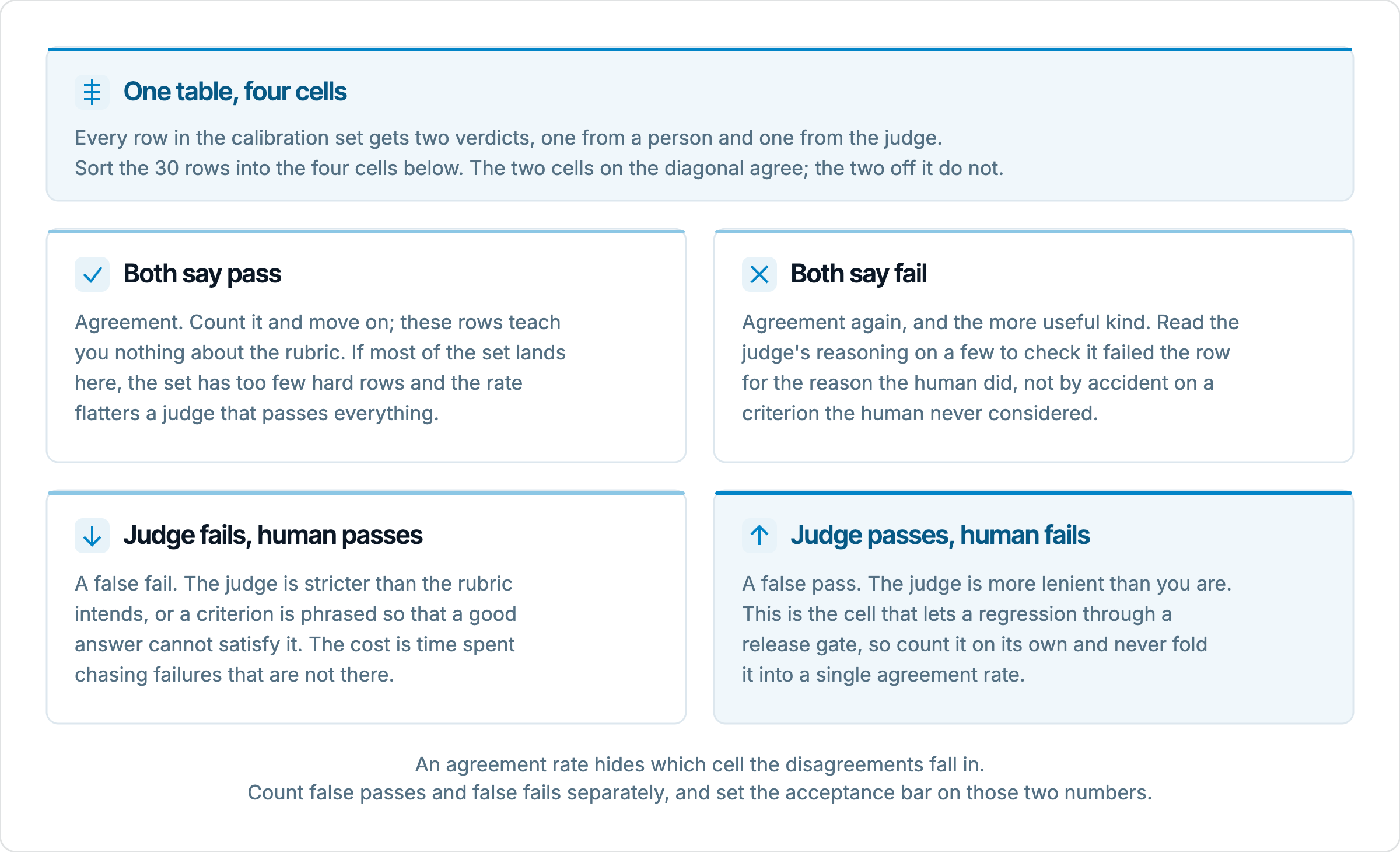
Raw agreement also hides a trap that the composition of the set controls. Suppose 24 of your 30 human labels are pass. A judge that says pass on every row, having understood nothing, agrees with you 80 percent of the time. The fix is in how you build the set, not in the statistic: aim for roughly half passes and half fails, so that a lazy judge scores near 50 percent and a good one scores near 100. Statisticians correct for this with Cohen's kappa, which is agreement adjusted for how often two raters would agree by chance. You can compute it, but on 30 rows it is as coarse as the raw rate, and it collapses two very different kinds of disagreement into one number.
Those two kinds are the thing to count separately. A false pass is a row the human failed and the judge passed; a false fail is the reverse. For a metric that gates releases, false passes are the dangerous cell, because each one is a regression the gate will wave through. False fails cost you time investigating failures that are not there, which is annoying but recoverable. Two judges with the same agreement rate can be worlds apart on this split, and the split is what tells you which way to adjust the rubric.
Build the calibration set
The rows come from wherever your hard cases live. If the project has a golden dataset, start there, because those rows already carry a reason to exist and an expected outcome. Production traces promoted into a dataset are the next best source, since real users produce the hedged, partial, and oddly phrased answers that break rubrics. Generated rows are fine as filler for the easy end of the set, but do not build the whole set from them; the generator tends to produce answers the judge finds easy to classify, and easy rows teach you nothing.
Balance matters more than volume. We aim for about 10 clear passes, 10 clear fails, and 10 that a reasonable person would hesitate over. The hesitation rows are where the rubric is either underspecified or genuinely subjective, and they are the rows most likely to produce disagreements worth reading. If you cannot find 10 borderline rows, that is itself informative: either the AI system rarely produces ambiguous output on this criterion, or your dataset has not seen enough of production. Also make sure the fails fail for different reasons. Ten rows that all miss the order number test one criterion ten times; you want each criterion in the rubric to have at least a couple of fails against it.
The set needs columns the judge will never read. In the dataset editor, use the Add column popover to add human_verdict as an enum with the values pass and fail, and human_note as a text column for one sentence on why. If you are importing from a spreadsheet, upload it as CSV from the New dataset sheet and then retype the columns, since every imported column arrives as text. Once the labels are in, click Duplicate so the labelled version is frozen, and run against that version. Runs snapshot the dataset they used, so this keeps the calibration set reproducible even as you keep editing the live one.
The custom metric itself should already exist as a preset on the Custom metrics page, with its Name, Base, and criteria filled in, so that what you calibrate is exactly what the plans will use. One detail worth knowing before you start iterating: attaching a preset to a plan copies its parameters into the plan, and editing the preset afterwards does not change plans that already bound it. Every time you change the rubric during calibration, you re-attach the preset in the plan's Metrics step to pick up the new version. Forgetting this is the most common way to rerun the old rubric and conclude the fix did nothing.
Label the rows before the judge sees them
The labels have to be written before anyone looks at the judge's output. This sounds obvious, and it is the step most teams skip, because it feels faster to run the judge and then "check" its verdicts. Checking is not labelling. Once you have read the judge's reasoning, you are deciding whether you can argue with it, and a plausible paragraph is very hard to argue with. You will agree with verdicts you would have given the other way if you had come to the row cold. The judge's reasoning is evidence to read later, not a prompt for your own verdict.
Two people should label independently, each with the rubric in front of them and nothing else. They label pass or fail and write the note; the note is as important as the verdict, because later you will be matching the judge's reasoning against the human's reason, not just the human's answer. Time per row is a minute or two for a single-turn response against a short rubric. For 30 rows that is under an hour per person, which is why the method is affordable and why there is no excuse to do it with one person.
Then compare the two sets of human labels before you touch the judge. Rows where the two people agree are your calibration rows. Rows where they disagree are not, at least not yet, because they show that the rubric itself does not determine a verdict. Talk through each one. Usually the disagreement traces to a phrase in the rubric that each reader filled in differently, and the right outcome is to fix the rubric so the row has an unambiguous answer, then relabel. Occasionally the row is genuinely a matter of taste, in which case it does not belong in a pass-or-fail metric at all and should come out of the set. Either way, a judge cannot be expected to agree with two people who do not agree with each other.
This human-versus-human pass is the hidden payoff of the exercise. It finds rubric ambiguity without spending a single judge call, and the rubric you carry into the judge run is already tighter than the one you started with. If the two labellers disagreed on more than a handful of the 30, stop and rewrite before running anything. The judge run would only confirm what you already know, that the rubric is not yet a specification.
Run the judge on the set
Attach the preset to a test plan whose only purpose is calibration. On the plan's Metrics step, tick the preset under the Custom category and leave every other metric off, so the run's pass rate and cost reflect this one judge. The judge model is chosen on the plan's LLM Judge step and applies to every LLM-backed metric on the plan; there is no per-metric judge. Write down which judge model you used, because the result is a calibration of this rubric with this judge, and swapping the model later invalidates it.
Click Run eval. In the drawer, the Column bindings map the dataset's input and expected output to what the connector sends, and if the plan carries a custom metric a chip picker labelled Custom-metric extra fields appears. This is where you opt dataset columns into the judge's view, so that a criterion containing a placeholder like the order id can resolve. Tick only the columns your criteria reference, then click Start eval run. Thirty rows on a Custom Eval metric with the default verdict strategy is 30 judge calls, which finishes in a minute or two.
On the run page, use the Failed filter chip first and expand each row. The Metrics card on the right shows the score against the threshold and the judge's reasoning; for the verdict strategy it names each criterion with its level, from none through minor, partial, and mostly to fully. Clicking the metric name opens the verbose log with the full prompt the judge received, which is where you confirm that placeholders resolved and that no criterion ended up under skipped_criteria. A criterion that was dropped did not fail, it was never judged, and that is a setup bug to fix before you read any verdicts.
For the comparison itself, the CSV button in the header downloads one row per test case with the score, verdict, and reasoning. Put it next to your labelled sheet, match rows on their input text, and add one column: agree or disagree. With 30 rows you can also do this on the run page by hand, expanding each row with the labelled sheet beside you. Either way, the output is a list of disagreements with the judge's reasoning and the human's note side by side.
Read the disagreements row by row
Suppose the set has 14 human passes and 16 human fails, and the judge agrees on 25 of the 30. That is an 83 percent agreement rate, and on its own it tells you almost nothing. Now split the five. Say one is a false fail, where the judge failed a row both humans passed, and four are false passes, where the judge passed rows both humans failed. The same 83 percent now has a shape: the judge is more lenient than you, and lenient in a way that would let four of sixteen genuine failures through a gate. That is the finding, and the number was just the way in.
Each disagreement gets classified by cause, and there are only a few causes. The table is the one we fill in for every calibration.
Cause | What the judge's reasoning shows | Fix |
|---|---|---|
Rubric gap | The judge applied the rubric correctly, and the rubric does not say what you meant | Tighten the criterion, anchor the levels, add a pass and a fail example |
Label error | Rereading the row, the judge is right and the humans missed something | Correct the label, note why, keep the row |
Judge error | The rubric is clear, the row is clear, the judge misread it | Rerun to see if it persists; if so, consensus or a stronger judge model |
Threshold | Per-criterion levels match the human's reading, but the aggregate landed on the wrong side of the bar | Adjust the threshold, then recheck the other 29 rows |
Back to the four false passes. Reading the reasoning, all four turn out to be answers of the "refunds usually take 5 days" kind, and the judge scored the criterion "the response provides a refund status" as mostly on each. That is a rubric gap, not a judge error: nothing in the criterion said that a status must name where this refund is now. The one false fail is different. The human note says the answer gave the status in the second sentence, and the judge's reasoning quotes the first sentence only. That looks like a judge error, and the test is whether it reproduces on a rerun. If it does not, it was the one-row wobble you expected and you let it go.
Label errors are the humbling category and you will find them. When the judge is right and both labellers were wrong, the fix is to correct the label, but write down why it was wrong, because the same confusion will recur in whoever labels the next batch. Do not quietly delete the row to make the agreement look better. A row that fooled two people is exactly the row the set should keep.
Fix one thing and rerun
The four false passes all point at one criterion, so that is what changes. The guide's advice to anchor what each level means applies directly: fully means the current status with a timestamp, mostly means the status without one, partial means the refund is mentioned but its position is not, and a generic timing claim is minor. A pass example and a fail example go into the criterion as well, since explicit examples cut judge variance more than any sampling setting does. The threshold stays where it was. The judge model stays where it was. Nothing else about the plan moves.
Changing one thing per iteration is the discipline that makes the second run interpretable. If you anchor the levels and raise the threshold and switch to a stronger judge in the same pass, the four false passes will probably disappear and you will have no idea which change did it, or which one introduced the two new false fails. The comparing runs guide makes the same point about target changes; it is just as true for the judge. Edit the preset, re-attach it in the plan's Metrics step so the plan gets the fresh copy, and run again against the same frozen dataset version.
Then read the whole set again, not only the rows that were wrong last time. A tightened criterion can flip rows that previously agreed, and the only way to know is to recheck all 30. In our example the expected outcome is that the four hedged answers now fail, the earlier false fail does not reproduce, and no previously agreeing row has moved. If a previously agreeing row did move, you have learned something about the new wording, and it goes through the same classification as before. Two or three iterations usually get a Custom Eval rubric to a point where every remaining disagreement has an explanation you can defend.
Some disagreements are not fixable with wording, and that is worth recognising early. If the criterion asks about factual correctness and the judge has no reference answer, it is scoring plausibility, and no amount of anchoring changes that; the fix is to point the criterion at the expected output with a placeholder. If a G-Eval paragraph keeps splitting on the same borderline rows, the rubric may be a checklist in disguise, and moving it to Custom Eval with one criterion per line will give you per-criterion verdicts to calibrate instead of one blended score. If the judge model itself keeps misreading a clearly written criterion, consensus aggregation with three to five runs or a stronger judge model is the lever, and you recalibrate from scratch afterwards because it is a different judge.
When to trust the judge
Set the bar before the first run, in writing, because afterwards you will be tempted to set it wherever the result landed. The bar depends on what the metric gates. For a judge in the release gate, we want zero unexplained false passes on the 30 and every remaining disagreement classified as a label error or a reproducible judge error we have decided to live with. For an exploratory metric that only ranks rows for a human to read, a couple of false passes is acceptable because a person is still downstream. State the bar in terms of the two cells, not the agreement rate, since the rate cannot distinguish a judge that is too strict from one that is too lenient.
Trust is also scoped to what the 30 rows covered. The judge is calibrated for this rubric, this judge model, this threshold, and rows that resemble the set. It says nothing about behaviour on inputs unlike anything you labelled, and a production distribution shift will bring exactly those. It says nothing about multi-turn conversations if every row was single-turn. And it cannot catch a provider updating the judge model under the same name, which changes the judge without anyone changing the plan. The calibration is a measurement taken at a point in time, and it goes stale.
So recalibrate on a trigger, not on a feeling. Any edit to the rubric, any change of judge model, and any change to the AI system's scope large enough to produce new kinds of answers each call for a rerun against the labelled set, which now takes minutes because the labels exist. The custom metrics guide suggests revisiting rubrics quarterly; running the calibration set on that cadence is the cheapest possible version of that review. Keep the labelled dataset version attached to the calibration plan and never edit it in place, so that every rerun compares against the same 30 verdicts.
Keep growing the set from the disagreements the judge produces in real runs. When someone reading a production run finds a row where they disagree with the judge, that row and its label go into the calibration set, the same way an incident becomes a permanent golden row. Over a few months the set drifts upward from 30 toward 50 or 60, and it becomes a record of every way this judge has ever been wrong. That record is the thing you can show an auditor, a stakeholder, or a new teammate when they ask why the gate's verdict should be believed.