An agent that passes every single-turn test can still fail in production, and the failures share a shape. On turn 3 it calls the same search tool it called on turn 2, with the same arguments, and gets the same result back. On turn 7 it asks the user for an order number the user gave on turn 1. On turn 12, after a few rounds of pushback, a returns assistant that opened the conversation by explaining that it cannot issue refunds issues one. None of these turns is wrong when you look at it alone. The search call is a valid call with valid arguments, the question is politely phrased, and the refund message is fluent and helpful. The failure lives in the relationship between turns, and a check that scores one input and one output at a time has no way to see it.
This guide is about that gap. We cover the three multi-turn failure modes we see most often when we evaluate agents, loops, memory failures and role drift, and the EvaliQA metrics that catch each one: Repetitive Pattern Detection for loops, Knowledge Retention for memory, Role Adherence for drift, with a Custom Eval checklist and the deterministic detectors of online evaluation around them. The approach is the same throughout: build scenarios that run over many turns, keep the full trajectory (the ordered sequence of user messages, model outputs, tool calls and tool results the agent produced during a run), and score properties of that sequence rather than properties of any single message. In EvaliQA the trajectory is the turns column of a multi-turn dataset row when you run a test plan, and a session of traces when you score production traffic, and every metric in this guide reads one or the other. Where a check depends on a particular piece of data, we say which column or trace field it needs.
Why single-turn checks miss these failures
A single-turn check takes one prompt, collects one response and scores it against a reference or a rubric. It is the right shape for a chat model answering a question, and it is cheap, repeatable and easy to reason about, which is why most evaluation suites are built out of it. The trouble is that an agent is not a function from prompt to response. It runs a loop: read the state, decide on an action, execute it, read the result, decide again. State accumulates as the loop runs, in the conversation history, in tool results, and in whatever explicit memory the agent keeps. The properties that matter for an agent are properties of that loop: whether it terminates, whether the state it carries forward stays correct, and whether the rules it started with still hold at the end.
A single-turn check evaluates a slice through the loop. It can tell you that a given decision was reasonable given the state at that moment, and that is useful, but it cannot tell you whether the sequence of reasonable decisions goes anywhere. It is the difference between testing every function in a program and testing the program. We describe agent evaluation in terms of three altitudes: end-to-end metrics ask whether the task was completed, trajectory metrics ask whether the path to the outcome was sensible, and step metrics ask whether each individual action was correct. Single-turn checks live at the step altitude. Loops, memory failures and role drift live at the trajectory altitude, and sometimes only become visible end to end. This is why EvaliQA keeps its Agent metric category separate from the RAG and general LLM judge metrics: Answer Relevancy or Faithfulness score one input and output pair, while Task Success Rate, Knowledge Retention or Role Adherence read the turns column and score the whole conversation.
Teams skip trajectory-level checks for understandable reasons. Multi-turn scenarios need something to play the user, they take longer to run, and they are harder to make deterministic because a small change early in the run changes everything after it. All three objections are real, and we address each later in the guide. But the cost of not running them is that the failures you ship are exactly the ones your suite is structurally unable to detect, and you learn about them from support tickets and transcripts rather than from a failing test. The remainder of this guide is a way to move that discovery earlier.
Three failure modes that only appear over turns
A loop is repeated action without progress: the agent takes the same step, or a trivially different one, and the state does not move. A memory failure is a break in the state the agent carries forward: it forgets something the user said, applies something the user retracted, or acts on something nobody said. Role drift is the gradual loosening of the persona, scope or rules the agent was given, usually under pressure from the user, until by the late turns it is behaving as a different agent. The three are distinct in cause and in remedy, but they have one thing in common: every turn passes a per-turn check, and the failure is only visible when you read the sequence.
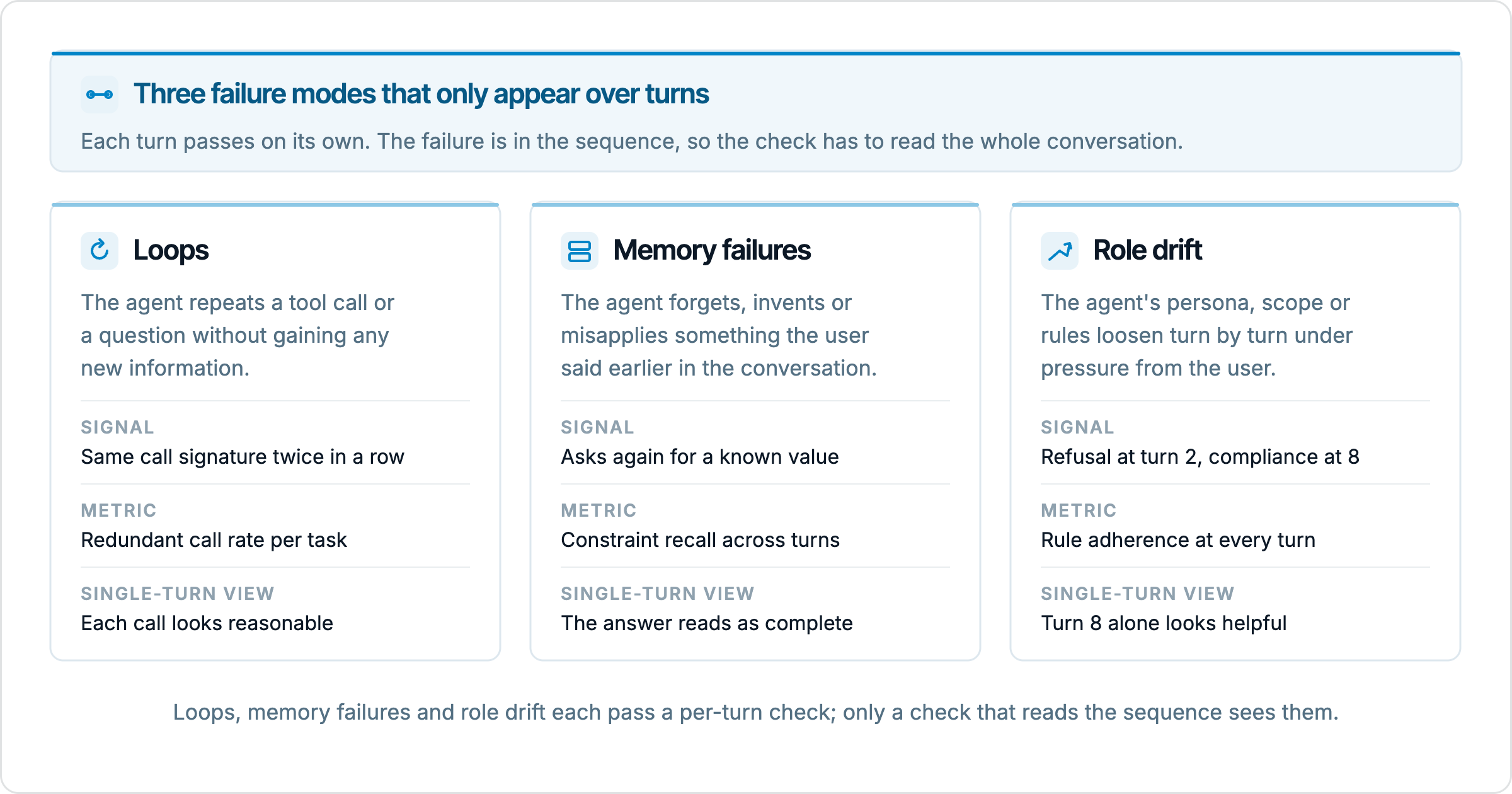
The figure also shows why the remedies differ. A loop shows up in the tool log, and on live traffic it is caught by detectors that compare tool names and arguments without any model in the loop. A memory failure needs a scenario that plants facts early and probes for them later, so the scenario design is doing most of the work, and Knowledge Retention reads the result. Role drift needs a simulated user that applies pressure, and a scorer that reads every turn against the assigned role rather than the last turn in isolation, which is what Role Adherence does. The next three sections take each in turn.
Detecting loops
Loops come in a few forms and it helps to name them, because the detection differs. An exact loop is the same tool called with the same arguments more than once without an intervening change in state. A semantic loop is the same intent expressed differently: a search for "order 48213 status", then "status of order 48213", then "48213 shipping update", each returning the same record. An oscillation alternates between two or three actions, calling a lookup, then a refund tool that fails validation, then the lookup again, indefinitely. A clarification loop happens with the user rather than the tools: the agent asks a question, the user answers, and the agent asks the same question again because it did not parse the answer. All four burn tokens and time, and all four end either at the turn budget or with a frustrated user.
Offline, the metric to attach is Repetitive Pattern Detection, from the Agent category. It reads the turns column, asks the plan's judge model whether the agent repeated the same actions or responses without progressing, and returns a score where high means no loops and low means the agent is stuck; the default threshold is 0.7. Because the judge reads the whole transcript and is asked about progress rather than string equality, it catches semantic loops and clarification loops as well as exact ones, which is the reason to run it even when you also have structural checks. The docs are explicit about where it is weak: it is noisy on short conversations, so skip it on plans where max_turns is 3 or less, and add it to any plan where conversation length is unbounded. Two companions sharpen the picture. Conversational Flow penalises unnecessary clarifications and repetition, so a support agent that answers correctly but takes 8 turns to do what should take 3 scores badly, which is the clarification loop seen from the user's side. And Tools Error, which scores tool use per row against the input and expected output, has repeated_failure and result_ignored among its six categories; set its error_types parameter to those two and it becomes a targeted check for the oscillation case where the agent keeps calling a tool that keeps failing.
Consider an order-status agent with a get_order(order_id) tool. A user asks where their parcel is. The tool returns a record with status "processing" and no tracking number. The agent, having been instructed to give the user a tracking number, calls get_order again, receives the same record, and calls it again. Nothing in the agent's instructions covers what to do when the field it needs is absent, so it retries the only action it knows. Each individual call is valid. Repetitive Pattern Detection scores the conversation low because nothing progressed between the calls, and the run page's average turns per conversation, which the docs treat as a standing signal, sits at max_turns for this scenario because the loop only ends when the budget does. A check that scores the agent's final message might even pass it, since the agent eventually writes a reasonable apology when it hits the budget.
Live, the cheapest loop check in EvaliQA needs no model at all. The deterministic detectors of online evaluation run on every session for free: redundancy fires when the same tool is invoked with the same arguments more than once across the session, at severity info, and retry_loop fires on runs of identical adjacent spans with the same name and the same input, at severity warn. The difference in severity is deliberate and matches the allowlist problem. Polling a status endpoint until a job finishes, or paging through results, will trip redundancy on a legitimate repeat, so read it as a prompt to look; consecutive identical spans are almost never legitimate, so retry_loop is the one to alert on, with an alert rule filtered on finding severity. What the detectors do not catch is the semantic loop, since they compare names and arguments and a reworded query is a different argument; for that you bind Repetitive Pattern Detection as a live conversation metric, which we cover in the offline and live section. And neither the detectors nor the metric say whether the agent should have stopped and told the user it was stuck; that is a separate judgement about the message and belongs with Failure Rate or a custom criterion.
Checking memory across turns
An agent's memory is everything it can draw on that was not in the current message: the conversation history inside its context window, any scratchpad it writes to, any retrieval-backed memory store, and any user profile persisted across sessions. Memory failures take three forms. Forgetting is the obvious one: the user stated a constraint on turn 1 and the agent violates it or asks for it again on turn 9. Stale state is subtler: the user stated a budget on turn 1 and changed it on turn 4, and the agent plans against the turn 1 figure. Invention is the most dangerous: the agent acts on a preference or fact the user never gave, sometimes carried over from a different session or, in a shared memory store, a different user. The last of these is a privacy problem as well as a correctness problem, and it deserves its own scenarios.
The metric is Knowledge Retention. It reads the turns column and has the judge look for contradictions and lapses across turns: facts the user stated that the agent later ignores, asks for again, or contradicts. The default threshold is 0.7. The docs are clear that it needs material to work on: it scores trivially high on single-fact conversations, and it has no signal on conversations of 2 or 3 turns, so the scenario does most of the work. A planted fact needs a turn where it is introduced, a distance in turns before it is tested, and a probe that can only be answered correctly if the fact is still in play. For stale state you also need a retraction turn, and the correct answer is the updated value, not the original. Because the score is per conversation, you get the breakdown by distance by building two datasets with the same planted facts and different max_turns, one probing at 5 turns and one at 20, and comparing the runs. An agent that holds facts at the short distance and drops them at the long one has a specific problem, usually context compaction or summarisation, that a single aggregate would hide, and the docs name the same pattern: a sharp drop in Knowledge Retention past turn 4 or 5 points at context loss.
A travel planning example makes the shape concrete. On turn 1 the user says they will not take overnight flights. On turn 4 they raise their budget. On turn 6 they mention a colleague is joining and needs a separate booking. On turn 9 the agent proposes an itinerary. The probe is the itinerary itself: does it contain an overnight leg (forgetting), is it priced against the original budget (stale state), does it book two seats or one (recall of the turn 6 fact), and does it include a seat preference the user never expressed (invention). Knowledge Retention gives you one score for the conversation; to see which of the four went wrong, add a Custom Eval with one criterion per planted fact using the verdict strategy, so the judge returns a separate verdict (none, minor, partial, mostly or fully) per criterion and names the one that failed. Put the planted values in dataset columns, tick those columns under Extra fields when you start the run, and reference them in the criteria as placeholders, for example "The itinerary respects the flight constraint the user stated: {{flight_constraint}}." Every criterion must contain at least one placeholder that resolves, or it is silently dropped from the run; a metric whose criteria are all prose scores 0.0 with the reason that no criteria could be evaluated, which is a trap worth knowing before your first run.
Personas give you a cheap second angle on the same failures. The persona catalogue describes Confused as the persona that spots hallucinated context accumulation, because the user mixes up terms and contradicts themselves, and Distracted as the one that spots stale context bugs, because the user jumps between topics and comes back. Running the same scenarios under Default and under those two, then filtering the run's row list by persona, shows whether the agent's memory survives a user who does not present facts cleanly. Persisted memory needs a different mode. Red teaming multi-turn includes the Persistent context and Context poisoning techniques, which plant a false identity or misleading facts in early turns for later turns to rely on, and the docs recommend running it whenever you enable persistent memory or long context; the verdict is breach or held on the whole transcript. What Knowledge Retention does not catch is memory that is correct but ignored for a good reason, for instance when a later tool result makes an earlier user preference impossible. In those cases the right behaviour is to explain the conflict to the user, which is a judgement about the message and belongs with the role and rule checks in the next section.
Measuring role drift
Role drift is what happens to an agent's instructions over the length of a conversation. A system prompt establishes a persona (a returns assistant for one retailer), a scope (returns and exchanges, nothing else) and a set of rules (never promise a refund, never discuss competitor pricing, always verify the order before acting). In the early turns the agent holds all three. Then the user pushes, the context fills with the user's framing, a tool result contains text that reads like an instruction, and by turn 10 the agent is discussing competitor pricing and has promised a refund it cannot process. No single turn crossed a bright line; each concession was a small step from the previous one. That is the difference between drift and a jailbreak: a jailbreak is one message that breaks a rule, drift is a sequence of messages each of which bends it slightly.
Because drift is gradual, single-turn red teaming does not surface it, and neither does a simulated user that cannot react. In EvaliQA there are two ways to apply pressure over turns. The first stays inside an evaluation, multi-turn plan: pick the Adaptive strategy, where the Platform AI agent improvises each user turn in reaction to what your agent just said, and give it the Manipulative persona, which the catalogue describes as actively trying to trick the system into breaking rules, with Impatient and Aggressive for the frustration path. Simulation and Scripted cannot do this, because their user side is pre-baked and will not cite what the agent said two turns ago. The second route is a red teaming, multi-turn plan with the Gradual escalation style, which starts polite and ramps pressure across turns, and the Crescendo, Persistent context and Goal redirection techniques. Red teaming needs a strong, pinned attacker LLM set on the Run eval sheet, and it reports breach or held per vulnerability rather than a metric score, so use it for the question "can the rule be broken at all" and the evaluation plan for "how consistently does the agent hold its role on the conversations it will actually have".
The metric for the evaluation plan is Role Adherence. It reads the turns column and scores how consistently the agent stays in its assigned persona across the conversation; breaking character mid-conversation scores down, even if the agent is back in role by the end. The persona is set in the metric's chatbot_role parameter, with a fallback to a chatbot_role column on the row, and the docs recommend setting it on the metric so every row is judged against the same description. Write the rules into it, not only the tone: "a returns assistant for one retailer, handles returns and exchanges only, cannot issue or promise refunds, does not discuss competitor pricing" gives the judge something to fail against, while "friendly and professional support agent" does not, and the docs note that a Role Adherence of 100% across everything usually means the description was too loose. The default threshold is 0.7; for a customer-facing agent where a break is a serious bug, the docs suggest raising it to 0.95, and we agree. The score is per conversation, so the turn where the agent gave in is not a number the run reports; you find it by expanding the failing row's transcript, and it is the most useful single fact the run produces, because it tells you which pressure move worked.
Role Adherence gives one score for the persona as a whole. To know which rule bent, add a Custom Eval with the verdict strategy and one criterion per rule, each anchored to a dataset column by a placeholder, for instance "The agent never promises or issues a refund; the only permitted outcome for a refund request is {{refund_policy}}." The judge then returns a verdict per rule and names the one that failed, which is what makes the result debuggable. The limits of the approach are two. First, the checklist only catches the rules you enumerated; if the system prompt implies a norm without stating it, the judge has nothing to score against, so write the norms down before you write the scenarios. Second, the judge is itself a language model reading a long, persuasive conversation, and it can be swayed by the same framing that swayed the agent. Follow the docs' routine for any new custom metric: run it on 5 hand-picked conversations where you already know the verdict, 2 clear passes, 2 clear fails and 1 ambiguous, read the reasoning, and tighten the criteria until it agrees with you. For compliance-grade rules, turn on the consensus toggle so several judge runs are combined rather than one.
Building multi-turn scenarios
All three checks depend on scenarios that run over many turns, and the quality of the scenario decides the quality of the signal. In EvaliQA a multi-turn dataset row is one conversation, not one input, and its columns are the specification for the simulated user: a scenario (the user's underlying intent), a persona from the catalogue of 15, an initial_state with whatever the agent needs at turn 1, an expected_outcome that describes success as an outcome rather than a transcript, and a max_turns budget. How that row is driven at run time depends on the strategy you pick under the mode on Step 2 of the wizard. Simulation replays scenario seeds through a deterministic simulator with no LLM calls on the user side, so the same seed produces the same conversation every run. Scripted replays a user_turns column verbatim, which is the way to reproduce a production incident exactly. Adaptive lets the Platform AI agent improvise the user turns in reaction to your agent, at the cost of determinism and of one extra model call per turn. We build scenarios in the following order.
Name the task and the failure you are probing. One scenario, one failure mode; a scenario that tries to test loops and drift at once gives you a run that fails for reasons you cannot separate.
Pick the strategy for the failure. Scripted for a loop or a memory probe you want to pin exactly, including the retraction turn; Adaptive with the Manipulative persona for drift, because pressure only works when the user reacts; Simulation for the broad regression set that runs on every change.
Write the seed as goals and facts, not lines. For a memory scenario, that means the planted facts in
initial_stateor the scripted turns, the turn each is introduced on, any retractions, and the probe described inexpected_outcome. For a drift scenario, it means the rules under attack and the outcome that counts as holding them.Set
max_turnsdeliberately and treat hitting it as a signal. The docs suggest 5 to 7 as a start for support scenarios and 6 to 10 for red teaming; a loop scenario needs enough room for the loop to show, and a budget is also what makes a looping agent terminate.Keep your own side fixed. EvaliQA calls your endpoint, so the tool responses behind it are yours to control; a loop scenario needs the tool to return the same incomplete record every time, or the loop will not reproduce.
Attach the metrics on Step 4 at both altitudes: the one trajectory metric this scenario is about, plus Task Success Rate or Goal Achievement for the end-to-end verdict. Three metrics is a healthy starting count, because every LLM-based metric is one judge call per conversation.
Freeze the simulator. Do not regenerate the dataset between runs, since that changes the user side and breaks comparability; use Duplicate as new version when you want to iterate on the scenarios.
The simulated user is the part most likely to go wrong, and under Adaptive it fails in the same ways the agent does. A model playing a customer can forget its own planted facts, can be talked out of its goal by a persuasive agent, and can drift from an escalating adversary into a cooperative one. Read a sample of Adaptive transcripts before you trust its runs: a scenario where the simulator quietly dropped the pressure at turn 5 will report that the agent held its rules, and it will be wrong. Size the dataset with the multiplication in mind, since the generator produces one conversation per scenario and persona pair. The docs put a smoke test at 10 to 20 conversations with 3 to 5 max turns and a release qualification at 40 to 80 conversations across 3 to 5 personas, and that is enough for the three checks in this guide if each scenario targets one failure.
Determinism is achievable in most of the pipeline and worth pursuing. Simulation and Scripted remove the user side as a source of variation entirely, and fixed tool responses behind your endpoint remove another; what remains is the agent's own sampling, which you fix with a temperature of 0 where your framework allows it or absorb by reading pass rates across the dataset rather than a single row. Adaptive is the exception: its aggregate pass rates stay stable across runs while individual transcripts do not, which is why the docs pair it with a quarterly exploration sweep and keep Simulation for the golden set that runs on every merge. The payoff of a deterministic run is that when a row fails you can replay it, step through the transcript, and see the exact turn where the loop started or the constraint was dropped, which is the point at which evaluation turns into debugging.
Scoring the conversation with an LLM judge
Every metric in the Agent category except Tool Correctness uses the plan's judge model, and that is where an LLM judge (a model prompted to assess another model's output against a rubric) comes in. Pin the judge to one model and keep it pinned across runs, or the deltas you read will be the judge's and not the agent's. Give the judge as little to infer as possible. Task Success Rate has task_description and success_criteria parameters that skip its goal-inference and criteria-generation calls when set, and Goal Achievement has user_goal; the docs recommend all three for reproducibility, and they also make the result cheaper, since inference is an extra judge call per row. Task Success Rate can otherwise succeed for the wrong reason, passing an agent that partially completed a task because the inferred description was lax, and an explicit criteria list is the fix.
Avoid the single holistic score for anything you want to act on. A G-Eval with a paragraph rubric asking for "conversation quality" produces a number that moves with tone and length far more than with whether the rules held, it will not tell you which turn to look at, and at its default of 20 samples per row it is 20 judge calls per conversation per metric. Custom Eval with the verdict strategy is the right base for checklists, because it scores each criterion separately, defaults to one judge call per row, and shows per-criterion verdicts and reasoning in the run results. The one holistic question worth asking is the end-to-end one, and EvaliQA splits it in two: Task Success Rate scores whether the agent did its job, Goal Achievement scores whether the user left with what they came for, and the docs point out that the two often disagree in interesting ways. Score them separately from the trajectory metrics so that you can see when they diverge. An agent that completes the task while Role Adherence drops on turn 8 is a different case from one that holds every rule and fails the task, and only separate scores show the difference.
Long conversations create a problem for the judge that mirrors the memory problem in the agent: a judge reading 40 turns can lose the planted fact from turn 2 by the time it reaches turn 30. Keep max_turns as short as the failure allows, and where a distance of 20 turns is the point of the scenario, use the Custom Eval placeholders to hand the judge the planted value explicitly rather than asking it to find the value in the transcript. Calibrate before relying on it: the 5 known-outcome rows from the drift section apply to every custom metric, and for the built-ins, read the judge's reasoning on every failing row of the first run and check it matches your own reading. Drift scenarios in particular need this, because the judge's tendency to agree with a persuasive conversation is exactly the tendency you are measuring in the agent.
Running the checks offline and live
Offline, these checks form a regression suite. A fixed dataset version, fixed strategy, fixed judge, run on every change to the agent's prompt, tools or model, with Repetitive Pattern Detection, Knowledge Retention and Role Adherence reported per row and compared to the previous run in the compare view. Because the inputs are frozen, a metric that moves points at the change you made. Filter the row list by persona to see whether a regression is general or specific to Manipulative or Distracted users. This is where release gating lives: an agent whose Role Adherence on the refund pressure scenarios drops below the 0.95 threshold does not ship, whatever its single-turn scores say. Keep the multi-turn plan alongside your single-turn plans in the same project so that a change is judged at all three altitudes together.
Live, the same metrics run on real sessions through online evaluation. Two things must be true first: your traces carry a session_id, because scoring is per session and a trace without one is stored but never scored, and the Platform AI agent is configured under Settings, because every judge call goes through it. Then open the Online evaluation page, pick the project, and on the Settings tab switch on Auto-evaluate sessions and Deterministic detectors; the detectors are free and give you retry_loop and redundancy on every session from that moment. Under Metric scoring, click Add metric to bind Repetitive Pattern Detection, Knowledge Retention and Role Adherence with a threshold each; conversation-level metrics ask you what one turn is made of, so you point them at the user message and the agent reply per trace and EvaliQA assembles the conversation from the session. The session-level pass runs 60 seconds after the last trace of a session, so a long conversation is analysed once, after it ends. Results appear on the Results tab as recent scored sessions with a badge per metric, on the Overview tab as pass rate over time, and on the session page's Analysis panel, and an alert rule can watch any bound metric or finding severity.
The strengths differ by failure mode. Loops are the easiest to detect live, because the detectors need no ground truth and cost nothing. Memory is harder because you did not plant the facts, but Knowledge Retention live is exactly the proxy you want: the judge spotting the agent asking for, or contradicting, something the user said earlier in the same session. Role drift live needs a chatbot_role that matches your production system prompt and shows most in sessions that ran long, which the Sessions tab lets you find by sorting on the number of traces. The two modes then feed each other. Every live failure that the offline suite would not have caught is a missing scenario, and the trace page has Add trace to dataset for precisely this: pick the test plan and the dataset version, map the trace fields to the row's columns, type the expected outcome you now know the agent should have produced as a custom value, and the next run covers it. Offline coverage is only ever as good as the scenarios you thought to write; live traffic tells you which ones you did not think of. Its own weakness is that nothing is controlled, so a moving pass rate can reflect a change in your users rather than your agent, and it is the offline suite that settles which.